ON THIS PAGE

  • Demo
  • Source code
  • How it Works

Depth and Video Sync

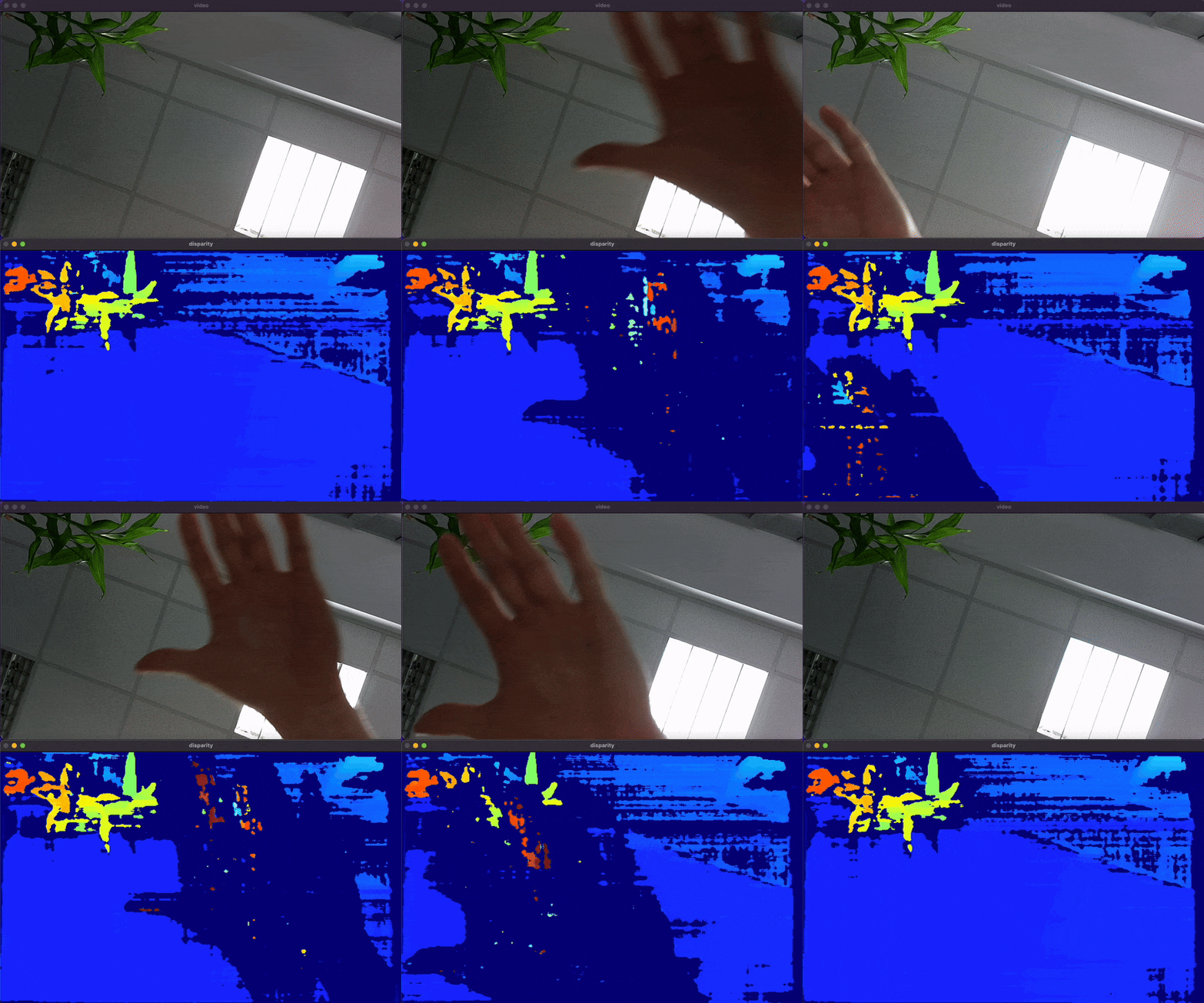
This example demonstrates the use of the DepthAI Sync node to synchronize output from StereoDepth and Color Camera nodes. It showcases how to process and display disparity maps from stereo cameras and video frames from a color camera in real time.

Similar samples

Demo

Depth and Video Sync Demo
This example requires the DepthAI v3 API, see installation instructions.

Source code

Python

Python
GitHub
1import depthai as dai
2import numpy as np
3import cv2
4from datetime import timedelta
5
6pipeline = dai.Pipeline()
7
8monoLeft = pipeline.create(dai.node.MonoCamera)
9monoRight = pipeline.create(dai.node.MonoCamera)
10color = pipeline.create(dai.node.ColorCamera)
11stereo = pipeline.create(dai.node.StereoDepth)
12sync = pipeline.create(dai.node.Sync)
13
14xoutGrp = pipeline.create(dai.node.XLinkOut)
15
16xoutGrp.setStreamName("xout")
17
18monoLeft.setResolution(dai.MonoCameraProperties.SensorResolution.THE_400_P)
19monoLeft.setCamera("left")
20monoRight.setResolution(dai.MonoCameraProperties.SensorResolution.THE_400_P)
21monoRight.setCamera("right")
22
23stereo.setDefaultProfilePreset(dai.node.StereoDepth.PresetMode.HIGH_ACCURACY)
24
25color.setCamera("color")
26
27sync.setSyncThreshold(timedelta(milliseconds=50))
28
29monoLeft.out.link(stereo.left)
30monoRight.out.link(stereo.right)
31
32stereo.disparity.link(sync.inputs["disparity"])
33color.video.link(sync.inputs["video"])
34
35sync.out.link(xoutGrp.input)
36
37disparityMultiplier = 255.0 / stereo.initialConfig.getMaxDisparity()
38with dai.Device(pipeline) as device:
39    queue = device.getOutputQueue("xout", 10, False)
40    while True:
41        msgGrp = queue.get()
42        for name, msg in msgGrp:
43            frame = msg.getCvFrame()
44            if name == "disparity":
45                frame = (frame * disparityMultiplier).astype(np.uint8)
46                frame = cv2.applyColorMap(frame, cv2.COLORMAP_JET)
47            cv2.imshow(name, frame)
48        if cv2.waitKey(1) == ord("q"):
49            break

C++

1#include <iostream>
2
3// Includes common necessary includes for development using depthai library
4#include "depthai/depthai.hpp"
5
6int main() {
7    // Create pipeline
8    dai::Pipeline pipeline;
9
10    // Define sources and outputs
11    auto monoLeft = pipeline.create<dai::node::MonoCamera>();
12    auto monoRight = pipeline.create<dai::node::MonoCamera>();
13    auto color = pipeline.create<dai::node::ColorCamera>();
14    auto stereo = pipeline.create<dai::node::StereoDepth>();
15    auto sync = pipeline.create<dai::node::Sync>();
16
17    auto xoutGrp = pipeline.create<dai::node::XLinkOut>();
18
19    // XLinkOut
20    xoutGrp->setStreamName("xout");
21
22    // Properties
23    monoLeft->setResolution(dai::MonoCameraProperties::SensorResolution::THE_400_P);
24    monoLeft->setCamera("left");
25    monoRight->setResolution(dai::MonoCameraProperties::SensorResolution::THE_400_P);
26    monoRight->setCamera("right");
27
28    stereo->setDefaultProfilePreset(dai::node::StereoDepth::PresetMode::HIGH_ACCURACY);
29
30    color->setCamera("color");
31
32    sync->setSyncThreshold(std::chrono::milliseconds(100));
33
34    // Linking
35    monoLeft->out.link(stereo->left);
36    monoRight->out.link(stereo->right);
37
38    stereo->disparity.link(sync->inputs["disparity"]);
39    color->video.link(sync->inputs["video"]);
40
41    sync->out.link(xoutGrp->input);
42
43    // Connect to device and start pipeline
44    dai::Device device(pipeline);
45
46    auto queue = device.getOutputQueue("xout", 10, true);
47
48    float disparityMultiplier = 255 / stereo->initialConfig.getMaxDisparity();
49
50    while(true) {
51        auto msgGrp = queue->get<dai::MessageGroup>();
52        for(auto& frm : *msgGrp) {
53            auto imgFrm = std::dynamic_pointer_cast<dai::ImgFrame>(frm.second);
54            cv::Mat img = imgFrm->getCvFrame();
55            if(frm.first == "disparity") {
56                img.convertTo(img, CV_8UC1, disparityMultiplier);  // Extend disparity range
57                cv::applyColorMap(img, img, cv::COLORMAP_JET);
58            }
59            cv::imshow(frm.first, img);
60        }
61
62        int key = cv::waitKey(1);
63        if(key == 'q' || key == 'Q') {
64            return 0;
65        }
66    }
67    return 0;
68}

How it Works

  • Initialize MonoCamera nodes for left and right cameras.
  • Set up a ColorCamera node.
  • Create a StereoDepth node for depth perception.
  • Configure the Sync node to synchronize disparity from the StereoDepth node and video frames from the ColorCamera node.
  • Display the synchronized frames using OpenCV. Frames are synchronized to threshold of 50 milliseconds.

Need assistance?

Head over to Discussion Forum for technical support or any other questions you might have.