oakctl tool
oakctl tool
oakctl is a command-line tool that allows you to interact with your OAK4 cameras. It can be used to create, deploy, and manage apps and devices that are running the oak-agent service and are on the local network.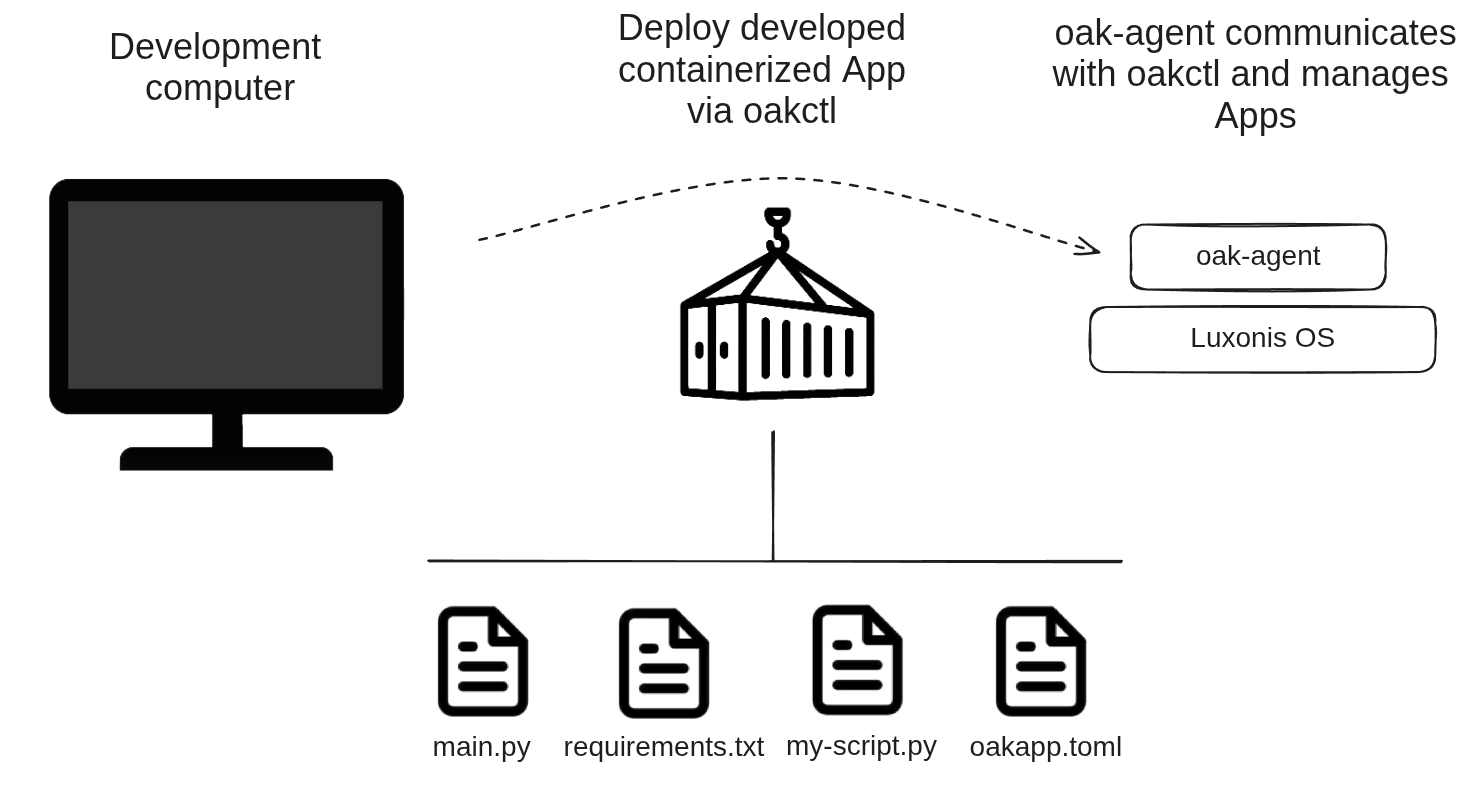
oakctl right away.Installation
Linux/MacOS
On 64bit system, run:
Command Line
1bash -c "$(curl -fsSL https://oakctl-releases.luxonis.com/oakctl-installer.sh)"Update
oakctl tool later like this:Command Line
1oakctl self-updateProblems updating on Windows
If you have problems updating the oakctl version on Windows, download the installer from here.
USB Internet Sharing
Version note
oakctl v0.22.0 and Luxonis OS 1.32.0 or newer is required for USB Internet sharing.oakctl usbd. This is useful for workflows such as oakctl app run, oakctl app build, working with hub, updating the device OS, and any other operation which requires an internet connection.When enabled, the oakctl-usbd background service watches for supported OAK USB Ethernet interfaces and configures the host-side networking automatically, including interface addressing, IP forwarding, and NAT. On Linux, it also installs a udev rule so NetworkManager and systemd-networkd do not take control of the OAK4 USB Ethernet interface.oakctl usbd is opt-in and disabled by default.Enable oakctl usbd
Command Line
1oakctl usbd enableoakctl may prompt for administrator or root access.You can check whether the service is currently enabled:Command Line
1oakctl usbd statusDisable oakctl usbd
Command Line
1oakctl usbd disableUsage
Connect to a device
Command Line
1oakctl connectCommand Line
1oakctl connect 10.0.1.24--with-password flag. This will prevent you from entering the password every time the session expires.Find devices
oakctl allows you to interact with your devices that have oak-agent installed. You can list all available devices (found on your network) with the following command:Command Line
1oakctl list
2+---+---------------+---------------+------------+----------------+---------------+-------+
3| # | Serial Number | Device        | Connection | OS             | Agent Version | Setup |
4+=========================================================================================+
5| 1 | 1623452492    | Luxonis, Inc. | 10.0.1.24  | OS RVC4 1.18.0 | 0.13.7        | OK    |
6|   |               |  OAK4-D R7    |            |                |               |       |
7+---+---------------+---------------+------------+----------------+---------------+-------+
App Development
Command Line
1oakctl app run /app/path/to/sourceoakctl app run uses oakapp.toml from the provided app directory. Use --oakapp-file to select an alternative config file (for example oakapp.dev.toml or oakapp.prod.toml), as long as that file is inside the same app directory tree.Optional flags:
| Flag | Description |
|---|---|
-b, --detach | Run the app in detached mode. You can stop it with oakctl app stop <APP_ID>. |
-d, --device [<DEVICE>] | Specify device using IP, IP:PORT, index, or Serial Number from oakctl list. |
-i, --invalidate | Invalidate cache and force rebuild. |
-e, --env <KEY=VALUE> | Export runtime environment variable to the app (can be provided multiple times). |
--env-file <FILE> | Export runtime environment variables from a .env file. |
--oakapp-file [<PATH>] | Use an alternative oakapp.toml file (for example dev/prod variants) from inside the provided app directory tree. |
--preserve-line-endings | Disable automatic CRLF to LF conversion before uploading files to device. |
Example apps
oakapp.toml:Command Line
1git clone https://github.com/luxonis/oak-examples.git
2cd oak-examples
3# Run an app
4oakctl app run ./neural-networks/pose-estimation/human-pose # or some other example
Environment variables
-e, --env flag or --env-file flag. These variables will be available in the app's runtime environment and can be used to configure the app without changing the code.Command Line
1oakctl app run ./app/path --env KEY1=VALUE1 --env KEY2=VALUE2oakapp.toml file using build_env field or pass them during build with --build-arg flag:Command Line
1oakctl app build ./app/path --build-arg KEY1=VALUE1 --build-arg KEY2=VALUE| Variable | Description |
|---|---|
OAKAGENT_APP_ID | Unique app ID. |
OAKAGENT_CONTAINER_ID | Container ID (may differ from App ID if the app was updated). |
OAKAGENT_APP_IDENTIFIER | App identifier from oakapp.toml. |
OAKAGENT_APP_VERSION | App version from oakapp.toml. |
DEPTHAI_ZOO_MODELS_PATH | Path to DepthAI Zoo models directory; set based on depthai_models field in oakapp.toml; prefer to not modify manually. |
DEPTHAI_ZOO_CACHE_PATH | Path to DepthAI Zoo cache directory; used for caching downloaded models; prefer to not modify manually. |
DEPTHAI_ZOO_INTERNET_CHECK | Enable internet connectivity check for model downloads; set based on depthai_models field in oakapp.toml; prefer to not modify manually. |
DEPTHAI_DEVICE_NAME_LIST | Set to 127.0.0.1 on all RVC4 devices to make sure that standalone apps use only the device they are running on, even if there are multiple devices on the same network. |
OAKAPP_STATIC_FRONTEND_PATH | Path to static frontend files for the app. |
OAKAPP_STATIC_FRONTEND_PORT | Port for serving static frontend files. It is set from range 9000-9128 to avoid conflicts with the ports used by the agent or other apps. |
OAKAGENT_STORAGE_APP | App-specific persistent storage path. |
OAKAGENT_STORAGE_SHARED | Shared storage path accessible across apps with the same identifier. |
OAKAGENT_STORAGE_GLOBAL | Global storage path on the device. |
Persistent Storage
Persistent storage paths are used to store data that should persist across app restarts and updates. These paths are mounted into the app's container. You can choose the target directory name for the storage in the container with
oakapp.toml configuration (storage_dir_name).OAKAGENT_STORAGE_APPis a storage path that is unique to each app and is not shared with other apps. It is useful for storing app-specific data that should not be accessible by other apps.OAKAGENT_STORAGE_SHAREDis a storage path that is shared between all apps with the same identifier. It is useful for storing data that should be accessible by different installations of the same app.OAKAGENT_STORAGE_GLOBALis a global storage path that is not tied to any specific app. It is useful for storing data that should be accessible regardless of which apps are installed or running.
App Management
-d, --device <DEVICE> to specify the device to run the command on (IP address or index from the oakctl list).List installed apps
com.luxonis.default).Command Line
1$ oakctl app list
2+---+--------+---------------------------+---------+-------------------+
3| E | App Id | Identifier                | Status  | Frontend URL      |
4+====================================================================================================+
5| * | f8da5  | com.luxonis.default:1.3.8 | running | 10.0.1.24:9000    |
6+---+--------+---------------------------+---------+-------------------+E) has asterisk if the app is enabled.Any app can be in one of the following states: installing, building, ready, starting, running, stopping, stopped, deleting, deleted, unknown.Ready means the app is installed and ready to run, but it was not started since the agent was started, while stopped means the app is installed but not running, it was stopped by the user.Note
App IDs are truncated in the list for better readability. If there are multiple apps with the same prefix, the truncation length increases until all app IDs are unique. You can also use the
--long flag to show full app IDs in the list.All app control commands accept both full and truncated App IDs as long as they are unique.App control flow
start, stop, and delete. First, let's start the app:Command Line
1$ oakctl app start 612a745c-8d68-4264-a3d6-d06d14275ef5
2Starting app 612a745c-8d68-4264-a3d6-d06d14275ef5 ...
3 App has been started!Command Line
1$ oakctl app start 612a745cCommand Line
1$ oakctl app logs <app-id>
2Reading logs ...
3  Press Ctrl+C to stop reading logs.
4  App output:
5 [2025-02-12T14:37:54Z] Hello cli 1 / Wed Feb 12 14:37:54 UTC 2025-n flag:Command Line
1oakctl app logs <app-id> -n 10Command Line
1oakctl app logs <app-id> --no-followCommand Line
1$ oakctl app stop 612a745c-8d68-4264-a3d6-d06d14275ef5
2Stopping app 612a745c-8d68-4264-a3d6-d06d14275ef5 ...
3 App has been stopped!Command Line
1$ oakctl app delete 612a745c-8d68-4264-a3d6-d06d14275ef5
2Deleting app 612a745c-8d68-4264-a3d6-d06d14275ef5 ...
3 App has been deleted!Command Line
1oakctl app enable <app-id>disable command:Command Line
1oakctl app disable <app-id>exec command:Command Line
1oakctl app exec <app-id> -i /bin/bashNote
Be careful when modifying files or saving data inside the container, as changes can be lost when the container is stopped or removed.Better approach is to mount a persistent folder from the host device into the container using mounts (see
oakapp.toml configuration) or persistent storage that is managed by the OAK agent (see OAKAGENT_STORAGE_APP, OAKAGENT_STORAGE_SHARED, OAKAGENT_STORAGE_GLOBAL environment variables).Install an app
--enable=false or --keep-others flags.App installation is done by following command:Command Line
1$ oakctl app install com-example-emotion_recognition_1-0-1.oakapp
2Sending data to agent ...
3  Data sent successfully!
4
5✔ Oakapp package built successfully.
6Installed app has ID: ddb8a884-d9e1-4779-a88b-c30d5d1e265f
7
8Start the app: oakctl app start ddb8a884-d9e1-4779-a88b-c30d5d1e265f*.oakapp file, from Hub (by identifier) or from URL.If you want to install app from Hub, do this:Command Line
1# Install app by identifier
2oakctl app install -i com.example.appCommand Line
1# Install app by URL
2oakctl app install -u https://example.com/app.oakapp
Update an app
oakctl app install command. By default, oakctl app install attempts to update an existing app with the same identifier. Use the --force-new flag to install a new instance instead of updating (this is useful for self-hosted oak-agent; Luxonis OS does not allow multiple DepthAI apps at the same time).If multiple apps share the same identifier, specify which one to update using the --update <APP_ID> flag.The update process follows these steps:- The new app version is downloaded from the Hub, URL, or local
*.oakappfile (depending on the source:-i,-u, or file path). The current version remains running during this step. - Once the new version is downloaded and validated, the current version stops and the new version starts. Any previous rollback version is then removed.
- Stage the new version:
oakctl app install --manual-updatedownloads and prepares the new version without stopping the current one. Verify readiness withoakctl app list. - Commit the update:
oakctl app update <APP_ID> --commitstops the current version and starts the new one. - Rollback if needed:
oakctl app update <APP_ID> --rollbackreverts to the previous version if issues occur. - Finalize when ready:
oakctl app update <APP_ID> --finalizeremoves the old version kept for rollback once you confirm the new version is stable.
Build And Publish App
*.oakapp file that can be installed on other devices:Command Line
1oakctl app build ./folder/app/srcoakctl app build uses oakapp.toml from the provided app directory. Use --oakapp-file to select an alternative config file (for example oakapp.dev.toml or oakapp.prod.toml), as long as that file is inside the same app directory tree.Optional flags:-d, --device [<DEVICE>]- specify device using IP,IP:PORT, index, or Serial Number fromoakctl list-k, --keep- keep the container after the build (useful if you want tooakctl app startit right after the build)-p, --publish- publish the app to the Hub after the build (the app will show up in the Hub's OAK4 Apps).-O, --optimized- build the app in optimized mode (smaller size, longer build time)-U, --update-description- update the app description on the Hub if the app is published-N, --no-download- do not download the*.oakappfile to host after build-o, --output [<PATH>]- path to the directory where the built*.oakappfile should be downloaded--oakapp-file [<PATH>]- use an alternativeoakapp.tomlfile from inside the provided app directory tree--preserve-line-endings- disable automatic CRLF to LF conversion before uploading files to device
oakapp.toml file.Hub connection
Command Line
1oakctl hub loginCommand Line
1oakctl hub statusoakctl hub login again and select the team in the web login flow. oakctl hub switch-team is an alias to oakctl hub login.Logout using:Command Line
1oakctl hub logout*.oakapp packages:Command Line
1oakctl hub publish <oakapp-file>Command Line
1oakctl hub run-script <script-file>Device Management
Device Info
Command Line
1$ oakctl device info
2Device Info:
3  OS:                   Luxonis OS RVC4 1.4.0
4  Agent Version:        2.0.11 (rvc4)
5  Architecture:         linux/arm64
6  Serial Number:        2713799968
7 Model: Luxonis, Inc. KalamaP OAK4-D R1--check_internet flag to check internet connectivity as well.Device Update
CHANNEL are stable and beta:Command Line
1oakctl device update --channel=[CHANNEL]--select flag:Command Line
1oakctl device update --select --channel=[CHANNEL]--url or --path flags:Command Line
1oakctl device update --url=[URL]
2oakctl device update --path=[PATH]--local can be used to download the file locally on your machine and then transfer it to the device once download is complete:Command Line
1oakctl device update --local--local flag can also be used in combination with --url or other flags.Device Reboot
oakctl:Command Line
1oakctl device rebootDevice Unlock
Command Line
1oakctl device unlockDevice Flash
Command Line
1oakctl device flash [<path-to-tar.xz>]*.tar.xz image is optional; if not specified, the latest stable image will be downloaded and flashed. For detailed flashing and OS update instructions see updating OS page.oak-agent
oak-agent is a service that runs on the OAK4 device and manages the containers. It's responsible:- Managing apps, running containers
- Communicating with the
oakctltool - Communicating with the Hub (cloud platform)
Containers
runc as a lightweight container runtime, which is also what Docker/Podman uses. We opted-in for runc because it's lightweight and gives us full control over the container lifecycle.Release Notes for oakctl and oak-agent
oakctl v0.23.0 (May 29, 2026)
Added
- Added analytics to
oakctl. Analytics can be disabled with theOAKCTL_ANALYTICS=0environment variable.
Changed
- Removed the deprecation notice on
oakctl app install --update.
oakctl v0.22.0 (May 21, 2026)
Added
oakctl app examples listto show available OAK app examples andoakctl app examples clone <path>to download theoak-examplesrepository locally.- USB internet sharing support via
oakctl usbd.- Added the
oakctl-usbdbackground service to share the host's internet connection with OAK devices over USB. - Added
oakctl usbd <status|enable|disable>to manage theoakctl-usbdservice.
- Added the
Changed
- Removed deprecation notices from
oakctl list,oakctl connect,oakctl setup,oakctl setup-b64, andoakctl start-setup. - Made
oakctl listandoakctl connectvisible again in help output.
agent v0.19.1, oakctl v0.20.0 (May 5, 2026)
Fixed
oakctl adbwould sometimes exit with code255even though theadbcommand succeeded.oakctlno longer shows the new-version availability prompt when runningself-update.
Added
oakctl device update --url/--pathto update an RVC device OS from a URL or local file.oakctl device update --localto download OS updates locally.oakctl device connection get|unsetto inspect or clear the current device connection after usingoakctl connect.
Changed
oakctlCLI consistency:oakctl listwas moved tooakctl device list(the old command is hidden and shows a deprecation notice).oakctl connectwas moved tooakctl device connection set(the old command is hidden and shows a deprecation notice).oakctl start-setupwas moved tooakctl device setup start(the old command is hidden and shows a deprecation notice).oakctl setupwas moved tooakctl device setup apply(the old command is hidden and shows a deprecation notice).oakctl device flashwas renamed tooakctl device reflash(the old command is hidden and shows a deprecation notice).oakctl app deletewas renamed tooakctl app uninstall(the old command is hidden and shows a deprecation notice).oakctl hub publishwas moved tooakctl app publish(the old command is hidden and shows a deprecation notice).oakctl app config <app_id> set|getwas refactored tooakctl app config set|get <app_id>.oakctl setup-b64was moved tooakctl device setup apply-b64(the old command is hidden and shows a deprecation notice).
- Expanded
--helpoutput across all ofoakctl. Help now includes example commands and short explanations of core concepts.
agent v0.18.6, oakctl v0.18.6 (April 8, 2026)
Added
oakctl app installnow deletes unnecessary files after installation to save storage space.oakctl app prune-storagenow removes installation and download files too.oakctl app deletenow also deletes malformed apps.oakctl device infonow shows:- date
- network information
- HTTP API port for downloading built apps
oakctl app runno longer rebuilds the whole app if a command fails during build steps; it keeps successfully built layers instead.- New
oakapp.tomldefinition:- Added
shellfield to specify the default shell forRUNcommands,build_steps, andentrypoint(default:["/bin/sh", "-c"]). - Commands can now be written in shell form (string) or exec form (array of strings).
- Removed
shlex-based parsing because it did not support constructs like redirection and pipes. - Added optional
argsection for build-time environment variables and--build-argflag foroakctl app buildandoakctl app run. - Added optional
additional_build_mountssection for mounts used only during the build stage.
- Added
- All Hub service endpoints can now be configured by API.
- Use
OAKCTL_HUB_API_URLinoakctl. - Use
api=in setup-utility config foroak-agent.
- Use
Changed
- Renamed the env variable that selects the Hub services environment in
oakctlfromENVtoOAKCTL_ENV.
agent v0.18.3, oakctl v0.18.2 (February 17, 2026)
Added
- Image download progress reporting during
oakctl app buildandoakctl app runcommands. - GPU support for self-hosted agent, which allows oak apps to use the host's Nvidia GPU if enabled.
oakctl app [build|run] --oakapp-file [PATH]arg to specify a custom path to theoakapp.tomlfile.oakctl app logs --no-followarg to avoid attaching to the log stream.- Remote command execution from Luxonis Hub.
- Replaced
--*-b64arguments ofoakctl setupwith a new subcommandoakctl setup-b64. - Rejection of relative paths in
oakapp.tomlmount fields:required_mounts,required_devices,optional_mounts,optional_devices,additional_mounts. oakctl device updatesupport for self-hosted oak-agent.
Fixed
Failed to mount overlayfserror onoakctl app buildwhen trying to use a base image with many layers (around 30).oakctl adbon jetson.- Added installation of QDL udev rules to
oakctl self-update.- Fixes some instances of
qdl: Failed to open deviceduringoakctl device flash.
- Fixes some instances of
/etc/resolv.confmissing in container on second app run after editingoakapp.toml.
agent v0.17.4, oakctl v0.17.4 (January 15, 2026)
Added
oakctl app build --output [PATH]argument to indicate where to download the*.oakappfile after building it.- Base64-encoded arguments of
oakctl setupcommand to ensure cross-OS-compatible escaping of special characters for the Hub-generated setup command. - Automated check for new
oakctlversions once per day. oakctl app prune-storagecommand to remove unnecessary app files.oakctl app list --longflag to show full App ID.oak-agenttests WebRTC connection.oakctl device infoandoakctl listshow adoption status.- Welcome ACK factory reset support.
oakctl app installupdates an existing app by default.- Can be modified with
--force-newflag to install as a new app. - Can be modified with
--updateflag to update a specific existing app.
- Can be modified with
oakctl app install --env / --env-fileto set environment variables during app installation.- Multiplatform self-hosted Docker image.
Changed
oakctl app listnow shows App IDs truncated to 3 characters by default; truncation increases automatically when there are collisions.oak-agentsaves new app build metadata.- Self-hosted WebRTC terminal opens host shell instead of container shell.
oakctl app <ACTION> <app-id>commands now accept both full and truncated App IDs.
Fixed
- Fixed an issue where OTA update status deserialization failed if multiple messages were received in a single read.
oakctlon Windows converts CRLF to LF automatically.- Self-hosted
oak-agent/oakctlfixes:- fixed
oakctl device info --check_internet - fixed
oakctl device reboot - fixed
oakctl setupcommand (failed on some devices like RPi) adbbinary for ARM devices was missing (mistakenly included x86 binary instead)
- fixed
- Fixed app publish upload with
OAKCTL_HUB_TOKEN. oakctlbuilds for macOS ARM and Windows were not signed.- Fixed build cache invalidation for
oak-agent. - Fixed an issue where
oakctldid not save and/or readsn-data.jsoncorrectly.
Deprecated
OAKCTL_HUB_LOGIN_TOKENenv renamed toOAKCTL_HUB_TOKEN.oakctl hub switch-teamis now an alias tooakctl hub login(team is selected in web login flow).--enabledflag renamed from-eto-E.
oakctl v0.16.5 (December 15, 2025)
Added
- New flag
--yesfor non-interactiveoakctl device update. - New flag
--check_internetforoakctl device updateto check internet connectivity before updating. oakctl viewercommand to open Viewer is enabled.- New flag
--no-downloadforoakctl app buildto skip downloading built*.oakappfile to host; useful for tests. - New flags
--enableand--disable-othersforoakctl app start.
Changed
oakctl hub loginnow uses web-based authentication flow.- Minor improvements for integration into Viewer.