Demo
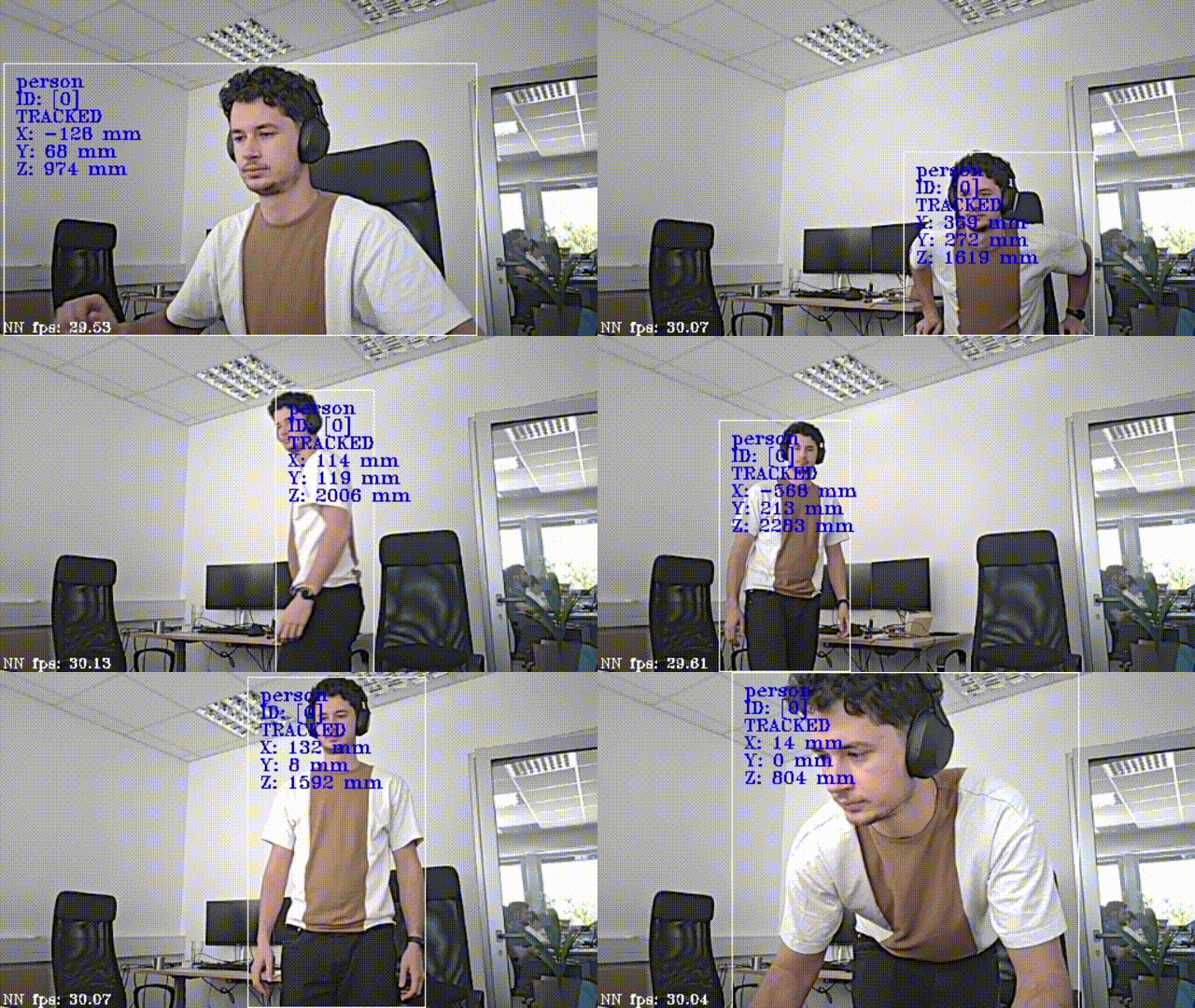 This example requires the DepthAI v3 API, see installation instructions.
Pipeline
Source code
Python
C++
Python
PythonGitHub
1#!/usr/bin/env python3
2
3import cv2
4import depthai as dai
5import time
6
7
8fullFrameTracking = False
9
10# Create pipeline
11with dai.Pipeline() as pipeline:
12    # Define sources and outputs
13    camRgb = pipeline.create(dai.node.Camera).build(dai.CameraBoardSocket.CAM_A)
14    monoLeft = pipeline.create(dai.node.Camera).build(dai.CameraBoardSocket.CAM_B)
15    monoRight = pipeline.create(dai.node.Camera).build(dai.CameraBoardSocket.CAM_C)
16
17    stereo = pipeline.create(dai.node.StereoDepth)
18    leftOutput = monoLeft.requestOutput((640, 400))
19    rightOutput = monoRight.requestOutput((640, 400))
20    leftOutput.link(stereo.left)
21    rightOutput.link(stereo.right)
22
23    spatialDetectionNetwork = pipeline.create(dai.node.SpatialDetectionNetwork).build(camRgb, stereo, "yolov6-nano")
24    objectTracker = pipeline.create(dai.node.ObjectTracker)
25
26    spatialDetectionNetwork.setConfidenceThreshold(0.6)
27    spatialDetectionNetwork.input.setBlocking(False)
28    spatialDetectionNetwork.setBoundingBoxScaleFactor(0.5)
29    spatialDetectionNetwork.setDepthLowerThreshold(100)
30    spatialDetectionNetwork.setDepthUpperThreshold(5000)
31    labelMap = spatialDetectionNetwork.getClasses()
32
33    objectTracker.setDetectionLabelsToTrack([0])  # track only person
34    # possible tracking types: ZERO_TERM_COLOR_HISTOGRAM, ZERO_TERM_IMAGELESS, SHORT_TERM_IMAGELESS, SHORT_TERM_KCF
35    objectTracker.setTrackerType(dai.TrackerType.SHORT_TERM_IMAGELESS)
36    # take the smallest ID when new object is tracked, possible options: SMALLEST_ID, UNIQUE_ID
37    objectTracker.setTrackerIdAssignmentPolicy(dai.TrackerIdAssignmentPolicy.SMALLEST_ID)
38
39    preview = objectTracker.passthroughTrackerFrame.createOutputQueue()
40    tracklets = objectTracker.out.createOutputQueue()
41
42    if fullFrameTracking:
43        camRgb.requestFullResolutionOutput().link(objectTracker.inputTrackerFrame)
44        # do not block the pipeline if it's too slow on full frame
45        objectTracker.inputTrackerFrame.setBlocking(False)
46        objectTracker.inputTrackerFrame.setMaxSize(1)
47    else:
48        spatialDetectionNetwork.passthrough.link(objectTracker.inputTrackerFrame)
49
50    spatialDetectionNetwork.passthrough.link(objectTracker.inputDetectionFrame)
51    spatialDetectionNetwork.out.link(objectTracker.inputDetections)
52
53    startTime = time.monotonic()
54    counter = 0
55    fps = 0
56    color = (255, 255, 255)
57    pipeline.start()
58    while(pipeline.isRunning()):
59        imgFrame = preview.get()
60        track = tracklets.get()
61        assert isinstance(imgFrame, dai.ImgFrame), "Expected ImgFrame"
62        assert isinstance(track, dai.Tracklets), "Expected Tracklets"
63
64        counter+=1
65        current_time = time.monotonic()
66        if (current_time - startTime) > 1 :
67            fps = counter / (current_time - startTime)
68            counter = 0
69            startTime = current_time
70
71        frame = imgFrame.getCvFrame()
72        trackletsData = track.tracklets
73        for t in trackletsData:
74            roi = t.roi.denormalize(frame.shape[1], frame.shape[0])
75            x1 = int(roi.topLeft().x)
76            y1 = int(roi.topLeft().y)
77            x2 = int(roi.bottomRight().x)
78            y2 = int(roi.bottomRight().y)
79
80            try:
81                label = labelMap[t.label]
82            except:
83                label = t.label
84
85            cv2.putText(frame, str(label), (x1 + 10, y1 + 20), cv2.FONT_HERSHEY_TRIPLEX, 0.5, 255)
86            cv2.putText(frame, f"ID: {[t.id]}", (x1 + 10, y1 + 35), cv2.FONT_HERSHEY_TRIPLEX, 0.5, 255)
87            cv2.putText(frame, t.status.name, (x1 + 10, y1 + 50), cv2.FONT_HERSHEY_TRIPLEX, 0.5, 255)
88            cv2.rectangle(frame, (x1, y1), (x2, y2), color, cv2.FONT_HERSHEY_SIMPLEX)
89
90            cv2.putText(frame, f"X: {int(t.spatialCoordinates.x)} mm", (x1 + 10, y1 + 65), cv2.FONT_HERSHEY_TRIPLEX, 0.5, 255)
91            cv2.putText(frame, f"Y: {int(t.spatialCoordinates.y)} mm", (x1 + 10, y1 + 80), cv2.FONT_HERSHEY_TRIPLEX, 0.5, 255)
92            cv2.putText(frame, f"Z: {int(t.spatialCoordinates.z)} mm", (x1 + 10, y1 + 95), cv2.FONT_HERSHEY_TRIPLEX, 0.5, 255)
93
94        cv2.putText(frame, "NN fps: {:.2f}".format(fps), (2, frame.shape[0] - 4), cv2.FONT_HERSHEY_TRIPLEX, 0.4, color)
95
96        cv2.imshow("tracker", frame)
97
98        if cv2.waitKey(1) == ord('q'):
99 breakNeed assistance?
Head over to Discussion Forum for technical support or any other questions you might have.