DepthAI
Software Stack

ON THIS PAGE

  • Demo
  • Pipeline
  • Source code

ImageManip all operations

Supported on:RVC2RVC4
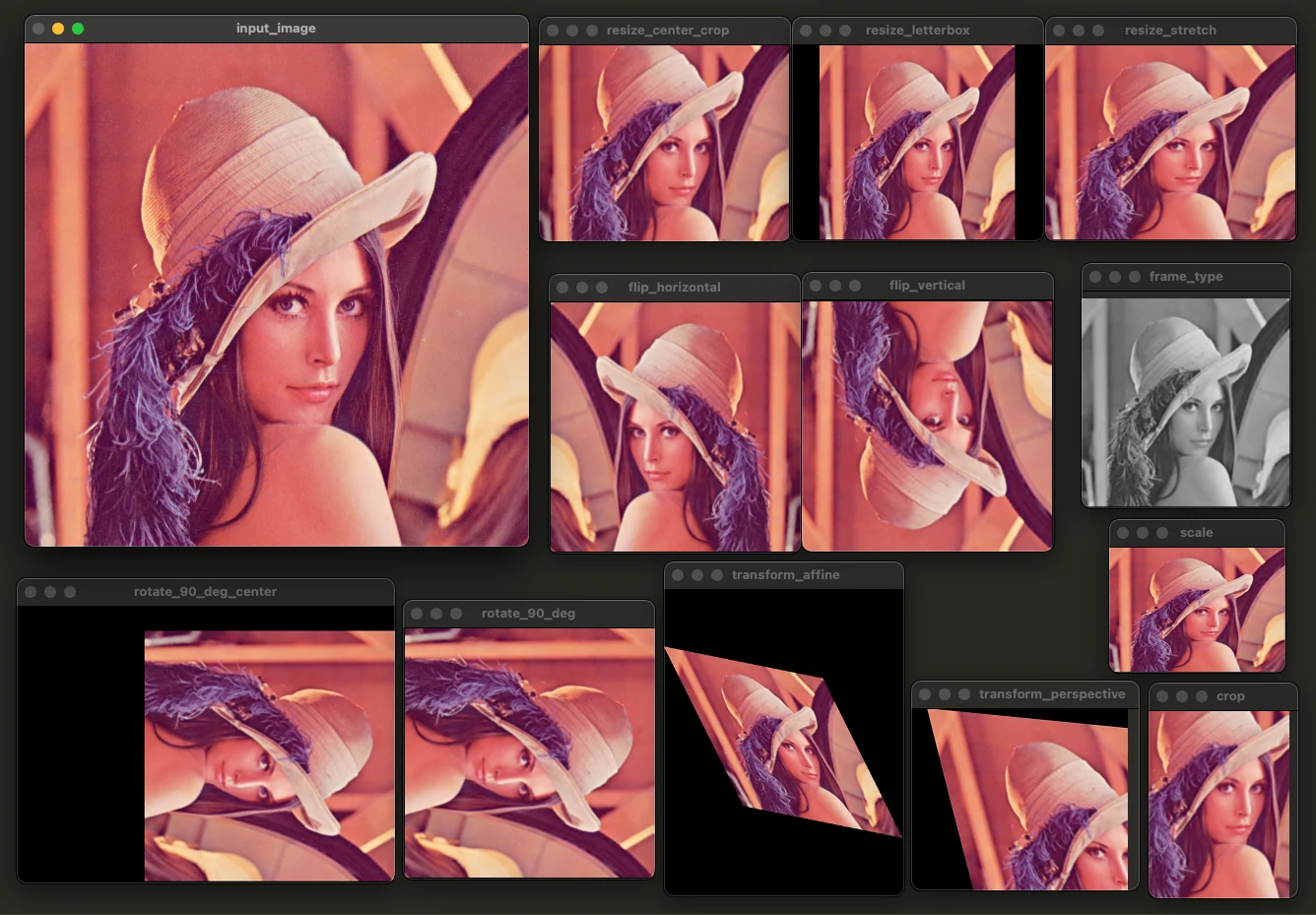
Showcases all available ImageManip operations:
  • Resize (conf.setOutputSize())
  • Crop (conf.addCrop())
  • Flip vertical (conf.addFlipVertical())
  • Flip horizontal (conf.addFlipHorizontal())
  • Scale (conf.addScale())
  • Rotate (conf.addRotateDeg())
  • Transform (conf.addTransformAffine() and conf.addTransformPerspective())
Each operation is done on a separate ImageManip node, so you can see the effect of each operation separately.

Demo

This example requires the DepthAI v3 API, see installation instructions.

Pipeline

Source code

Python

Python
GitHub
1import depthai as dai
2import cv2
3
4pipeline = dai.Pipeline()
5
6manip_input = pipeline.create(dai.node.ImageManip)
7manip_input.initialConfig.setFrameType(dai.ImgFrame.Type.BGR888p)
8inputQueue = manip_input.inputImage.createInputQueue()
9
10manip_ops = [
11    # Resize operations. If aspect ratio isn't the same, the image will be stretched/cropped/letterboxed (depending on resize mode)
12    # Docs here: https://docs.luxonis.com/software/depthai/resolution-techniques/
13    ('resize_stretch', lambda conf: conf.setOutputSize(256, 200, dai.ImageManipConfig.ResizeMode.STRETCH)),
14    ('resize_letterbox', lambda conf: conf.setOutputSize(256, 200, dai.ImageManipConfig.ResizeMode.LETTERBOX)),
15    ('resize_center_crop', lambda conf: conf.setOutputSize(256, 200, dai.ImageManipConfig.ResizeMode.CENTER_CROP)),
16    # Crop the image topLeft (10,40) to bottomRight (310,110)
17    ('crop', lambda conf: conf.addCrop(x=50, y=50, w=150, h=200)),
18    # Flip the frame vertically/horizontally
19    ('flip_vertical', lambda conf: conf.addFlipVertical()),
20    ('flip_horizontal', lambda conf: conf.addFlipHorizontal()),
21    # Scale the image by 0.7x in x and 0.5x in y
22    ('scale', lambda conf: conf.addScale(0.7, 0.5)),
23    # Rotate. If center isn't specified, it will rotate around center (0.5, 0.5)
24    ('rotate_90_deg', lambda conf: conf.addRotateDeg(90)),
25    ('rotate_90_deg_center', lambda conf: conf.addRotateDeg(90, center=dai.Point2f(0.2, 0.3)).setOutputCenter(False)),
26    ('transform_affine', lambda conf: conf.addTransformAffine( # Shearing
27        [1, 0.5,
28         0.2, 1])),
29    ('transform_perspective', lambda conf: conf.addTransformPerspective(
30        [1.0, 0.2, 0.0,  # First row
31        0.1, 1.0, 0.0,  # Second row
32        0.001, 0.002, 1.0])),  # Third row
33    ('frame_type', lambda conf: conf.setFrameType(dai.ImgFrame.Type.RAW8)), # to Grayscale
34]
35
36# Dynamically create ImageManip nodes, apply configurations, and set up queues
37queues = {}
38for name, config in manip_ops:
39    print(name, config)
40    manip = pipeline.create(dai.node.ImageManip)
41    config(manip.initialConfig)
42    manip_input.out.link(manip.inputImage)
43    queues[name] = manip.out.createOutputQueue(maxSize=4, blocking=False)
44
45
46imgFrame = dai.ImgFrame()
47
48input_frame = cv2.imread('../models/lenna.png') # 512x512
49# Send 256x256 image to the device
50imgFrame.setCvFrame(cv2.pyrDown(input_frame), dai.ImgFrame.Type.BGR888i)
51inputQueue.send(imgFrame)
52
53cv2.imshow('input_image', input_frame)
54
55
56pipeline.start()
57
58for name, queue in queues.items():
59    inFrame = queue.get()
60    cv2.imshow(name, inFrame.getCvFrame())
61
62key = cv2.waitKey(0)

C++

1#include <atomic>
2#include <functional>
3#include <iostream>
4#include <map>
5#include <memory>
6#include <opencv2/opencv.hpp>
7
8#include "depthai/depthai.hpp"
9
10int main() {
11    try {
12        // Create pipeline
13        dai::Pipeline pipeline;
14
15        // Create input manipulator
16        auto manipInput = pipeline.create<dai::node::ImageManip>();
17        manipInput->initialConfig->setFrameType(dai::ImgFrame::Type::BGR888p);
18        auto inputQueue = manipInput->inputImage.createInputQueue();
19
20        // Define manipulation operations
21        std::vector<std::pair<std::string, std::function<void(dai::ImageManipConfig&)>>> manipOps = {
22            // Resize operations
23            {"resize_stretch", [](dai::ImageManipConfig& conf) { conf.setOutputSize(256, 200, dai::ImageManipConfig::ResizeMode::STRETCH); }},
24            {"resize_letterbox", [](dai::ImageManipConfig& conf) { conf.setOutputSize(256, 200, dai::ImageManipConfig::ResizeMode::LETTERBOX); }},
25            {"resize_center_crop", [](dai::ImageManipConfig& conf) { conf.setOutputSize(256, 200, dai::ImageManipConfig::ResizeMode::CENTER_CROP); }},
26            // Crop operation
27            {"crop", [](dai::ImageManipConfig& conf) { conf.addCrop(50, 50, 150, 200); }},
28            // Flip operations
29            {"flip_vertical", [](dai::ImageManipConfig& conf) { conf.addFlipVertical(); }},
30            {"flip_horizontal", [](dai::ImageManipConfig& conf) { conf.addFlipHorizontal(); }},
31            // Scale operation
32            {"scale", [](dai::ImageManipConfig& conf) { conf.addScale(0.7f, 0.5f); }},
33            // Rotate operations
34            {"rotate_90_deg", [](dai::ImageManipConfig& conf) { conf.addRotateDeg(90); }},
35            {"rotate_90_deg_center",
36             [](dai::ImageManipConfig& conf) {
37                 conf.addRotateDeg(90, dai::Point2f(0.2f, 0.3f));
38                 conf.setOutputCenter(false);
39             }},
40            // Transform operations
41            {"transform_affine",
42             [](dai::ImageManipConfig& conf) {
43                 std::array<float, 4> matrix = {1.0f, 0.5f, 0.2f, 1.0f};
44                 conf.addTransformAffine(matrix);
45             }},
46            {"transform_perspective",
47             [](dai::ImageManipConfig& conf) {
48                 std::array<float, 9> matrix = {
49                     1.0f,
50                     0.2f,
51                     0.0f,  // First row
52                     0.1f,
53                     1.0f,
54                     0.0f,  // Second row
55                     0.001f,
56                     0.002f,
57                     1.0f  // Third row
58                 };
59                 conf.addTransformPerspective(matrix);
60             }},
61            // Frame type conversion
62            {"frame_type", [](dai::ImageManipConfig& conf) { conf.setFrameType(dai::ImgFrame::Type::RAW8); }}};
63
64        // Create manipulator nodes and queues
65        std::map<std::string, std::shared_ptr<dai::MessageQueue>> queues;
66        for(const auto& [name, config] : manipOps) {
67            std::cout << "Creating manipulator: " << name << std::endl;
68            auto manip = pipeline.create<dai::node::ImageManip>();
69            config(*manip->initialConfig);
70            manipInput->out.link(manip->inputImage);
71            queues[name] = manip->out.createOutputQueue(4, false);
72        }
73
74        // Load and prepare input image
75        cv::Mat inputFrame = cv::imread(LENNA_PATH);  // 512x512
76        if(inputFrame.empty()) {
77            throw std::runtime_error("Could not read input image");
78        }
79
80        // Create and send input frame
81        auto imgFrame = std::make_shared<dai::ImgFrame>();
82        cv::Mat downscaled;
83        cv::pyrDown(inputFrame, downscaled);
84        imgFrame->setCvFrame(downscaled, dai::ImgFrame::Type::BGR888i);
85        inputQueue->send(imgFrame);
86
87        // Display input image
88        cv::imshow("input_image", inputFrame);
89
90        // Start pipeline
91        pipeline.start();
92
93        // Process and display results
94        for(const auto& [name, queue] : queues) {
95            auto inFrame = queue->get<dai::ImgFrame>();
96            cv::imshow(name, inFrame->getCvFrame());
97        }
98
99        // Wait for key press
100        cv::waitKey(0);
101
102        // Cleanup
103        pipeline.stop();
104        pipeline.wait();
105
106    } catch(const std::exception& e) {
107        std::cerr << "Error: " << e.what() << std::endl;
108        return 1;
109    }
110
111    return 0;
112}

Need assistance?

Head over to Discussion Forum for technical support or any other questions you might have.