Frame Synchronization
- Hardware syncing: multi-sensor sub-ms accuracy, hardware trigger
- Software syncing: based on timestamp/sequence numbers
Hardware syncing
Software syncing
Hardware syncing
FSYNC signal
FSYNC signal output
At the moment, only OV9282/OV9782 can output FSYNC signal, while IMX378/477/577/etc should also have the capability, but isn't yet supported (so these can not drive FSYNC signal, only be driven by it). AR0234 has input-only FSYNC trigger.
Synchronizing frames externally
Py
1# Example: we have 3 cameras on ports A,B, and C
2cam_A.initialControl.setFrameSyncMode(dai.CameraControl.FrameSyncMode.INPUT)
3cam_B.initialControl.setFrameSyncMode(dai.CameraControl.FrameSyncMode.INPUT)
4cam_C.initialControl.setFrameSyncMode(dai.CameraControl.FrameSyncMode.INPUT)Sensor FSYNC support
- Continuous streaming with external syncing, configured with
CameraControl.setFrameSyncMode(). In this mode, the FSIN signal is expected to arrive at a continuous rate matching the configured sensor FPS, and trigger can't arrive at arbitrary times as that would disrupt internal sensor operations (leading to bad frames, etc). It can only correct for very small amounts of drift over time. - Snapshot mode with external syncing, configured with
CameraControl.setExternalTrigger(). In this mode, trigger can arrive to the sensor at any time, and the sensor will take the photo/snapshot.
| Sensor | Shutter | Support |
|---|---|---|
| OV9282, OV9782 | Global | FSYNC input/output, both continuous mode and snapshot (arbitrary external trigger) supported |
| OV7251 | Global | Should have the same hardware support as OV9*82, but not implemented in FW as of now |
| AR0234 | Global | FSYNC input, both continuous and snapshot mode supported |
| IMX378, IMX477, IMX577, IMX380 | Rolling | FSYNC input, only continuous mode supported for rolling shutter sensors. Hardware also supports FSYNC output, but not implemented in FW yet |
| IMX582 | Rolling | Similar to IMX378, but not yet tested |
| IMX296 (RPi GS Camera) | Global | Arbitrary external trigger supported on XTR/XTRIG pin. Pulse length determines exposure time (sensor feature). Global Arbitrary external trigger supported on XTR/XTRIG pin. Pulse length determines exposure time (sensor feature). |
External FSYNC Example
Older devices
Newer devices
Older devices
In this example (script here), sensors were set to
Snapshot mode, as we were triggering the signal with a switch button. Only stereo cameras (2x OV9282) were triggered by the button, as IMX378 color camera does not support snapshot mode. If we were to use OV9782 color camera, it could be triggered by the button as well.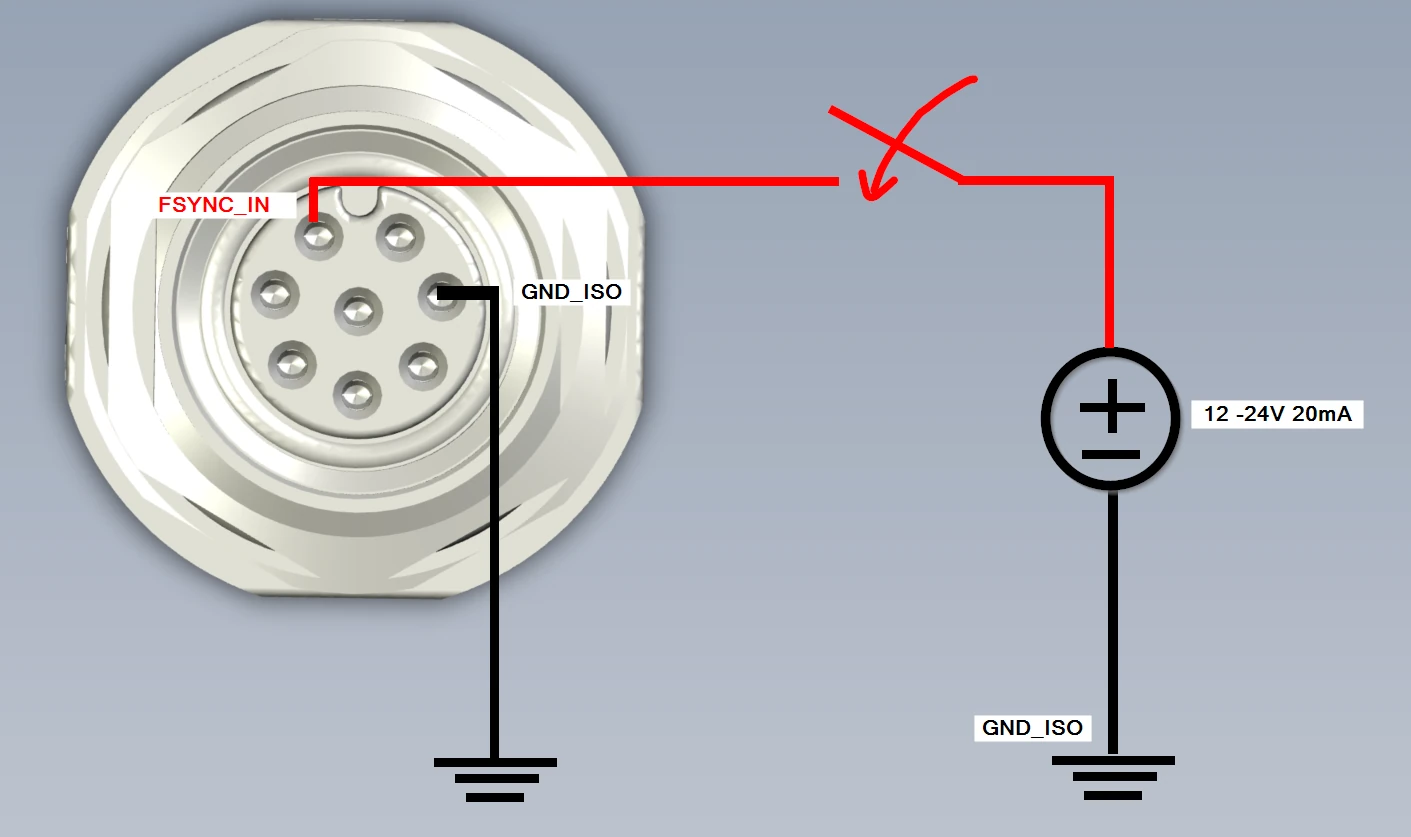
FSYNC Triggering
Only global shutter (OV9282, OV9782, AR0234...) cameras support FSYNC triggering in photo/snapshot mode. Rolling shutter cameras (IMX378, IMX477, IMX577, etc) don't support it.
Strobe signal
Strobe demo
Frame capture graphs
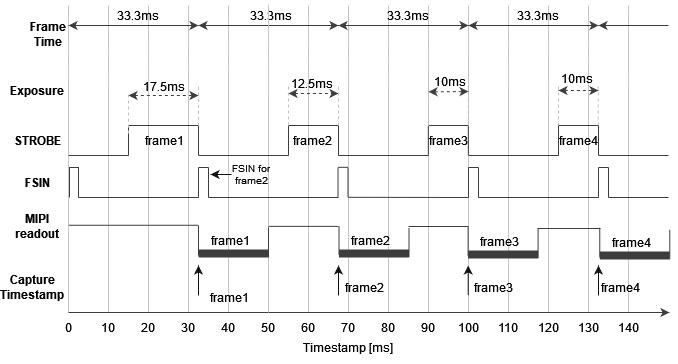
Global shutter sensor timings
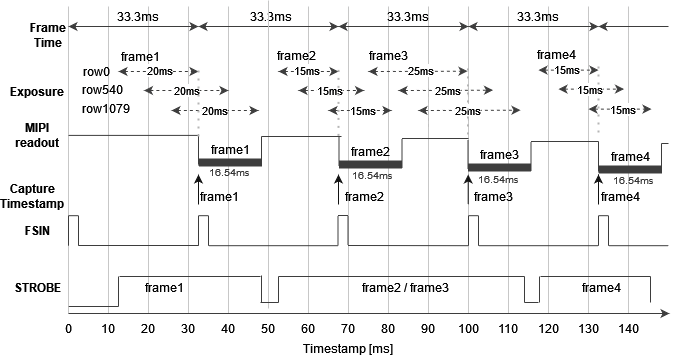
 For rolling shutter, the example graph looks a bit different. MIPI SoF follows after the first row of the image was fully exposed and it's being streamed, but the following rows are still exposing or may have not started exposing yet (depending on exposure time).
Rolling shutter sensor timings
OAK-FFC hardware syncing
Py
1cam_A.initialControl.setFrameSyncMode(dai.CameraControl.FrameSyncMode.OUTPUT)
2cam_D.initialControl.setFrameSyncMode(dai.CameraControl.FrameSyncMode.INPUT)
Arducam FFC camera syncing
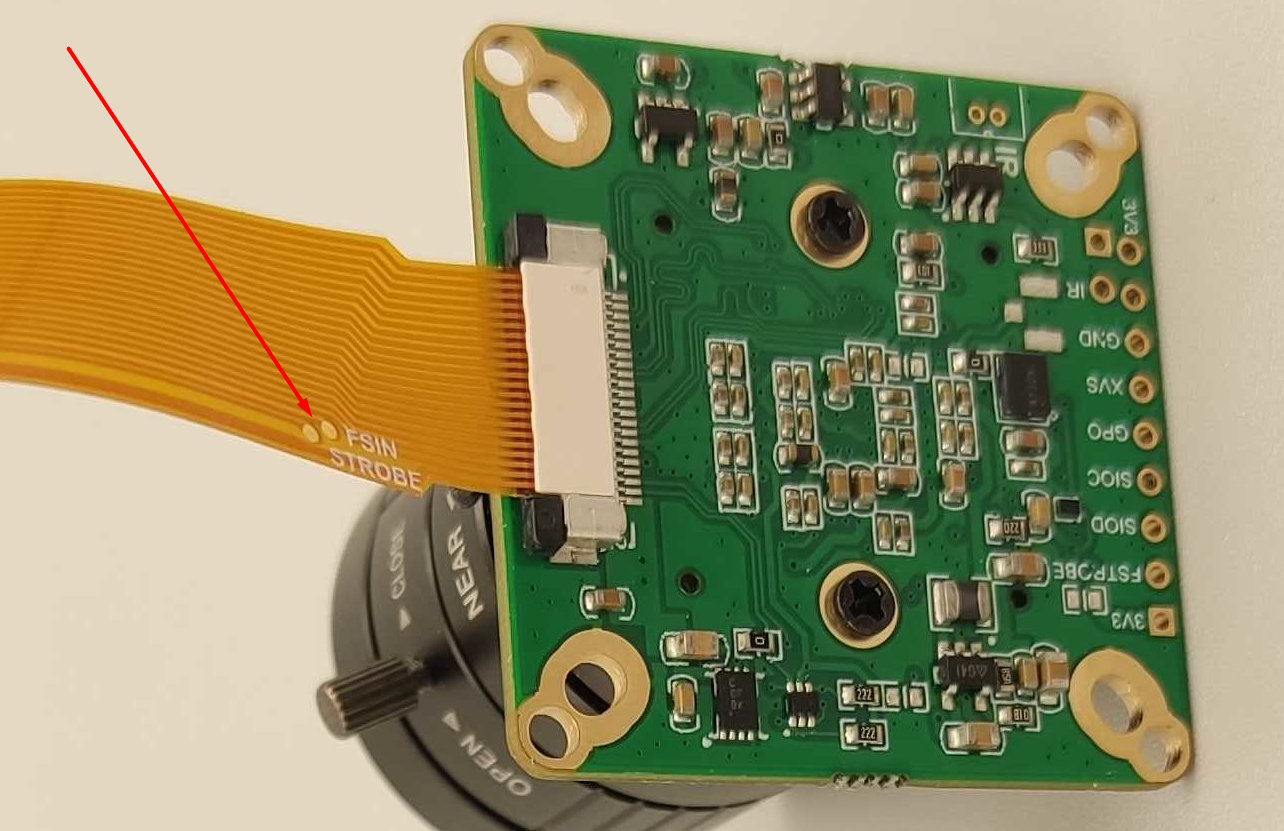
Connecting FSIN/STROBE
OAK-FFC-4P FSIN
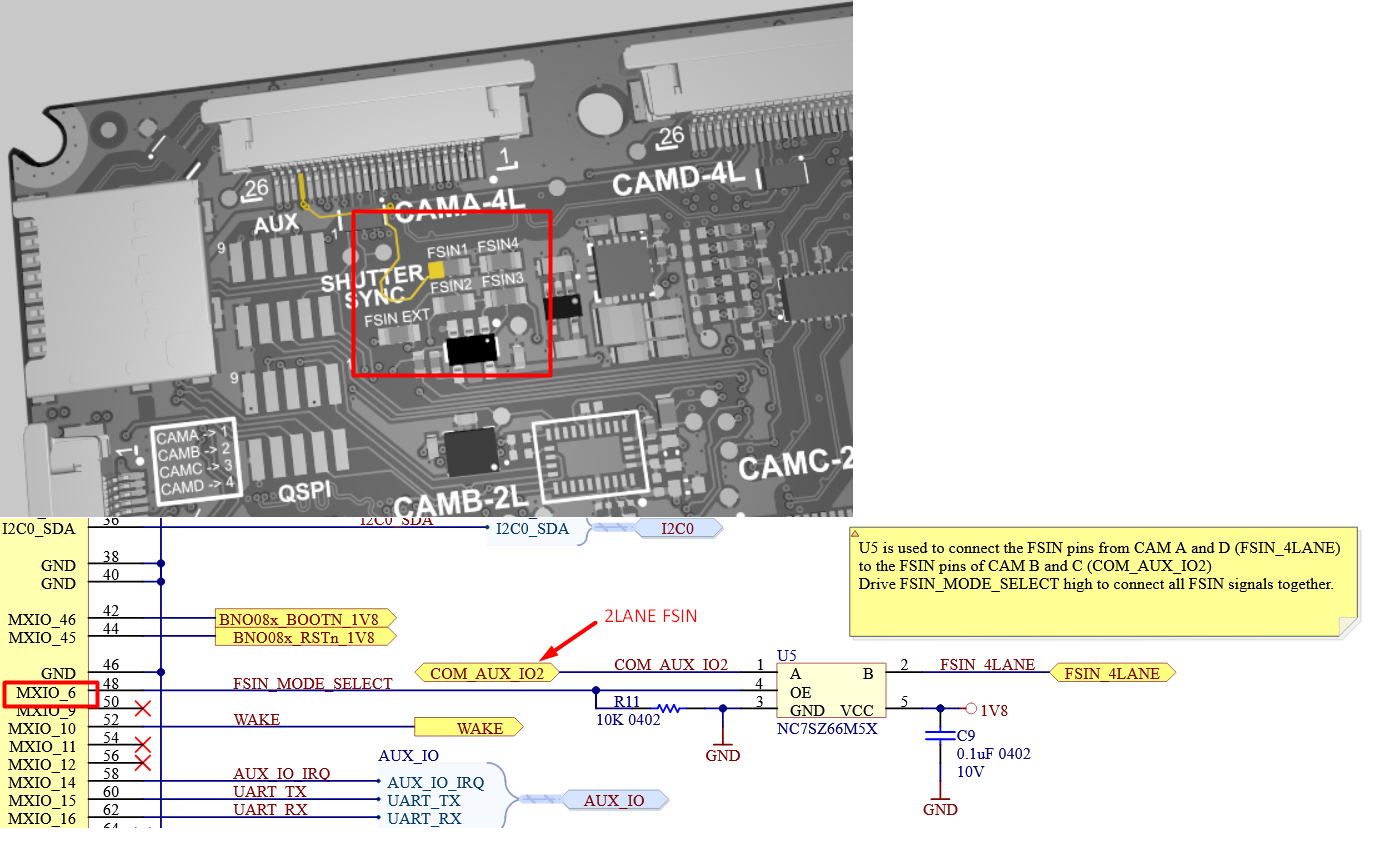 As shown on image above, on OAK-FFC-4P you can enable connection of
 FSIN_4LANE and FSIN_2LANE with the MXIO6. The script below will sync together all 4 cameras that are connected to the OAK-FFC-4P.Python
1# CAM_A will drive FSIN signal for all other cameras:
2cam_A.initialControl.setFrameSyncMode(dai.CameraControl.FrameSyncMode.INPUT) # 4LANE
3cam_B.initialControl.setFrameSyncMode(dai.CameraControl.FrameSyncMode.OUTPUT) # 2LANE
4cam_C.initialControl.setFrameSyncMode(dai.CameraControl.FrameSyncMode.INPUT) # 2LANE
5cam_D.initialControl.setFrameSyncMode(dai.CameraControl.FrameSyncMode.INPUT) # 4LANE
6
7# AND importantly to tie the FSIN signals of A+D and B+C pairs, by setting a GPIO:
8# OAK-FFC-4P requires driving MXIO6 high (FSIN_MODE_SELECT) to connect together
9# the A+D FSIN group (4-lane pair) with the B+C group (2-lane pair)
10config = dai.Device.Config()
11config.board.gpio[6] = dai.BoardConfig.GPIO(dai.BoardConfig.GPIO.OUTPUT,
12                                            dai.BoardConfig.GPIO.Level.HIGH)
13
14with dai.Device(config) as device:
15 device.startPipeline(pipeline)CAM_B and CAM_C
CAM_B and CAM_C (2-lane MIPI ports) share the same I2C bus, which means if both of them have the same sensor (FFC module) connected to them, they will be in sync regardless of any setting (as I2C command "start exporute" will arrive at the same time).This mechanism is used accross OAK-D cameras to sync stereo camera pair.
Series 2 USB OAKs
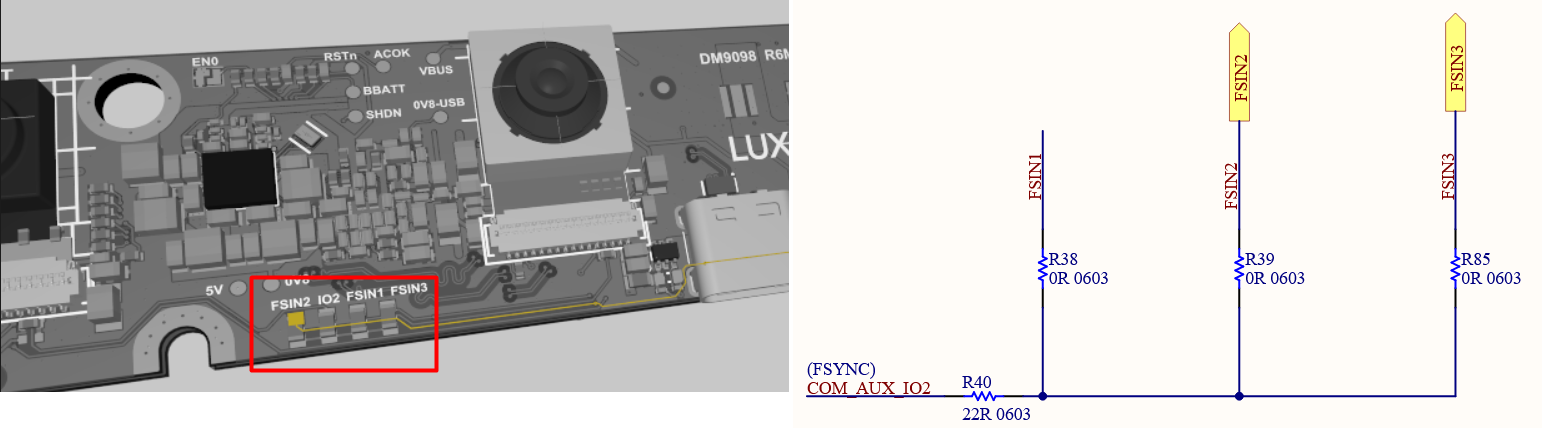
USB OAK-1* FSIN
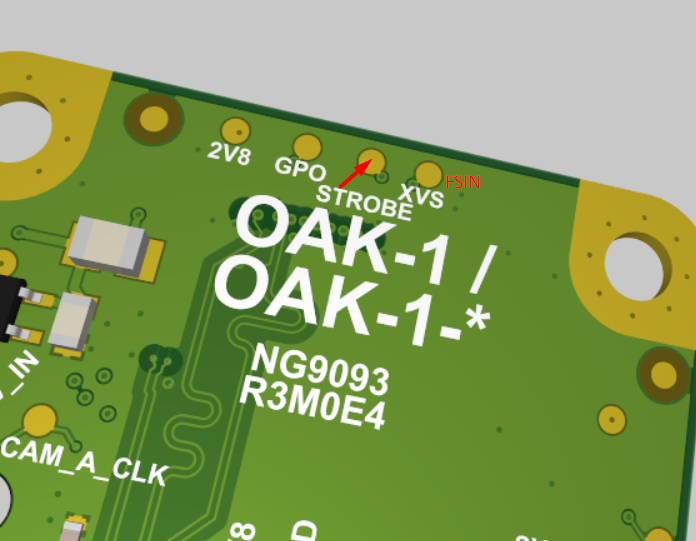
OAK-D-Lite FSIN
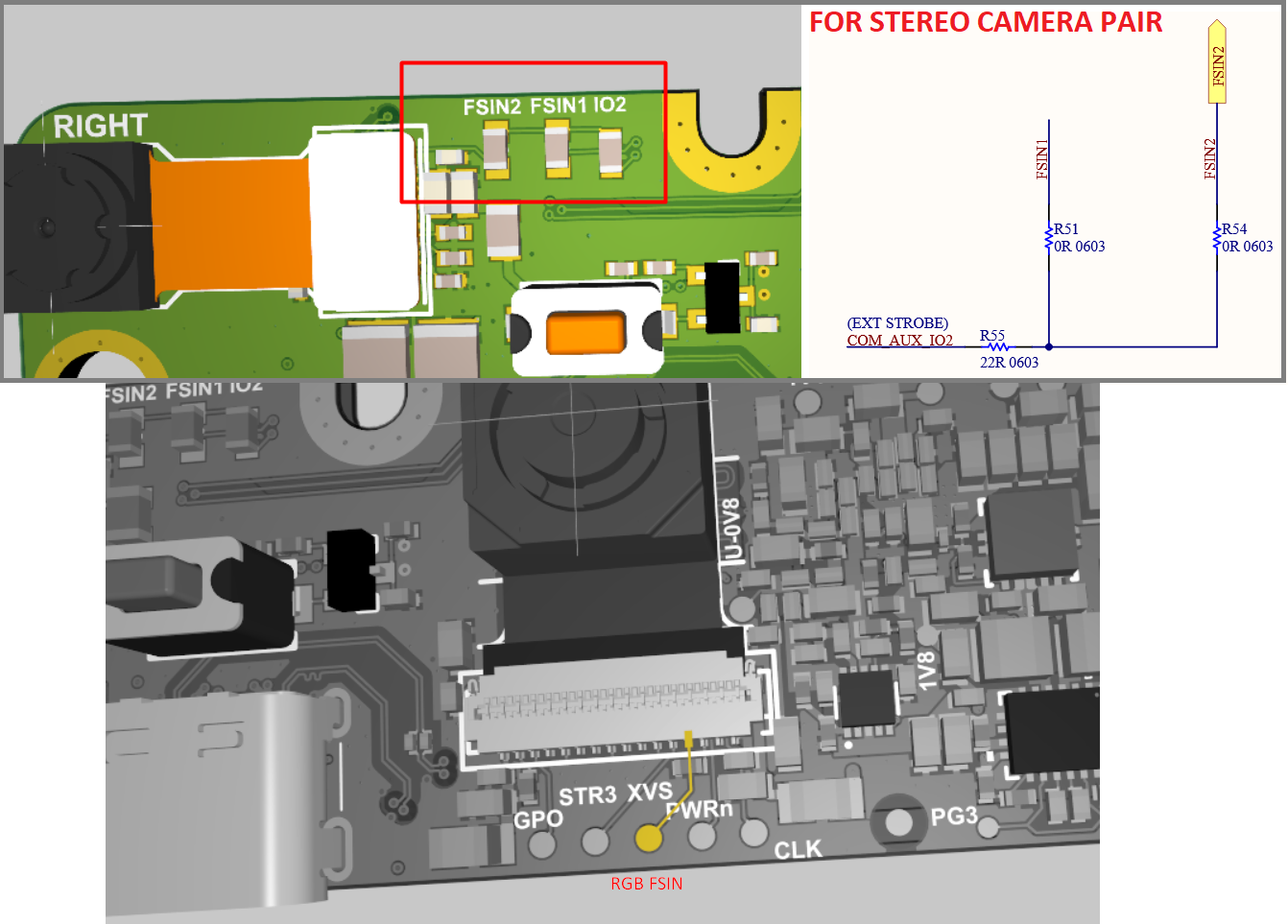 Note that stereo camera pair and color cameras aren't connected together.