此页面由 AI 自动翻译。查看英文原版
DepthAI
软件栈

本页目录

  • 演示
  • 管道
  • 源代码

神经网络多输入组合

Supported on:RVC2RVC4
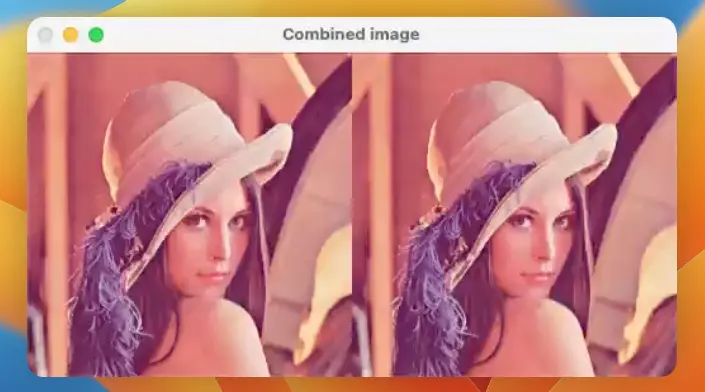
利用 NeuralNetwork 节点运行一个 NN 模型,该模型将两个输入图像连接起来, 并在组合图像上运行“推理”。它在主机上构建 NNData 消息,其中包含两个张量(每个输入图像一个), 然后将消息发送到设备。

演示

此示例需要 DepthAI v3 API,请参阅 安装说明

管道

源代码

Python

Python
GitHub
1#!/usr/bin/env python3
2import cv2
3import depthai as dai
4import numpy as np
5from pathlib import Path
6
7# Get the absolute path of the current script's directory
8script_dir = Path(__file__).resolve().parent
9examplesRoot = (script_dir / Path('../')).resolve()  # This resolves the parent directory correctly
10models = examplesRoot / 'models'
11tagImage = models / 'lenna.png'
12
13# Decode the image using OpenCV
14lenaImage = cv2.imread(str(tagImage.resolve()))
15lenaImage = cv2.resize(lenaImage, (256, 256))
16lenaImage = cv2.cvtColor(lenaImage, cv2.COLOR_BGR2RGB)
17lenaImage = np.array(lenaImage)
18
19device = dai.Device()
20platform = device.getPlatform()
21if platform == dai.Platform.RVC2:
22    lenaImage = np.transpose(lenaImage, (2, 0, 1))
23    nnTensorType = dai.TensorInfo.DataType.U8F
24elif platform == dai.Platform.RVC4:
25    # Add an empty dimension to the beginning
26    lenaImage = np.expand_dims(lenaImage, axis=0)
27    nnTensorType = dai.TensorInfo.DataType.FP16
28
29inputNNData = dai.NNData()
30inputNNData.addTensor("image1", lenaImage, dataType=nnTensorType)
31inputNNData.addTensor("image2", lenaImage, dataType=nnTensorType)
32
33
34with dai.Pipeline(device) as pipeline:
35    model = dai.NNModelDescription("depthai-test-models/simple-concatenate-model")
36    model.platform = platform.name
37
38    nnArchive = dai.NNArchive(dai.getModelFromZoo(model))
39
40    neuralNetwork = pipeline.create(dai.node.NeuralNetwork)
41    neuralNetwork.setNNArchive(nnArchive)
42    nnDataInputQueue = neuralNetwork.input.createInputQueue()
43    qNNData = neuralNetwork.out.createOutputQueue()
44    pipeline.start()
45    while pipeline.isRunning():
46        nnDataInputQueue.send(inputNNData)
47        inNNData: dai.NNData = qNNData.get()
48        tensor : np.ndarray = inNNData.getFirstTensor()
49        # Drop the first dimension
50        tensor = tensor.squeeze().astype(np.uint8)
51        # Check the shape - in case 3 is not the last dimension, permute it to the last
52        if tensor.shape[0] == 3:
53            tensor = np.transpose(tensor, (1, 2, 0))
54        cv2.imshow("Combined image", tensor)
55        key = cv2.waitKey(1)
56        if key == ord('q'):
57            break

C++

1#include <iostream>
2#include <opencv2/opencv.hpp>
3#include <xtensor/containers/xadapt.hpp>
4#include <xtensor/containers/xarray.hpp>
5
6#include "depthai/depthai.hpp"
7#include "depthai/modelzoo/Zoo.hpp"
8
9int main() {
10    // Decode the image using OpenCV
11    cv::Mat lenaImageCv = cv::imread(LENNA_PATH);
12    cv::resize(lenaImageCv, lenaImageCv, cv::Size(256, 256));
13    cv::cvtColor(lenaImageCv, lenaImageCv, cv::COLOR_BGR2RGB);
14
15    // Create xt::xarray from cv::Mat
16    std::vector<uint8_t> lenaImageData(lenaImageCv.data, lenaImageCv.data + lenaImageCv.total() * lenaImageCv.channels());
17    xt::xarray<uint8_t> lenaImage = xt::adapt(lenaImageData);
18
19    // Create pipeline
20    dai::Pipeline pipeline;
21
22    // Create model description
23    dai::NNModelDescription model;
24    model.model = "depthai-test-models/simple-concatenate-model";
25    model.platform = pipeline.getDefaultDevice()->getPlatformAsString();
26    dai::NNArchive archive(dai::getModelFromZoo(model));
27
28    // Create and set up nodes
29    auto neuralNetwork = pipeline.create<dai::node::NeuralNetwork>();
30    neuralNetwork->setNNArchive(archive);
31    auto nnDataInputQueue = neuralNetwork->input.createInputQueue();
32    auto qNNData = neuralNetwork->out.createOutputQueue();
33
34    // Prepare input data
35    auto inputNNData = std::make_shared<dai::NNData>();
36    auto platform = pipeline.getDefaultDevice()->getPlatform();
37
38    if(platform == dai::Platform::RVC2) {
39        // Transpose to CHW format
40        lenaImage = xt::transpose(lenaImage, {2, 0, 1});
41        inputNNData->addTensor("image1", lenaImage, dai::TensorInfo::DataType::U8F);
42        inputNNData->addTensor("image2", lenaImage, dai::TensorInfo::DataType::U8F);
43    } else {
44        // Add empty dimension at front (NHWC format)
45        lenaImage = xt::expand_dims(lenaImage, 0);
46        inputNNData->addTensor("image1", lenaImage, dai::TensorInfo::DataType::FP16);
47        inputNNData->addTensor("image2", lenaImage, dai::TensorInfo::DataType::FP16);
48    }
49
50    // Start pipeline
51    pipeline.start();
52
53    // Main loop
54    while(pipeline.isRunning()) {
55        nnDataInputQueue->send(inputNNData);
56        auto inNNData = qNNData->get<dai::NNData>();
57        auto tensor = inNNData->getFirstTensor<float>();
58        auto tensor_uint8 = xt::eval(xt::squeeze(xt::cast<uint8_t>(tensor), 0));
59
60        cv::Mat output;
61        if(tensor_uint8.shape()[0] == 3) {
62            tensor_uint8 = xt::transpose(tensor_uint8, {1, 2, 0});
63        }
64        output = cv::Mat(tensor_uint8.shape()[0], tensor_uint8.shape()[1], CV_8UC3);
65        std::memcpy(output.data, tensor_uint8.data(), tensor_uint8.size());
66
67        cv::imshow("Combined image", output);
68
69        char key = cv::waitKey(1);
70        if(key == 'q') {
71            break;
72        }
73    }
74
75    return 0;
76}

需要帮助?

请前往 Discussion Forum 获取技术支持或提出您可能有的任何其他问题。