DepthAI Pipeline Graph
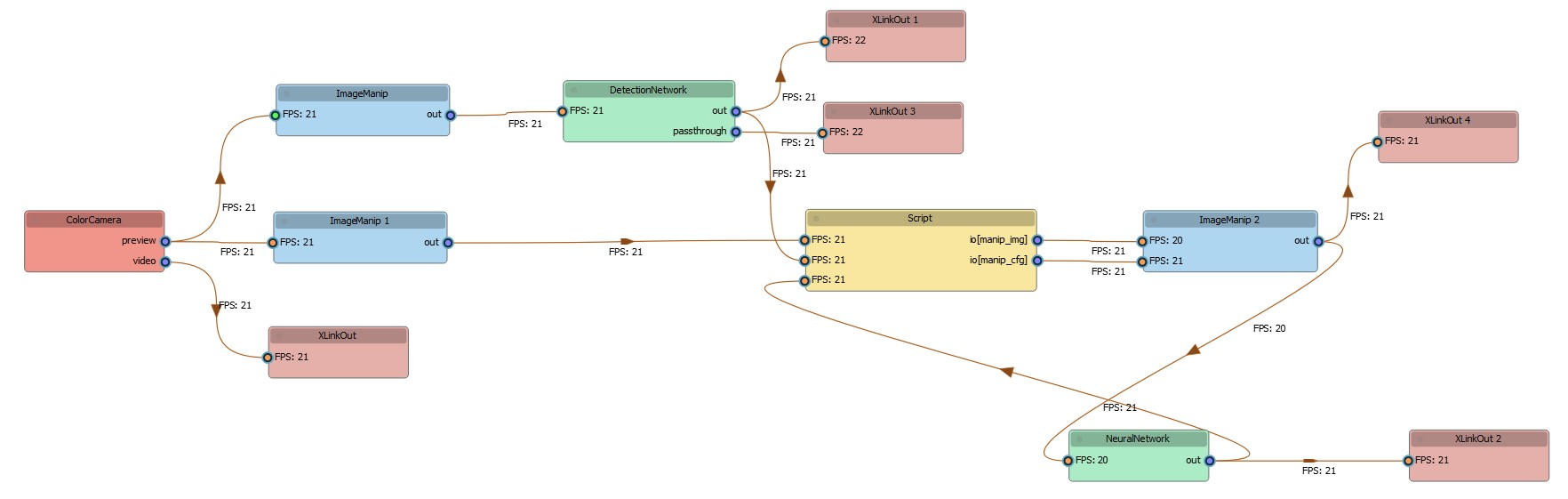
工作原理
DEPTHAI_LEVEL=debug,则 JSON 配置将打印到控制台:Command Line
1[2022-06-01 16:47:33.721] [debug] Schema dump: {"connections":[{"node1Id":8,"node1Output":"passthroughDepth","node1OutputGroup":"","node2Id":10,"node2Input":"in","node2InputGroup":""},...]pipeline_graph 工具执行以下步骤:- 设置
DEPTHAI_LEVEL=debug - 执行您的代码
- 从输出中捕获 schema dump
- 使用修改版的 NodeGraphQt 解析 schema 以创建可视化图
安装
Command Line
1pip install git+https://github.com/luxonis/depthai_pipeline_graph.gitCommand Line
1pip install PySide2运行工具
Command Line
1pipeline_graph -hrun、from_file 和 load。可用操作
- Run: 实时执行您的 DepthAI 脚本并生成 pipeline 图。
Command Line
1pipeline_graph run "python your_script.py"-dnk 选项允许您的脚本在捕获 schema 后继续运行:Command Line
1pipeline_graph run "python your_script.py" -dnk- From File: 从日志文件或 JSON schema 生成 pipeline 图:
Command Line
1pipeline_graph from_file path/to/your/log_or_json_file- Load: 加载和编辑先前保存的 pipeline 图:
Command Line
1pipeline_graph load path/to/your/saved_graph.json自定义选项
节点命名
ColorCamera (0)),索引表示创建顺序。 如果存在许多相同类型的节点,请使用 -var 或 --use_variable_names 选项将索引替换为代码中的变量名,以获得更好的清晰度。Command Line
1pipeline_graph run "python your_script.py" -var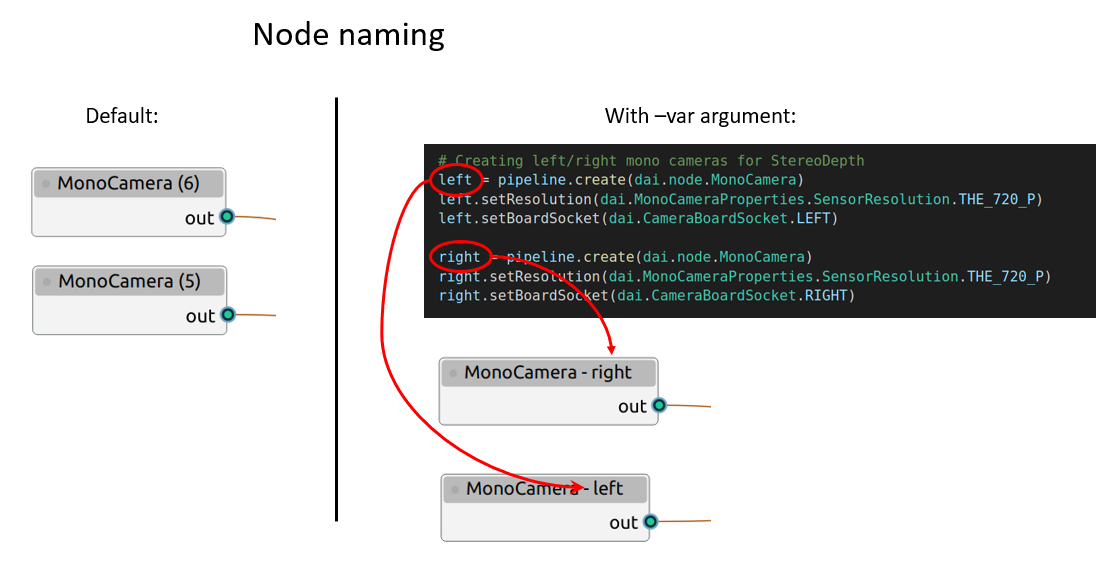
-p 或 --pipeline_name 参数指定其他名称。Command Line
1pipeline_graph run "python your_script.py" -var -p custom_pipeline_name与图交互
- 重新排列节点: 如果默认位置不符合您的需求,只需拖放节点即可调整其布局。
- 重命名节点: 双击节点的名称进行直接编辑。
- 更改节点外观: 双击节点本身(在名称区域之外),将打开一个窗口,您可以在其中修改其颜色和名称。
- 上下文菜单选项: 在图上的任意位置右键单击以调出菜单。您可以从这里将图保存为 JSON 文件、加载先前保存的图或访问其他选项。