DepthAI v2 has been superseded by DepthAI v3. You are viewing legacy documentation.
DepthAI Tutorials
DepthAI API References

ON THIS PAGE

  • Demos
  • Setup
  • Source code
  • Pipeline

ImageManip Rotate

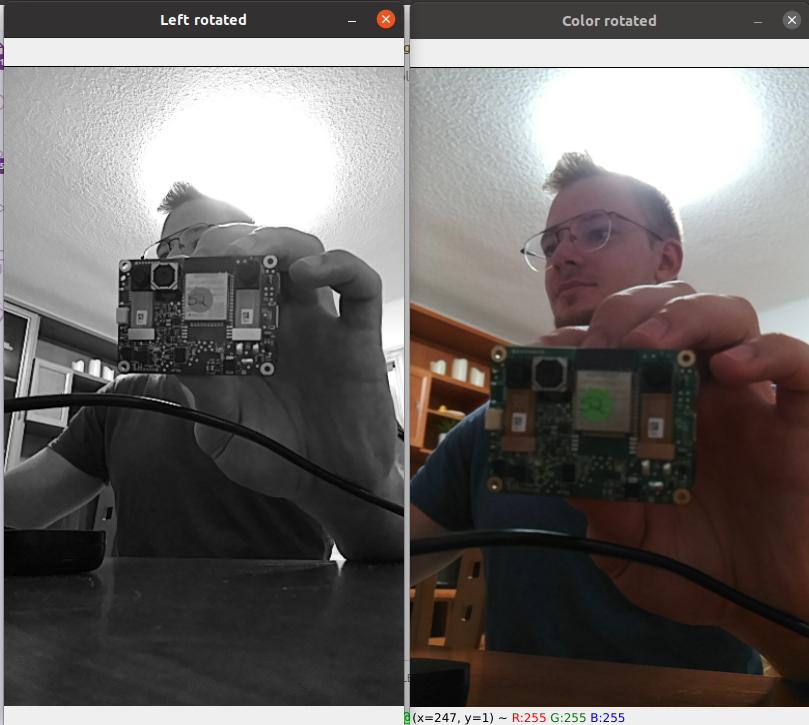
This example showcases how to rotate color and mono frames with the help of ImageManip node. In the example, we are rotating by 90°.

Demos

Rotated mono and color frames
Here I have DepthAI device positioned vertically on my desk.

Setup

Please run the install script to download all required dependencies. Please note that this script must be ran from git context, so you have to download the depthai-python repository first and then run the script
Command Line
1git clone https://github.com/luxonis/depthai-python.git
2cd depthai-python/examples
3python3 install_requirements.py
For additional information, please follow the installation guide.

Source code

Python

Python
GitHub
1#!/usr/bin/env python3
2
3import cv2
4import depthai as dai
5
6# Create pipeline
7pipeline = dai.Pipeline()
8
9# Rotate color frames
10camRgb = pipeline.create(dai.node.ColorCamera)
11camRgb.setPreviewSize(640, 400)
12camRgb.setResolution(dai.ColorCameraProperties.SensorResolution.THE_1080_P)
13camRgb.setInterleaved(False)
14
15manipRgb = pipeline.create(dai.node.ImageManip)
16rgbRr = dai.RotatedRect()
17rgbRr.center.x, rgbRr.center.y = camRgb.getPreviewWidth() // 2, camRgb.getPreviewHeight() // 2
18rgbRr.size.width, rgbRr.size.height = camRgb.getPreviewHeight(), camRgb.getPreviewWidth()
19rgbRr.angle = 90
20manipRgb.initialConfig.setCropRotatedRect(rgbRr, False)
21camRgb.preview.link(manipRgb.inputImage)
22
23manipRgbOut = pipeline.create(dai.node.XLinkOut)
24manipRgbOut.setStreamName("manip_rgb")
25manipRgb.out.link(manipRgbOut.input)
26
27# Rotate mono frames
28monoLeft = pipeline.create(dai.node.MonoCamera)
29monoLeft.setResolution(dai.MonoCameraProperties.SensorResolution.THE_400_P)
30monoLeft.setCamera("left")
31
32manipLeft = pipeline.create(dai.node.ImageManip)
33rr = dai.RotatedRect()
34rr.center.x, rr.center.y = monoLeft.getResolutionWidth() // 2, monoLeft.getResolutionHeight() // 2
35rr.size.width, rr.size.height = monoLeft.getResolutionHeight(), monoLeft.getResolutionWidth()
36rr.angle = 90
37manipLeft.initialConfig.setCropRotatedRect(rr, False)
38monoLeft.out.link(manipLeft.inputImage)
39
40manipLeftOut = pipeline.create(dai.node.XLinkOut)
41manipLeftOut.setStreamName("manip_left")
42manipLeft.out.link(manipLeftOut.input)
43
44with dai.Device(pipeline) as device:
45    qLeft = device.getOutputQueue(name="manip_left", maxSize=8, blocking=False)
46    qRgb = device.getOutputQueue(name="manip_rgb", maxSize=8, blocking=False)
47
48    while True:
49        inLeft = qLeft.tryGet()
50        if inLeft is not None:
51            cv2.imshow('Left rotated', inLeft.getCvFrame())
52
53        inRgb = qRgb.tryGet()
54        if inRgb is not None:
55            cv2.imshow('Color rotated', inRgb.getCvFrame())
56
57        if cv2.waitKey(1) == ord('q'):
58            break

C++

1#include <iostream>
2
3// Includes common necessary includes for development using depthai library
4#include "depthai/depthai.hpp"
5
6int main() {
7    using namespace std;
8
9    // Create pipeline
10    dai::Pipeline pipeline;
11
12    // Rotate color frames
13    auto camRgb = pipeline.create<dai::node::ColorCamera>();
14    camRgb->setPreviewSize(640, 400);
15    camRgb->setResolution(dai::ColorCameraProperties::SensorResolution::THE_1080_P);
16    camRgb->setInterleaved(false);
17
18    auto manipRgb = pipeline.create<dai::node::ImageManip>();
19    dai::RotatedRect rgbRr = {{camRgb->getPreviewWidth() / 2.0f, camRgb->getPreviewHeight() / 2.0f},  // center
20                              {camRgb->getPreviewHeight() * 1.0f, camRgb->getPreviewWidth() * 1.0f},  // size
21                              90};                                                                    // angle
22    manipRgb->initialConfig.setCropRotatedRect(rgbRr, false);
23    camRgb->preview.link(manipRgb->inputImage);
24
25    auto manipRgbOut = pipeline.create<dai::node::XLinkOut>();
26    manipRgbOut->setStreamName("manip_rgb");
27    manipRgb->out.link(manipRgbOut->input);
28
29    // Rotate mono frames
30    auto monoLeft = pipeline.create<dai::node::MonoCamera>();
31    monoLeft->setResolution(dai::MonoCameraProperties::SensorResolution::THE_400_P);
32    monoLeft->setCamera("left");
33
34    auto manipLeft = pipeline.create<dai::node::ImageManip>();
35    dai::RotatedRect rr = {{monoLeft->getResolutionWidth() / 2.0f, monoLeft->getResolutionHeight() / 2.0f},  // center
36                           {monoLeft->getResolutionHeight() * 1.0f, monoLeft->getResolutionWidth() * 1.0f},  // size
37                           90};                                                                              // angle
38    manipLeft->initialConfig.setCropRotatedRect(rr, false);
39    monoLeft->out.link(manipLeft->inputImage);
40
41    auto manipLeftOut = pipeline.create<dai::node::XLinkOut>();
42    manipLeftOut->setStreamName("manip_left");
43    manipLeft->out.link(manipLeftOut->input);
44
45    dai::Device device(pipeline);
46
47    auto qLeft = device.getOutputQueue("manip_left", 8, false);
48    auto qRgb = device.getOutputQueue("manip_rgb", 8, false);
49
50    while(true) {
51        auto inLeft = qLeft->tryGet<dai::ImgFrame>();
52        if(inLeft) {
53            cv::imshow("Left rotated", inLeft->getCvFrame());
54        }
55
56        auto inRgb = qRgb->tryGet<dai::ImgFrame>();
57        if(inRgb) {
58            cv::imshow("Color rotated", inRgb->getCvFrame());
59        }
60
61        int key = cv::waitKey(1);
62        if(key == 'q' || key == 'Q') return 0;
63    }
64    return 0;
65}

Pipeline

Need assistance?

Head over to Discussion Forum for technical support or any other questions you might have.