DepthAI v2 has been superseded by DepthAI v3. You are viewing legacy documentation.
DepthAI Tutorials
DepthAI API References

ON THIS PAGE

  • Demo
  • Setup
  • Source code
  • Pipeline

Script forward frames

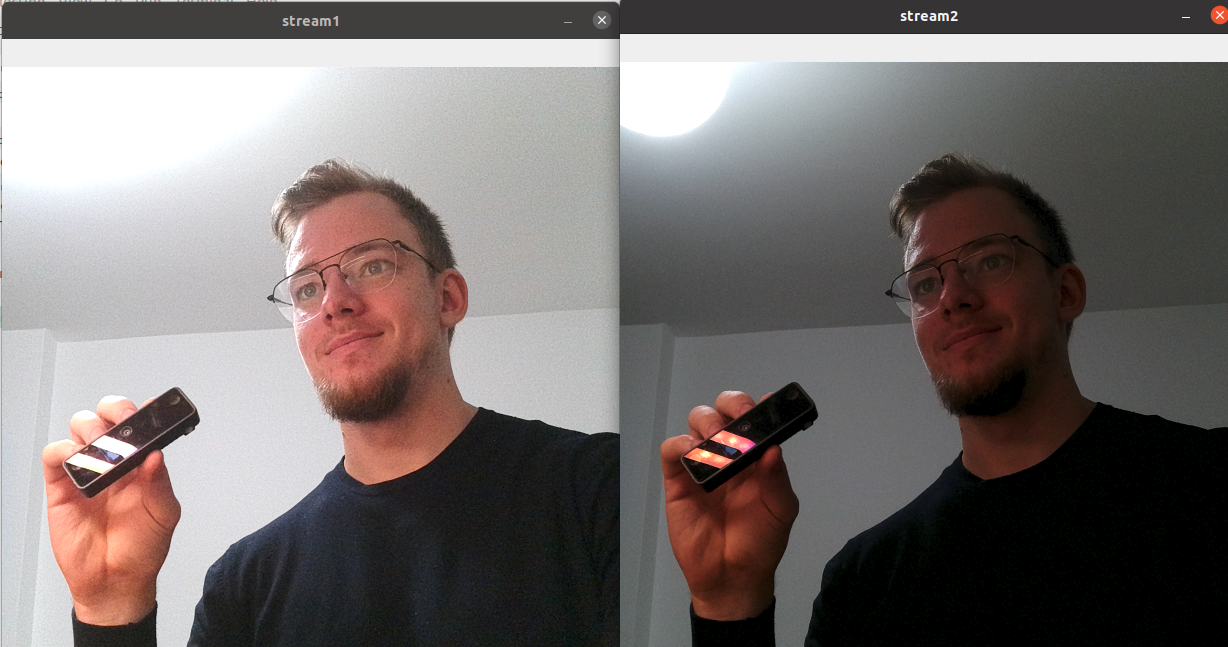
This example shows how to use Script node to forward (demultiplex) frames to two different outputs - in this case directly to two XLinkOut nodes. Script also changes exposure ratio for each frame, which results in two streams, one lighter and one darker.

Demo

https://user-images.githubusercontent.com/18037362/138553268-c2bd3525-c407-4b8e-bd0d-f87f13b8546d.png

Setup

Please run the install script to download all required dependencies. Please note that this script must be ran from git context, so you have to download the depthai-python repository first and then run the script
Command Line
1git clone https://github.com/luxonis/depthai-python.git
2cd depthai-python/examples
3python3 install_requirements.py
For additional information, please follow the installation guide.

Source code

Python

Python
GitHub
1#!/usr/bin/env python3
2import cv2
3import depthai as dai
4
5# Start defining a pipeline
6pipeline = dai.Pipeline()
7
8cam = pipeline.create(dai.node.ColorCamera)
9# Not needed, you can display 1080P frames as well
10cam.setIspScale(1,2)
11
12# Script node
13script = pipeline.create(dai.node.Script)
14script.setScript("""
15    ctrl = CameraControl()
16    ctrl.setCaptureStill(True)
17    # Initially send still event
18    node.io['ctrl'].send(ctrl)
19
20    normal = True
21    while True:
22        frame = node.io['frames'].get()
23        if normal:
24            ctrl.setAutoExposureCompensation(3)
25            node.io['stream1'].send(frame)
26            normal = False
27        else:
28            ctrl.setAutoExposureCompensation(-3)
29            node.io['stream2'].send(frame)
30            normal = True
31        node.io['ctrl'].send(ctrl)
32""")
33cam.still.link(script.inputs['frames'])
34
35# XLinkOut
36xout1 = pipeline.create(dai.node.XLinkOut)
37xout1.setStreamName('stream1')
38script.outputs['stream1'].link(xout1.input)
39
40xout2 = pipeline.create(dai.node.XLinkOut)
41xout2.setStreamName('stream2')
42script.outputs['stream2'].link(xout2.input)
43
44script.outputs['ctrl'].link(cam.inputControl)
45
46# Connect to device with pipeline
47with dai.Device(pipeline) as device:
48    qStream1 = device.getOutputQueue("stream1")
49    qStream2 = device.getOutputQueue("stream2")
50    while True:
51        cv2.imshow('stream1', qStream1.get().getCvFrame())
52        cv2.imshow('stream2', qStream2.get().getCvFrame())
53        if cv2.waitKey(1) == ord('q'):
54            break

C++

1#include <iostream>
2
3// Includes common necessary includes for development using depthai library
4#include "depthai/depthai.hpp"
5
6int main() {
7    using namespace std;
8
9    // Start defining a pipeline
10    dai::Pipeline pipeline;
11
12    // Define a source - color camera
13    auto cam = pipeline.create<dai::node::ColorCamera>();
14    // Not needed, you can display 1080P frames as well
15    cam->setIspScale(1, 2);
16
17    // Script node
18    auto script = pipeline.create<dai::node::Script>();
19    script->setScript(R"(
20    ctrl = CameraControl()
21    ctrl.setCaptureStill(True)
22    # Initially send still event
23    node.io['ctrl'].send(ctrl)
24
25    normal = True
26    while True:
27        frame = node.io['frames'].get()
28        if normal:
29            ctrl.setAutoExposureCompensation(3)
30            node.io['stream1'].send(frame)
31            normal = False
32        else:
33            ctrl.setAutoExposureCompensation(-3)
34            node.io['stream2'].send(frame)
35            normal = True
36        node.io['ctrl'].send(ctrl)
37    )");
38
39    cam->still.link(script->inputs["frames"]);
40
41    // XLinkOut
42    auto xout1 = pipeline.create<dai::node::XLinkOut>();
43    xout1->setStreamName("stream1");
44    script->outputs["stream1"].link(xout1->input);
45
46    auto xout2 = pipeline.create<dai::node::XLinkOut>();
47    xout2->setStreamName("stream2");
48    script->outputs["stream2"].link(xout2->input);
49
50    // Connections
51    script->outputs["ctrl"].link(cam->inputControl);
52
53    // Connect to device with pipeline
54    dai::Device device(pipeline);
55    auto qStream1 = device.getOutputQueue("stream1");
56    auto qStream2 = device.getOutputQueue("stream2");
57    while(true) {
58        cv::imshow("stream1", qStream1->get<dai::ImgFrame>()->getCvFrame());
59        cv::imshow("stream2", qStream2->get<dai::ImgFrame>()->getCvFrame());
60        if(cv::waitKey(1) == 'q') {
61            break;
62        }
63    }
64}

Pipeline

Need assistance?

Head over to Discussion Forum for technical support or any other questions you might have.