DepthAI v2 has been superseded by DepthAI v3. You are viewing legacy documentation.
DepthAI Tutorials
DepthAI API References

ON THIS PAGE

  • Setup
  • Demo
  • Source code
  • Pipeline

Warp Mesh

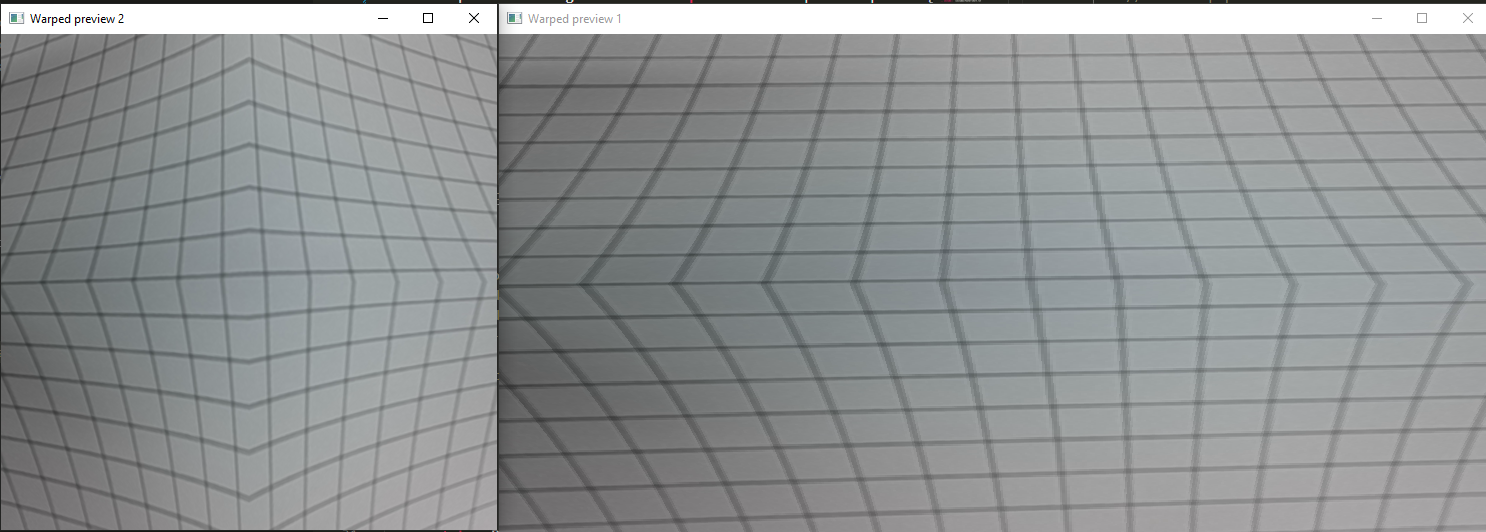
This example shows usage of Warp node to warp the input image frame.

Setup

Please run the install script to download all required dependencies. Please note that this script must be ran from git context, so you have to download the depthai-python repository first and then run the script
Command Line
1git clone https://github.com/luxonis/depthai-python.git
2cd depthai-python/examples
3python3 install_requirements.py
For additional information, please follow the installation guide.

Demo

https://user-images.githubusercontent.com/18037362/214597821-2f76239a-48fa-4146-ba47-9cad872454ea.png

Source code

Python

Python
GitHub
1#!/usr/bin/env python3
2import cv2
3import depthai as dai
4import numpy as np
5
6# Create pipeline
7pipeline = dai.Pipeline()
8
9camRgb = pipeline.create(dai.node.ColorCamera)
10camRgb.setPreviewSize(496, 496)
11camRgb.setInterleaved(False)
12maxFrameSize = camRgb.getPreviewWidth() * camRgb.getPreviewHeight() * 3
13
14# Warp preview frame 1
15warp1 = pipeline.create(dai.node.Warp)
16# Create a custom warp mesh
17tl = dai.Point2f(20, 20)
18tr = dai.Point2f(460, 20)
19ml = dai.Point2f(100, 250)
20mr = dai.Point2f(400, 250)
21bl = dai.Point2f(20, 460)
22br = dai.Point2f(460, 460)
23warp1.setWarpMesh([tl,tr,ml,mr,bl,br], 2, 3)
24WARP1_OUTPUT_FRAME_SIZE = (992,500)
25warp1.setOutputSize(WARP1_OUTPUT_FRAME_SIZE)
26warp1.setMaxOutputFrameSize(WARP1_OUTPUT_FRAME_SIZE[0] * WARP1_OUTPUT_FRAME_SIZE[1] * 3)
27warp1.setHwIds([1])
28warp1.setInterpolation(dai.Interpolation.NEAREST_NEIGHBOR)
29
30camRgb.preview.link(warp1.inputImage)
31xout1 = pipeline.create(dai.node.XLinkOut)
32xout1.setStreamName('out1')
33warp1.out.link(xout1.input)
34
35# Warp preview frame 2
36warp2 = pipeline.create(dai.node.Warp)
37# Create a custom warp mesh
38mesh2 = [
39    (20, 20), (250, 100), (460, 20),
40    (100, 250), (250, 250), (400, 250),
41    (20, 480), (250, 400), (460,480)
42]
43warp2.setWarpMesh(mesh2, 3, 3)
44warp2.setMaxOutputFrameSize(maxFrameSize)
45warp1.setHwIds([2])
46warp2.setInterpolation(dai.Interpolation.BICUBIC)
47
48camRgb.preview.link(warp2.inputImage)
49xout2 = pipeline.create(dai.node.XLinkOut)
50xout2.setStreamName('out2')
51warp2.out.link(xout2.input)
52
53# Connect to device and start pipeline
54with dai.Device(pipeline) as device:
55    # Output queue will be used to get the rgb frames from the output defined above
56    q1 = device.getOutputQueue(name="out1", maxSize=8, blocking=False)
57    q2 = device.getOutputQueue(name="out2", maxSize=8, blocking=False)
58
59    while True:
60        in1 = q1.get()
61        if in1 is not None:
62            cv2.imshow("Warped preview 1", in1.getCvFrame())
63        in2 = q2.get()
64        if in2 is not None:
65            cv2.imshow("Warped preview 2", in2.getCvFrame())
66
67        if cv2.waitKey(1) == ord('q'):
68            break

C++

1#include <iostream>
2
3// Inludes common necessary includes for development using depthai library
4#include "depthai/depthai.hpp"
5
6int main() {
7    using namespace std;
8
9    // Create pipeline
10    dai::Pipeline pipeline;
11
12    auto camRgb = pipeline.create<dai::node::ColorCamera>();
13    camRgb->setPreviewSize(496, 496);
14    camRgb->setInterleaved(false);
15    auto maxFrameSize = camRgb->getPreviewWidth() * camRgb->getPreviewHeight() * 3;
16
17    // Warp preview frame 1
18    auto warp1 = pipeline.create<dai::node::Warp>();
19    // Create a custom warp mesh
20    dai::Point2f tl(20, 20);
21    dai::Point2f tr(460, 20);
22    dai::Point2f ml(100, 250);
23    dai::Point2f mr(400, 250);
24    dai::Point2f bl(20, 460);
25    dai::Point2f br(460, 460);
26    warp1->setWarpMesh({tl, tr, ml, mr, bl, br}, 2, 3);
27    constexpr std::tuple<int, int> WARP1_OUTPUT_FRAME_SIZE = {992, 500};
28    warp1->setOutputSize(WARP1_OUTPUT_FRAME_SIZE);
29    warp1->setMaxOutputFrameSize(std::get<0>(WARP1_OUTPUT_FRAME_SIZE) * std::get<1>(WARP1_OUTPUT_FRAME_SIZE) * 3);
30    warp1->setInterpolation(dai::Interpolation::NEAREST_NEIGHBOR);
31    warp1->setHwIds({1});
32
33    camRgb->preview.link(warp1->inputImage);
34    auto xout1 = pipeline.create<dai::node::XLinkOut>();
35    xout1->setStreamName("out1");
36    warp1->out.link(xout1->input);
37
38    // Warp preview frame 2
39    auto warp2 = pipeline.create<dai::node::Warp>();
40    // Create a custom warp mesh
41    // clang-format off
42    std::vector<dai::Point2f> mesh2 = {
43        {20, 20}, {250, 100}, {460, 20},
44        {100,250}, {250, 250}, {400, 250},
45        {20, 480}, {250,400}, {460,480}
46    };
47    // clang-format on
48    warp2->setWarpMesh(mesh2, 3, 3);
49    warp2->setMaxOutputFrameSize(maxFrameSize);
50    warp2->setInterpolation(dai::Interpolation::BICUBIC);
51    warp2->setHwIds({2});
52
53    camRgb->preview.link(warp2->inputImage);
54    auto xout2 = pipeline.create<dai::node::XLinkOut>();
55    xout2->setStreamName("out2");
56    warp2->out.link(xout2->input);
57
58    dai::Device device(pipeline);
59    auto q1 = device.getOutputQueue("out1", 8, false);
60    auto q2 = device.getOutputQueue("out2", 8, false);
61    while(true) {
62        auto in1 = q1->get<dai::ImgFrame>();
63        if(in1) {
64            cv::imshow("Warped preview 1", in1->getCvFrame());
65        }
66        auto in2 = q2->get<dai::ImgFrame>();
67        if(in2) {
68            cv::imshow("Warped preview 2", in2->getCvFrame());
69        }
70        int key = cv::waitKey(1);
71        if(key == 'q' || key == 'Q') return 0;
72    }
73    return 0;
74}

Pipeline

Need assistance?

Head over to Discussion Forum for technical support or any other questions you might have.