DepthAI v2 has been superseded by DepthAI v3. You are viewing legacy documentation.
DepthAI Tutorials
DepthAI API References

ON THIS PAGE

  • Setup
  • Source code
  • Pipeline

Frame Normalization

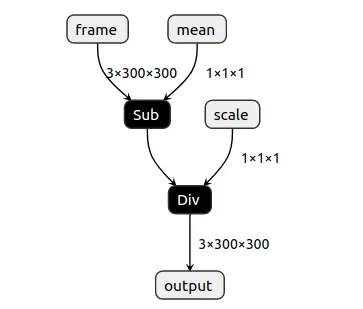
This example shows how you can normalize a frame before sending it to another neural network. Many neural network models require frames with RGB values (pixels) in range between -0.5 to 0.5. ColorCamera's preview outputs values between 0 and 255. Simple custom model, created with PyTorch (link here, tutorial here), allows users to specify mean and scale factors that will be applied to all frame values (pixels).
Python
1output = (input - mean) / scale
software/depthai/examples/normalize_model.webp
On the host, values are converted back to 0-255, so they can be displayed by OpenCV.

Setup

Please run the install script to download all required dependencies. Please note that this script must be ran from git context, so you have to download the depthai-python repository first and then run the script
Command Line
1git clone https://github.com/luxonis/depthai-python.git
2cd depthai-python/examples
3python3 install_requirements.py
For additional information, please follow the installation guide.

Source code

Python

Python
GitHub
1#!/usr/bin/env python3
2
3from pathlib import Path
4import sys
5import numpy as np
6import cv2
7import depthai as dai
8SHAPE = 300
9
10# Get argument first
11nnPath = str((Path(__file__).parent / Path('../models/normalize_openvino_2021.4_4shave.blob')).resolve().absolute())
12if len(sys.argv) > 1:
13    nnPath = sys.argv[1]
14
15if not Path(nnPath).exists():
16    import sys
17    raise FileNotFoundError(f'Required file/s not found, please run "{sys.executable} install_requirements.py"')
18
19p = dai.Pipeline()
20p.setOpenVINOVersion(dai.OpenVINO.VERSION_2021_4)
21
22camRgb = p.createColorCamera()
23# Model expects values in FP16, as we have compiled it with `-ip FP16`
24camRgb.setFp16(True)
25camRgb.setInterleaved(False)
26camRgb.setPreviewSize(SHAPE, SHAPE)
27
28nn = p.createNeuralNetwork()
29nn.setBlobPath(nnPath)
30nn.setNumInferenceThreads(2)
31
32script = p.create(dai.node.Script)
33script.setScript("""
34# Run script only once. We could also send these values from host.
35# Model formula:
36# output = (input - mean) / scale
37
38# This configuration will subtract all frame values (pixels) by 127.5
39# 0.0 .. 255.0 -> -127.5 .. 127.5
40data = NNData(2)
41data.setLayer("mean", [127.5])
42node.io['mean'].send(data)
43
44# This configuration will divide all frame values (pixels) by 255.0
45# -127.5 .. 127.5 -> -0.5 .. 0.5
46data = NNData(2)
47data.setLayer("scale", [255.0])
48node.io['scale'].send(data)
49""")
50
51# Re-use the initial values for multiplier/addend
52script.outputs['mean'].link(nn.inputs['mean'])
53nn.inputs['mean'].setWaitForMessage(False)
54
55script.outputs['scale'].link(nn.inputs['scale'])
56nn.inputs['scale'].setWaitForMessage(False)
57# Always wait for the new frame before starting inference
58camRgb.preview.link(nn.inputs['frame'])
59
60# Send normalized frame values to host
61nn_xout = p.createXLinkOut()
62nn_xout.setStreamName("nn")
63nn.out.link(nn_xout.input)
64
65# Pipeline is defined, now we can connect to the device
66with dai.Device(p) as device:
67    qNn = device.getOutputQueue(name="nn", maxSize=4, blocking=False)
68    shape = (3, SHAPE, SHAPE)
69    while True:
70        inNn = np.array(qNn.get().getData())
71        # Get back the frame. It's currently normalized to -0.5 - 0.5
72        frame = inNn.view(np.float16).reshape(shape).transpose(1, 2, 0)
73        # To get original frame back (0-255), we add multiply all frame values (pixels) by 255 and then add 127.5 to them
74        frame = (frame * 255.0 + 127.5).astype(np.uint8)
75        # Show the initial frame
76        cv2.imshow("Original frame", frame)
77
78        if cv2.waitKey(1) == ord('q'):
79            break

C++

1#include <chrono>
2#include <cstdio>
3#include <iostream>
4
5// Inludes common necessary includes for development using depthai library
6#include "depthai/depthai.hpp"
7#include "utility.hpp"
8
9int main(int argc, char** argv) {
10    using namespace std;
11    // Default blob path provided by Hunter private data download
12    // Applicable for easier example usage only
13    std::string nnPath(BLOB_PATH);
14
15    // If path to blob specified, use that
16    if(argc > 1) {
17        nnPath = std::string(argv[1]);
18    }
19
20    // Print which blob we are using
21    printf("Using blob at path: %s\n", nnPath.c_str());
22
23    // Create pipeline
24    dai::Pipeline pipeline;
25    pipeline.setOpenVINOVersion(dai::OpenVINO::Version::VERSION_2021_4);
26
27    // Define sources and outputs
28    auto camRgb = pipeline.create<dai::node::ColorCamera>();
29    // Model expects values in FP16, as we have compiled it with `-ip FP16`
30    camRgb->setFp16(true);
31    camRgb->setInterleaved(false);
32    camRgb->setPreviewSize(300, 300);  // NN input
33
34    auto nn = pipeline.create<dai::node::NeuralNetwork>();
35    nn->setBlobPath(nnPath);
36    nn->setNumInferenceThreads(2);
37
38    auto script = pipeline.create<dai::node::Script>();
39    script->setScript(R"(
40    # Run script only once
41    # Model formula:
42    # output = (input - mean) / scale
43
44    # This configuration will subtract all frame values (pixels) by 127.5
45    # 0.0 .. 255.0 -> -127.5 .. 127.5
46    data = NNData(2)
47    data.setLayer("mean", [127.5])
48    node.io['mean'].send(data)
49
50    # This configuration will divide all frame values (pixels) by 255.0
51    # -127.5 .. 127.5 -> -0.5 .. 0.5
52    data = NNData(2)
53    data.setLayer("scale", [255.0])
54    node.io['scale'].send(data)
55    )");
56    // Re-use the initial values for mean/scale
57    script->outputs["mean"].link(nn->inputs["mean"]);
58    nn->inputs["mean"].setWaitForMessage(false);
59
60    script->outputs["scale"].link(nn->inputs["scale"]);
61    nn->inputs["scale"].setWaitForMessage(false);
62    // Always wait for the new frame before starting inference
63    camRgb->preview.link(nn->inputs["frame"]);
64
65    auto xout = pipeline.create<dai::node::XLinkOut>();
66    xout->setStreamName("nn");
67    nn->out.link(xout->input);
68
69    // Connect to device and start pipeline
70    dai::Device device(pipeline);
71
72    // Output queues will be used to get the rgb frames and nn data from the outputs defined above
73    auto qNn = device.getOutputQueue("nn", 4, false);
74
75    while(true) {
76        auto inNn = qNn->get<dai::NNData>();
77        // To get original frame back (0-255), we add multiply all frame values (pixels) by 255 and then add 127.5 to them.
78        cv::imshow("Original Frame", fromPlanarFp16(inNn->getFirstLayerFp16(), 300, 300, 127.5, 255.0));
79
80        int key = cv::waitKey(1);
81        if(key == 'q' || key == 'Q') {
82            return 0;
83        }
84    }
85    return 0;
86}

Pipeline

Need assistance?

Head over to Discussion Forum for technical support or any other questions you might have.