DepthAI v2 has been superseded by DepthAI v3. You are viewing legacy documentation.
DepthAI Tutorials
DepthAI API References

ON THIS PAGE

  • Demo
  • Setup
  • Source code
  • Pipeline

RGB-Left Align

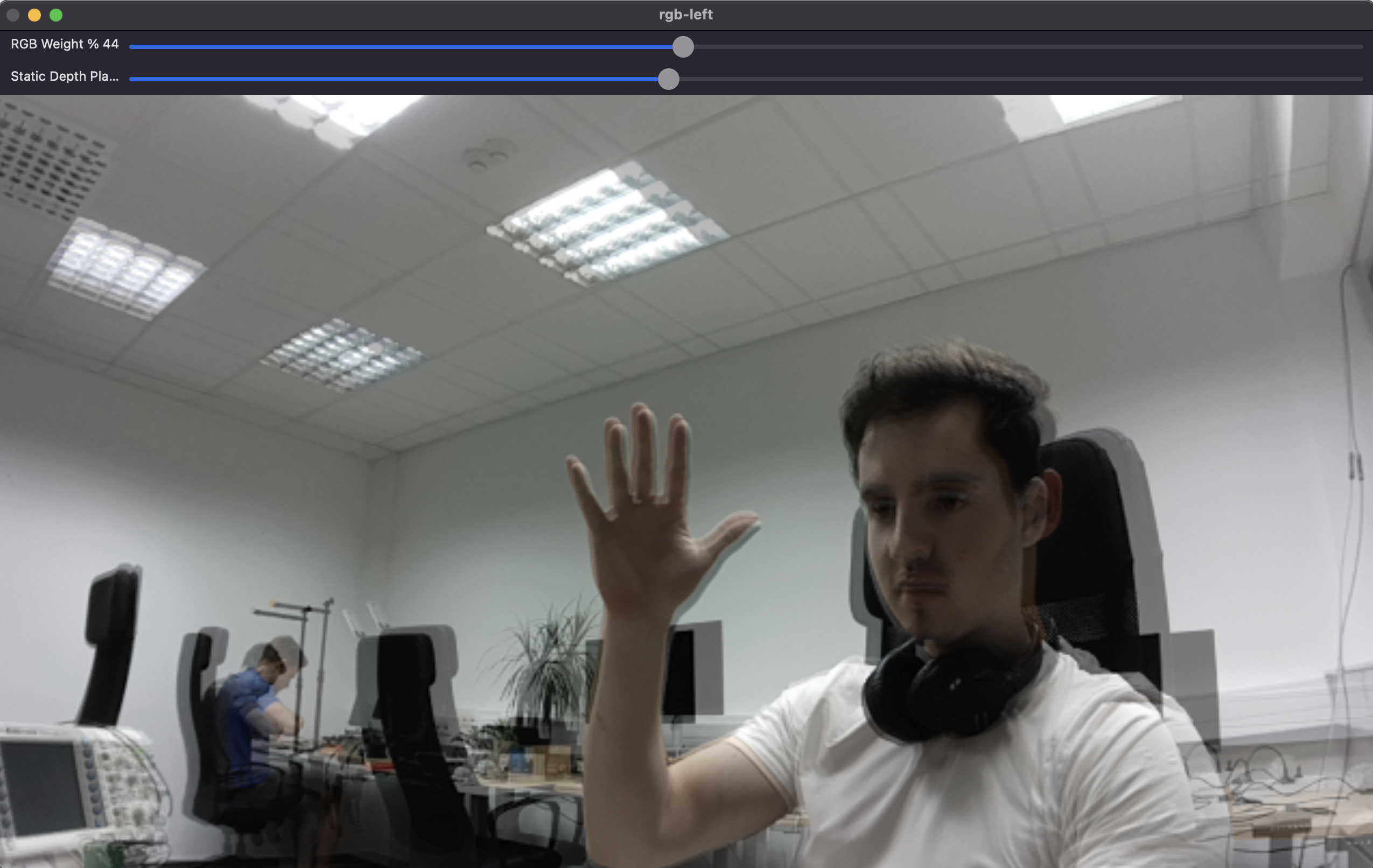
This example demonstrates how to align depth information from a left camera to an RGB camera. This is particularly useful for applications where you need to overlay or compare depth and color data. An OpenCV window is created to display the blended image of the RGB and aligned depth data. Trackbars are provided to adjust the blending ratio and the static depth plane.

Demo

RGB-Left Alignment Demo

Setup

Please run the install script to download all required dependencies. Please note that this script must be ran from git context, so you have to download the depthai-python repository first and then run the script
Command Line
1git clone https://github.com/luxonis/depthai-python.git
2cd depthai-python/examples
3python3 install_requirements.py
For additional information, please follow the installation guide.

Source code

Python

Python
GitHub
1#!/usr/bin/env python3
2
3import cv2
4import depthai as dai
5from datetime import timedelta
6import numpy as np
7
8# This is an interactive example that shows how two frame sources without depth information.
9FPS = 30.0
10
11RGB_SOCKET = dai.CameraBoardSocket.CAM_A
12LEFT_SOCKET = dai.CameraBoardSocket.CAM_B
13ALIGN_SOCKET = LEFT_SOCKET
14
15COLOR_RESOLUTION = dai.ColorCameraProperties.SensorResolution.THE_1080_P
16LEFT_RIGHT_RESOLUTION = dai.MonoCameraProperties.SensorResolution.THE_720_P
17
18ISP_SCALE = 3
19
20device = dai.Device()
21
22calibrationHandler = device.readCalibration()
23rgbDistortion = calibrationHandler.getDistortionCoefficients(RGB_SOCKET)
24distortionModel = calibrationHandler.getDistortionModel(RGB_SOCKET)
25if distortionModel != dai.CameraModel.Perspective:
26    raise RuntimeError("Unsupported distortion model for RGB camera. This example supports only Perspective model.")
27
28pipeline = dai.Pipeline()
29
30# Define sources and outputs
31camRgb = pipeline.create(dai.node.ColorCamera)
32left = pipeline.create(dai.node.MonoCamera)
33sync = pipeline.create(dai.node.Sync)
34out = pipeline.create(dai.node.XLinkOut)
35align = pipeline.create(dai.node.ImageAlign)
36cfgIn = pipeline.create(dai.node.XLinkIn)
37
38left.setResolution(LEFT_RIGHT_RESOLUTION)
39left.setBoardSocket(LEFT_SOCKET)
40left.setFps(FPS)
41
42camRgb.setBoardSocket(RGB_SOCKET)
43camRgb.setResolution(COLOR_RESOLUTION)
44camRgb.setFps(FPS)
45camRgb.setIspScale(1, ISP_SCALE)
46
47out.setStreamName("out")
48
49sync.setSyncThreshold(timedelta(seconds=0.5 / FPS))
50
51cfgIn.setStreamName("config")
52
53cfg = align.initialConfig.get()
54staticDepthPlane = cfg.staticDepthPlane
55
56# Linking
57align.outputAligned.link(sync.inputs["aligned"])
58camRgb.isp.link(sync.inputs["rgb"])
59camRgb.isp.link(align.inputAlignTo)
60left.out.link(align.input)
61sync.out.link(out.input)
62cfgIn.out.link(align.inputConfig)
63
64
65rgbWeight = 0.4
66leftWeight = 0.6
67
68
69def updateBlendWeights(percentRgb):
70    """
71    Update the rgb and left weights used to blend rgb/left image
72
73    @param[in] percent_rgb The rgb weight expressed as a percentage (0..100)
74    """
75    global leftWeight
76    global rgbWeight
77    rgbWeight = float(percentRgb) / 100.0
78    leftWeight = 1.0 - rgbWeight
79
80def updateDepthPlane(depth):
81    global staticDepthPlane
82    staticDepthPlane = depth
83
84# Connect to device and start pipeline
85with device:
86    device.startPipeline(pipeline)
87    queue = device.getOutputQueue("out", 8, False)
88    cfgQ = device.getInputQueue("config")
89
90    # Configure windows; trackbar adjusts blending ratio of rgb/depth
91    windowName = "rgb-left"
92
93    # Set the window to be resizable and the initial size
94    cv2.namedWindow(windowName, cv2.WINDOW_NORMAL)
95    cv2.resizeWindow(windowName, 1280, 720)
96    cv2.createTrackbar(
97        "RGB Weight %",
98        windowName,
99        int(rgbWeight * 100),
100        100,
101        updateBlendWeights,
102    )
103    cv2.createTrackbar(
104        "Static Depth Plane [mm]",
105        windowName,
106        0,
107        2000,
108        updateDepthPlane,
109    )
110    while True:
111        messageGroup = queue.get()
112        assert isinstance(messageGroup, dai.MessageGroup)
113        frameRgb = messageGroup["rgb"]
114        assert isinstance(frameRgb, dai.ImgFrame)
115        leftAligned = messageGroup["aligned"]
116        assert isinstance(leftAligned, dai.ImgFrame)
117
118        frameRgbCv = frameRgb.getCvFrame()
119        # Colorize the aligned depth
120        leftCv = leftAligned.getCvFrame()
121
122        rgbIntrinsics = calibrationHandler.getCameraIntrinsics(RGB_SOCKET, int(frameRgbCv.shape[1]), int(frameRgbCv.shape[0]))
123
124        cvFrameUndistorted = cv2.undistort(
125            frameRgbCv,
126            np.array(rgbIntrinsics),
127            np.array(rgbDistortion),
128        )
129
130        if len(leftCv.shape) == 2:
131            leftCv = cv2.cvtColor(leftCv, cv2.COLOR_GRAY2BGR)
132        if leftCv.shape != cvFrameUndistorted.shape:
133            leftCv = cv2.resize(leftCv, (cvFrameUndistorted.shape[1], cvFrameUndistorted.shape[0]))
134
135        blended = cv2.addWeighted(cvFrameUndistorted, rgbWeight, leftCv, leftWeight, 0)
136        cv2.imshow(windowName, blended)
137
138        key = cv2.waitKey(1)
139        if key == ord("q"):
140            break
141
142        cfg.staticDepthPlane = staticDepthPlane
143        cfgQ.send(cfg)

C++

1#include <chrono>
2#include <opencv2/opencv.hpp>
3#include <queue>
4
5#include "depthai/depthai.hpp"
6
7constexpr auto FPS = 30.0;
8
9constexpr auto RGB_SOCKET = dai::CameraBoardSocket::CAM_A;
10constexpr auto LEFT_SOCKET = dai::CameraBoardSocket::CAM_B;
11constexpr auto ALIGN_SOCKET = LEFT_SOCKET;
12
13constexpr auto COLOR_RESOLUTION = dai::ColorCameraProperties::SensorResolution::THE_1080_P;
14constexpr auto LEFT_RIGHT_RESOLUTION = dai::MonoCameraProperties::SensorResolution::THE_720_P;
15
16class FPSCounter {
17   public:
18    void tick() {
19        auto now = std::chrono::steady_clock::now();
20        frameTimes.push(now);
21        if(frameTimes.size() > 100) {
22            frameTimes.pop();
23        }
24    }
25
26    double getFps() {
27        if(frameTimes.size() <= 1) return 0;
28        auto duration = std::chrono::duration_cast<std::chrono::milliseconds>(frameTimes.back() - frameTimes.front()).count();
29        return (frameTimes.size() - 1) * 1000.0 / duration;
30    }
31
32   private:
33    std::queue<std::chrono::steady_clock::time_point> frameTimes;
34};
35
36double rgbWeight = 0.4;
37double leftWeight = 0.6;
38int staticDepthPlane = 0;
39
40void updateBlendWeights(int percentRgb, void*) {
41    rgbWeight = static_cast<double>(percentRgb) / 100.0;
42    leftWeight = 1.0 - rgbWeight;
43}
44
45void updateDepthPlane(int depth, void*) {
46    staticDepthPlane = depth;
47}
48
49int main() {
50    dai::Pipeline pipeline;
51
52    auto camRgb = pipeline.create<dai::node::ColorCamera>();
53    auto left = pipeline.create<dai::node::MonoCamera>();
54    auto sync = pipeline.create<dai::node::Sync>();
55    auto out = pipeline.create<dai::node::XLinkOut>();
56    auto align = pipeline.create<dai::node::ImageAlign>();
57    auto cfgIn = pipeline.create<dai::node::XLinkIn>();
58
59    left->setResolution(LEFT_RIGHT_RESOLUTION);
60    left->setBoardSocket(LEFT_SOCKET);
61    left->setFps(FPS);
62
63    camRgb->setBoardSocket(RGB_SOCKET);
64    camRgb->setResolution(COLOR_RESOLUTION);
65    camRgb->setFps(FPS);
66    camRgb->setIspScale(1, 3);
67
68    out->setStreamName("out");
69
70    sync->setSyncThreshold(std::chrono::milliseconds(static_cast<int>((1 / FPS) * 1000.0 * 0.5)));
71
72    cfgIn->setStreamName("config");
73
74    align->outputAligned.link(sync->inputs["aligned"]);
75    camRgb->isp.link(sync->inputs["rgb"]);
76    camRgb->isp.link(align->inputAlignTo);
77    left->out.link(align->input);
78    sync->out.link(out->input);
79    cfgIn->out.link(align->inputConfig);
80
81    dai::Device device(pipeline);
82    auto queue = device.getOutputQueue("out", 8, false);
83    auto cfgQ = device.getInputQueue("config");
84
85    FPSCounter fpsCounter;
86
87    std::string windowName = "rgb-left";
88    cv::namedWindow(windowName, cv::WINDOW_NORMAL);
89    cv::resizeWindow(windowName, 1280, 720);
90    cv::createTrackbar("RGB Weight %", windowName, nullptr, 100, updateBlendWeights);
91    cv::createTrackbar("Static Depth Plane [mm]", windowName, nullptr, 2000, updateDepthPlane);
92
93    while(true) {
94        auto messageGroup = queue->get<dai::MessageGroup>();
95        fpsCounter.tick();
96
97        auto frameRgb = messageGroup->get<dai::ImgFrame>("rgb");
98        auto leftAligned = messageGroup->get<dai::ImgFrame>("aligned");
99
100        if(frameRgb && leftAligned) {
101            auto frameRgbCv = frameRgb->getCvFrame();
102            auto leftCv = leftAligned->getCvFrame();
103
104            if(leftCv.channels() == 1) {
105                cv::cvtColor(leftCv, leftCv, cv::COLOR_GRAY2BGR);
106            }
107            if(leftCv.size() != frameRgbCv.size()) {
108                cv::resize(leftCv, leftCv, frameRgbCv.size());
109            }
110
111            cv::Mat blended;
112            cv::addWeighted(frameRgbCv, rgbWeight, leftCv, leftWeight, 0, blended);
113            cv::imshow(windowName, blended);
114        }
115
116        int key = cv::waitKey(1);
117        if(key == 'q' || key == 'Q') {
118            break;
119        }
120
121        auto cfg = align->initialConfig.get();
122        cfg.staticDepthPlane = staticDepthPlane;
123        auto alignConfig = std::make_shared<dai::ImageAlignConfig>();
124        alignConfig->set(cfg);
125        cfgQ->send(alignConfig);
126    }
127
128    return 0;
129}

Pipeline

Need assistance?

Head over to Discussion Forum for technical support or any other questions you might have.