DepthAI v2 has been superseded by DepthAI v3. You are viewing legacy documentation.
DepthAI Tutorials
DepthAI API References

ON THIS PAGE

  • Demo
  • Setup
  • Source code
  • Pipeline

Spatial Calculator Multi-ROI

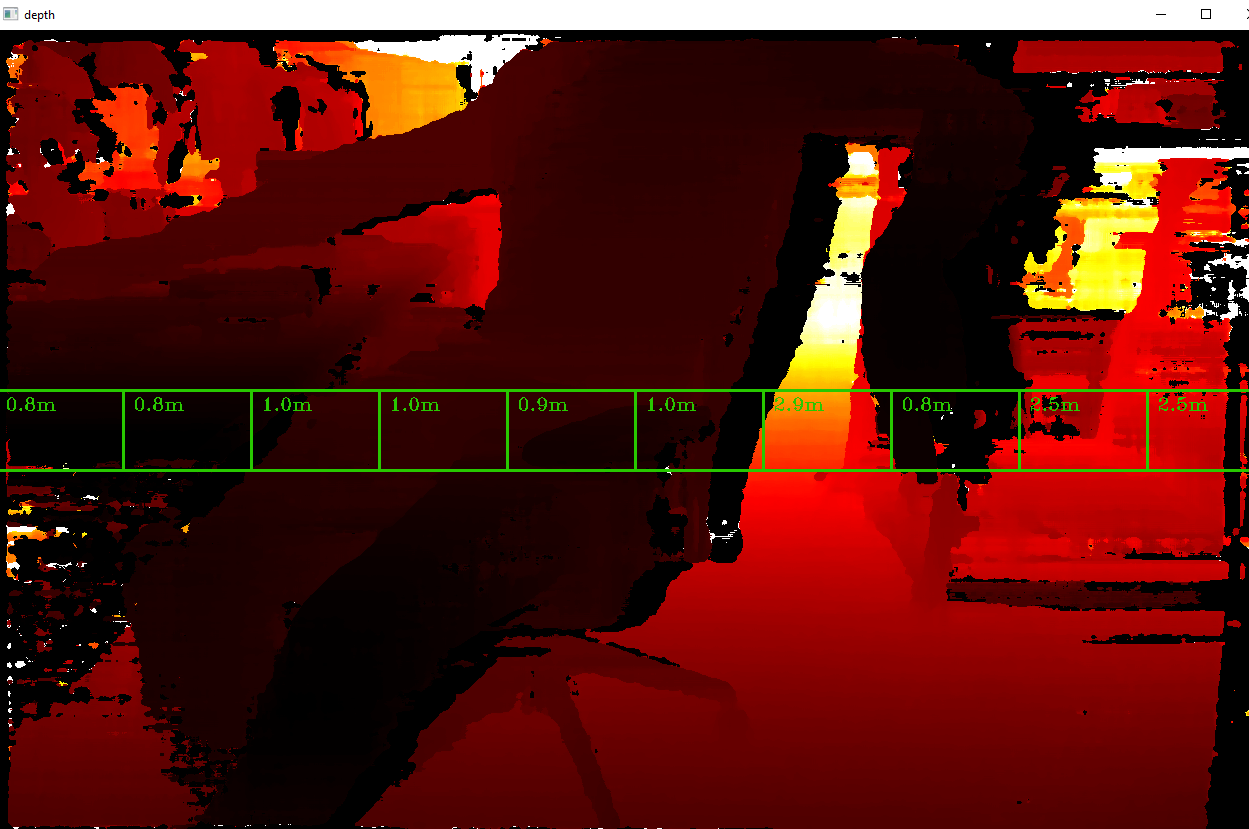
This example shows how one can use multiple ROIs with a single SpatialLocationCalculator node. A similar logic could be used as a simple depth line scanning camera for mobile robots.

Similar samples:

Demo

https://user-images.githubusercontent.com/18037362/231822498-6e3699a0-039e-424b-acb2-b246575e91ee.png

Setup

Please run the install script to download all required dependencies. Please note that this script must be ran from git context, so you have to download the depthai-python repository first and then run the script
Command Line
1git clone https://github.com/luxonis/depthai-python.git
2cd depthai-python/examples
3python3 install_requirements.py
For additional information, please follow the installation guide.

Source code

Python

Python
GitHub
1#!/usr/bin/env python3
2
3import cv2
4import depthai as dai
5import math
6import numpy as np
7
8# Create pipeline
9pipeline = dai.Pipeline()
10
11# Define sources and outputs
12monoLeft = pipeline.create(dai.node.MonoCamera)
13monoRight = pipeline.create(dai.node.MonoCamera)
14stereo = pipeline.create(dai.node.StereoDepth)
15spatialLocationCalculator = pipeline.create(dai.node.SpatialLocationCalculator)
16
17xoutDepth = pipeline.create(dai.node.XLinkOut)
18xoutSpatialData = pipeline.create(dai.node.XLinkOut)
19xinSpatialCalcConfig = pipeline.create(dai.node.XLinkIn)
20
21xoutDepth.setStreamName("depth")
22xoutSpatialData.setStreamName("spatialData")
23xinSpatialCalcConfig.setStreamName("spatialCalcConfig")
24
25# Properties
26monoLeft.setResolution(dai.MonoCameraProperties.SensorResolution.THE_400_P)
27monoLeft.setCamera("left")
28monoRight.setResolution(dai.MonoCameraProperties.SensorResolution.THE_400_P)
29monoRight.setCamera("right")
30
31stereo.setDefaultProfilePreset(dai.node.StereoDepth.PresetMode.HIGH_DENSITY)
32stereo.setLeftRightCheck(True)
33stereo.setSubpixel(True)
34spatialLocationCalculator.inputConfig.setWaitForMessage(False)
35
36# Create 10 ROIs
37for i in range(10):
38    config = dai.SpatialLocationCalculatorConfigData()
39    config.depthThresholds.lowerThreshold = 200
40    config.depthThresholds.upperThreshold = 10000
41    config.roi = dai.Rect(dai.Point2f(i*0.1, 0.45), dai.Point2f((i+1)*0.1, 0.55))
42    spatialLocationCalculator.initialConfig.addROI(config)
43
44# Linking
45monoLeft.out.link(stereo.left)
46monoRight.out.link(stereo.right)
47
48spatialLocationCalculator.passthroughDepth.link(xoutDepth.input)
49stereo.depth.link(spatialLocationCalculator.inputDepth)
50
51spatialLocationCalculator.out.link(xoutSpatialData.input)
52xinSpatialCalcConfig.out.link(spatialLocationCalculator.inputConfig)
53
54# Connect to device and start pipeline
55with dai.Device(pipeline) as device:
56    device.setIrLaserDotProjectorBrightness(1000)
57
58    # Output queue will be used to get the depth frames from the outputs defined above
59    depthQueue = device.getOutputQueue(name="depth", maxSize=4, blocking=False)
60    spatialCalcQueue = device.getOutputQueue(name="spatialData", maxSize=4, blocking=False)
61    color = (0,200,40)
62    fontType = cv2.FONT_HERSHEY_TRIPLEX
63
64    while True:
65        inDepth = depthQueue.get() # Blocking call, will wait until a new data has arrived
66
67        depthFrame = inDepth.getFrame() # depthFrame values are in millimeters
68
69        depth_downscaled = depthFrame[::4]
70        if np.all(depth_downscaled == 0):
71            min_depth = 0  # Set a default minimum depth value when all elements are zero
72        else:
73            min_depth = np.percentile(depth_downscaled[depth_downscaled != 0], 1)
74        max_depth = np.percentile(depth_downscaled, 99)
75        depthFrameColor = np.interp(depthFrame, (min_depth, max_depth), (0, 255)).astype(np.uint8)
76        depthFrameColor = cv2.applyColorMap(depthFrameColor, cv2.COLORMAP_HOT)
77
78        spatialData = spatialCalcQueue.get().getSpatialLocations()
79        for depthData in spatialData:
80            roi = depthData.config.roi
81            roi = roi.denormalize(width=depthFrameColor.shape[1], height=depthFrameColor.shape[0])
82
83            xmin = int(roi.topLeft().x)
84            ymin = int(roi.topLeft().y)
85            xmax = int(roi.bottomRight().x)
86            ymax = int(roi.bottomRight().y)
87
88            coords = depthData.spatialCoordinates
89            distance = math.sqrt(coords.x ** 2 + coords.y ** 2 + coords.z ** 2)
90
91            cv2.rectangle(depthFrameColor, (xmin, ymin), (xmax, ymax), color, thickness=2)
92            cv2.putText(depthFrameColor, "{:.1f}m".format(distance/1000), (xmin + 10, ymin + 20), fontType, 0.6, color)
93        # Show the frame
94        cv2.imshow("depth", depthFrameColor)
95
96        if cv2.waitKey(1) == ord('q'):
97            break

C++

1#include <iostream>
2
3#include "utility.hpp"
4
5// Includes common necessary includes for development using depthai library
6#include "depthai/depthai.hpp"
7
8static constexpr float stepSize = 0.05f;
9
10static std::atomic<bool> newConfig{false};
11
12int main() {
13    using namespace std;
14
15    // Create pipeline
16    dai::Pipeline pipeline;
17
18    // Define sources and outputs
19    auto monoLeft = pipeline.create<dai::node::MonoCamera>();
20    auto monoRight = pipeline.create<dai::node::MonoCamera>();
21    auto stereo = pipeline.create<dai::node::StereoDepth>();
22    auto spatialLocationCalculator = pipeline.create<dai::node::SpatialLocationCalculator>();
23
24    auto xoutDepth = pipeline.create<dai::node::XLinkOut>();
25    auto xoutSpatialData = pipeline.create<dai::node::XLinkOut>();
26    auto xinSpatialCalcConfig = pipeline.create<dai::node::XLinkIn>();
27
28    xoutDepth->setStreamName("depth");
29    xoutSpatialData->setStreamName("spatialData");
30    xinSpatialCalcConfig->setStreamName("spatialCalcConfig");
31
32    // Properties
33    monoLeft->setResolution(dai::MonoCameraProperties::SensorResolution::THE_400_P);
34    monoLeft->setCamera("left");
35    monoRight->setResolution(dai::MonoCameraProperties::SensorResolution::THE_400_P);
36    monoRight->setCamera("right");
37
38    stereo->setDefaultProfilePreset(dai::node::StereoDepth::PresetMode::HIGH_DENSITY);
39    stereo->setLeftRightCheck(true);
40    stereo->setExtendedDisparity(true);
41    spatialLocationCalculator->inputConfig.setWaitForMessage(false);
42
43    // Create 10 ROIs
44    for(int i = 0; i < 10; i++) {
45        dai::SpatialLocationCalculatorConfigData config;
46        config.depthThresholds.lowerThreshold = 200;
47        config.depthThresholds.upperThreshold = 10000;
48        config.roi = dai::Rect(dai::Point2f(i * 0.1, 0.45), dai::Point2f((i + 1) * 0.1, 0.55));
49        spatialLocationCalculator->initialConfig.addROI(config);
50    }
51
52    // Linking
53    monoLeft->out.link(stereo->left);
54    monoRight->out.link(stereo->right);
55
56    spatialLocationCalculator->passthroughDepth.link(xoutDepth->input);
57    stereo->depth.link(spatialLocationCalculator->inputDepth);
58
59    spatialLocationCalculator->out.link(xoutSpatialData->input);
60    xinSpatialCalcConfig->out.link(spatialLocationCalculator->inputConfig);
61
62    // Connect to device and start pipeline
63    dai::Device device(pipeline);
64    device.setIrLaserDotProjectorIntensity(0.7f);
65
66    // Output queue will be used to get the depth frames from the outputs defined above
67    auto depthQueue = device.getOutputQueue("depth", 4, false);
68    auto spatialCalcQueue = device.getOutputQueue("spatialData", 4, false);
69    auto color = cv::Scalar(0, 200, 40);
70    auto fontType = cv::FONT_HERSHEY_TRIPLEX;
71
72    while(true) {
73        auto inDepth = depthQueue->get<dai::ImgFrame>();
74
75        cv::Mat depthFrame = inDepth->getFrame();  // depthFrame values are in millimeters
76
77        cv::Mat depthFrameColor;
78        cv::normalize(depthFrame, depthFrameColor, 255, 0, cv::NORM_INF, CV_8UC1);
79        cv::equalizeHist(depthFrameColor, depthFrameColor);
80        cv::applyColorMap(depthFrameColor, depthFrameColor, cv::COLORMAP_HOT);
81
82        auto spatialData = spatialCalcQueue->get<dai::SpatialLocationCalculatorData>()->getSpatialLocations();
83        for(auto depthData : spatialData) {
84            auto roi = depthData.config.roi;
85            roi = roi.denormalize(depthFrameColor.cols, depthFrameColor.rows);
86
87            auto xmin = static_cast<int>(roi.topLeft().x);
88            auto ymin = static_cast<int>(roi.topLeft().y);
89            auto xmax = static_cast<int>(roi.bottomRight().x);
90            auto ymax = static_cast<int>(roi.bottomRight().y);
91
92            auto coords = depthData.spatialCoordinates;
93            auto distance = std::sqrt(coords.x * coords.x + coords.y * coords.y + coords.z * coords.z);
94
95            cv::rectangle(depthFrameColor, cv::Rect(cv::Point(xmin, ymin), cv::Point(xmax, ymax)), color);
96            std::stringstream depthDistance;
97            depthDistance.precision(2);
98            depthDistance << fixed << static_cast<float>(distance / 1000.0f) << "m";
99            cv::putText(depthFrameColor, depthDistance.str(), cv::Point(xmin + 10, ymin + 20), fontType, 0.5, color);
100        }
101        // Show the frame
102        cv::imshow("depth", depthFrameColor);
103
104        if(cv::waitKey(1) == 'q') {
105            break;
106        }
107    }
108    return 0;
109}

Pipeline

Need assistance?

Head over to Discussion Forum for technical support or any other questions you might have.