RGB-ToF Align
Demo
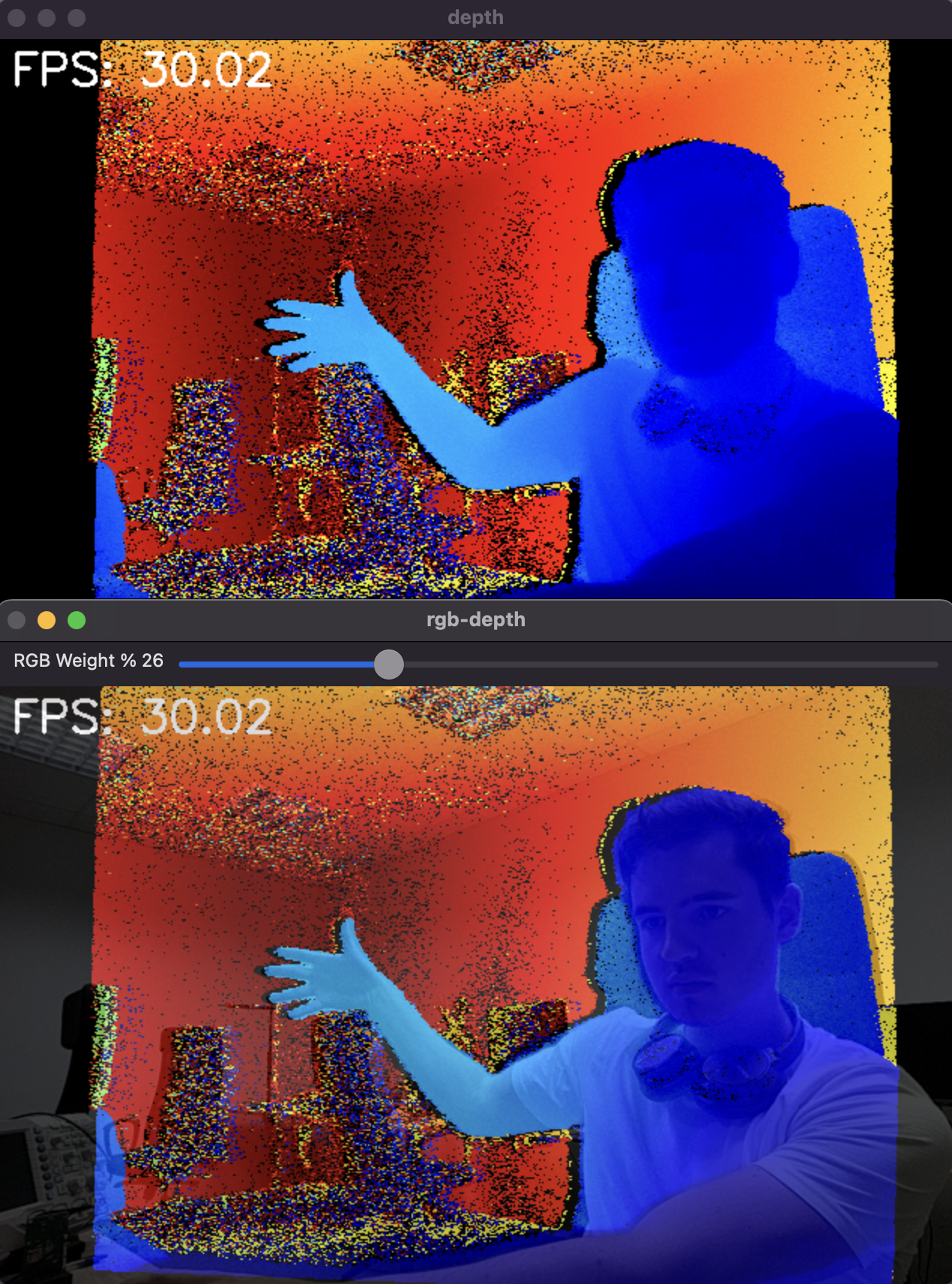
Setup
Command Line
1git clone https://github.com/luxonis/depthai-python.git
2cd depthai-python/examples
3python3 install_requirements.pySource code
Python
PythonGitHub
1#!/usr/bin/env python3
2
3import numpy as np
4import cv2
5import depthai as dai
6import time
7from datetime import timedelta
8
9# This example is intended to run unchanged on an OAK-D-SR-PoE camera
10FPS = 30.0
11
12RGB_SOCKET = dai.CameraBoardSocket.CAM_C
13TOF_SOCKET = dai.CameraBoardSocket.CAM_A
14ALIGN_SOCKET = RGB_SOCKET
15
16class FPSCounter:
17    def __init__(self):
18        self.frameTimes = []
19
20    def tick(self):
21        now = time.time()
22        self.frameTimes.append(now)
23        self.frameTimes = self.frameTimes[-100:]
24
25    def getFps(self):
26        if len(self.frameTimes) <= 1:
27            return 0
28        # Calculate the FPS
29        return (len(self.frameTimes) - 1) / (self.frameTimes[-1] - self.frameTimes[0])
30
31
32ISP_SCALE = 2
33
34device = dai.Device()
35
36calibrationHandler = device.readCalibration()
37rgbDistortion = calibrationHandler.getDistortionCoefficients(RGB_SOCKET)
38distortionModel = calibrationHandler.getDistortionModel(RGB_SOCKET)
39if distortionModel != dai.CameraModel.Perspective:
40    raise RuntimeError("Unsupported distortion model for RGB camera. This example supports only Perspective model.")
41
42pipeline = dai.Pipeline()
43
44# Define sources and outputs
45camRgb = pipeline.create(dai.node.ColorCamera)
46tof = pipeline.create(dai.node.ToF)
47camTof = pipeline.create(dai.node.Camera)
48sync = pipeline.create(dai.node.Sync)
49align = pipeline.create(dai.node.ImageAlign)
50out = pipeline.create(dai.node.XLinkOut)
51
52# ToF settings
53camTof.setFps(FPS)
54camTof.setImageOrientation(dai.CameraImageOrientation.ROTATE_180_DEG)
55camTof.setBoardSocket(TOF_SOCKET)
56
57# rgb settings
58camRgb.setBoardSocket(RGB_SOCKET)
59camRgb.setResolution(dai.ColorCameraProperties.SensorResolution.THE_800_P)
60camRgb.setFps(FPS)
61camRgb.setIspScale(1, ISP_SCALE)
62
63out.setStreamName("out")
64
65sync.setSyncThreshold(timedelta(seconds=0.5 / FPS))
66
67# Linking
68camRgb.isp.link(sync.inputs["rgb"])
69camTof.raw.link(tof.input)
70tof.depth.link(align.input)
71align.outputAligned.link(sync.inputs["depth_aligned"])
72sync.inputs["rgb"].setBlocking(False)
73camRgb.isp.link(align.inputAlignTo)
74sync.out.link(out.input)
75
76def colorizeDepth(frameDepth):
77    invalidMask = frameDepth == 0
78    # Log the depth, minDepth and maxDepth
79    try:
80        minDepth = np.percentile(frameDepth[frameDepth != 0], 3)
81        maxDepth = np.percentile(frameDepth[frameDepth != 0], 95)
82        logDepth = np.log(frameDepth, where=frameDepth != 0)
83        logMinDepth = np.log(minDepth)
84        logMaxDepth = np.log(maxDepth)
85        np.nan_to_num(logDepth, copy=False, nan=logMinDepth)
86        # Clip the values to be in the 0-255 range
87        logDepth = np.clip(logDepth, logMinDepth, logMaxDepth)
88
89        # Interpolate only valid logDepth values, setting the rest based on the mask
90        depthFrameColor = np.interp(logDepth, (logMinDepth, logMaxDepth), (0, 255))
91        depthFrameColor = np.nan_to_num(depthFrameColor)
92        depthFrameColor = depthFrameColor.astype(np.uint8)
93        depthFrameColor = cv2.applyColorMap(depthFrameColor, cv2.COLORMAP_JET)
94        # Set invalid depth pixels to black
95        depthFrameColor[invalidMask] = 0
96    except IndexError:
97        # Frame is likely empty
98        depthFrameColor = np.zeros((frameDepth.shape[0], frameDepth.shape[1], 3), dtype=np.uint8)
99    except Exception as e:
100        raise e
101    return depthFrameColor
102
103
104rgbWeight = 0.4
105depthWeight = 0.6
106
107
108def updateBlendWeights(percentRgb):
109    """
110    Update the rgb and depth weights used to blend depth/rgb image
111
112    @param[in] percent_rgb The rgb weight expressed as a percentage (0..100)
113    """
114    global depthWeight
115    global rgbWeight
116    rgbWeight = float(percentRgb) / 100.0
117    depthWeight = 1.0 - rgbWeight
118
119
120
121# Connect to device and start pipeline
122with device:
123    device.startPipeline(pipeline)
124    queue = device.getOutputQueue("out", 8, False)
125
126    # Configure windows; trackbar adjusts blending ratio of rgb/depth
127    rgbDepthWindowName = "rgb-depth"
128
129    cv2.namedWindow(rgbDepthWindowName)
130    cv2.createTrackbar(
131        "RGB Weight %",
132        rgbDepthWindowName,
133        int(rgbWeight * 100),
134        100,
135        updateBlendWeights,
136    )
137    fpsCounter = FPSCounter()
138    while True:
139        messageGroup = queue.get()
140        fpsCounter.tick()
141        assert isinstance(messageGroup, dai.MessageGroup)
142        frameRgb = messageGroup["rgb"]
143        assert isinstance(frameRgb, dai.ImgFrame)
144        frameDepth = messageGroup["depth_aligned"]
145        assert isinstance(frameDepth, dai.ImgFrame)
146
147        sizeRgb = frameRgb.getData().size
148        sizeDepth = frameDepth.getData().size
149        # Blend when both received
150        if frameDepth is not None:
151            cvFrame = frameRgb.getCvFrame()
152            rgbIntrinsics = calibrationHandler.getCameraIntrinsics(RGB_SOCKET, int(cvFrame.shape[1]), int(cvFrame.shape[0]))
153            cvFrameUndistorted = cv2.undistort(
154                cvFrame,
155                np.array(rgbIntrinsics),
156                np.array(rgbDistortion),
157            )
158            # Colorize the aligned depth
159            alignedDepthColorized = colorizeDepth(frameDepth.getFrame())
160            # Resize depth to match the rgb frame
161            cv2.putText(
162                alignedDepthColorized,
163                f"FPS: {fpsCounter.getFps():.2f}",
164                (10, 30),
165                cv2.FONT_HERSHEY_SIMPLEX,
166                1,
167                (255, 255, 255),
168                2,
169            )
170            cv2.imshow("depth", alignedDepthColorized)
171
172            blended = cv2.addWeighted(
173                cvFrameUndistorted, rgbWeight, alignedDepthColorized, depthWeight, 0
174            )
175            cv2.imshow(rgbDepthWindowName, blended)
176
177        key = cv2.waitKey(1)
178        if key == ord("q"):
179 breakPipeline
Need assistance?
Head over to Discussion Forum for technical support or any other questions you might have.