如何放置它
Python
Python
1modelDescription = dai.NNModelDescription("yolov6-nano")
2pipeline = dai.Pipeline()
3spatialDetectionNetwork = pipeline.create(dai.node.SpatialDetectionNetwork).build(camRgb, stereo, modelDescription)输入和输出
配置空间检测
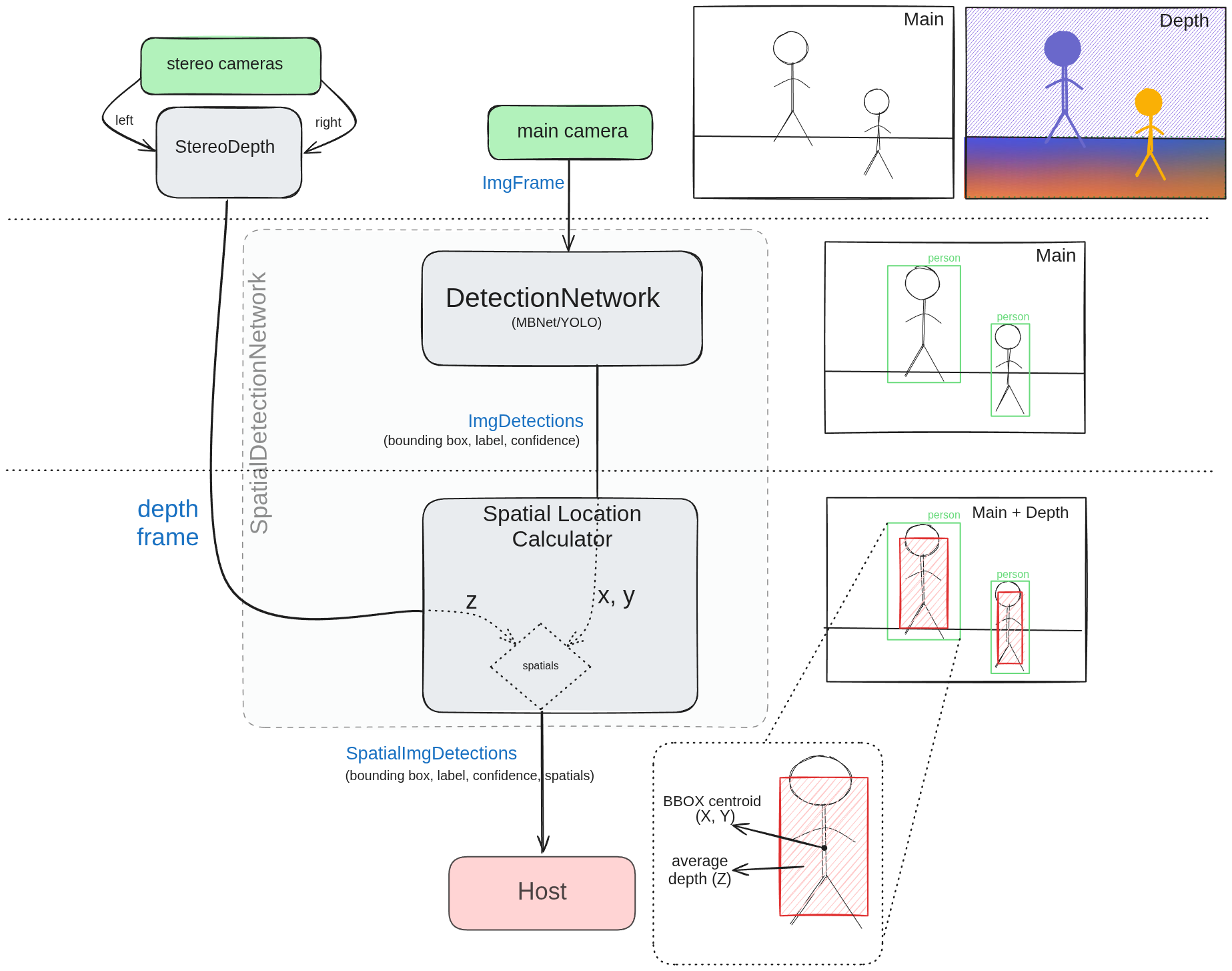
检测网络负责检测输入帧中的对象。它输出一个检测到的对象列表,每个对象由一个边界框、标签和一个置信度得分表示。
深度图与输入帧对齐。这是必需的,因为 DetectionNetwork 在输入帧上运行,而 SpatialLocationCalculator 在深度图上运行。
网络中的边界框被发送到 SpatialLocationCalculator,并根据
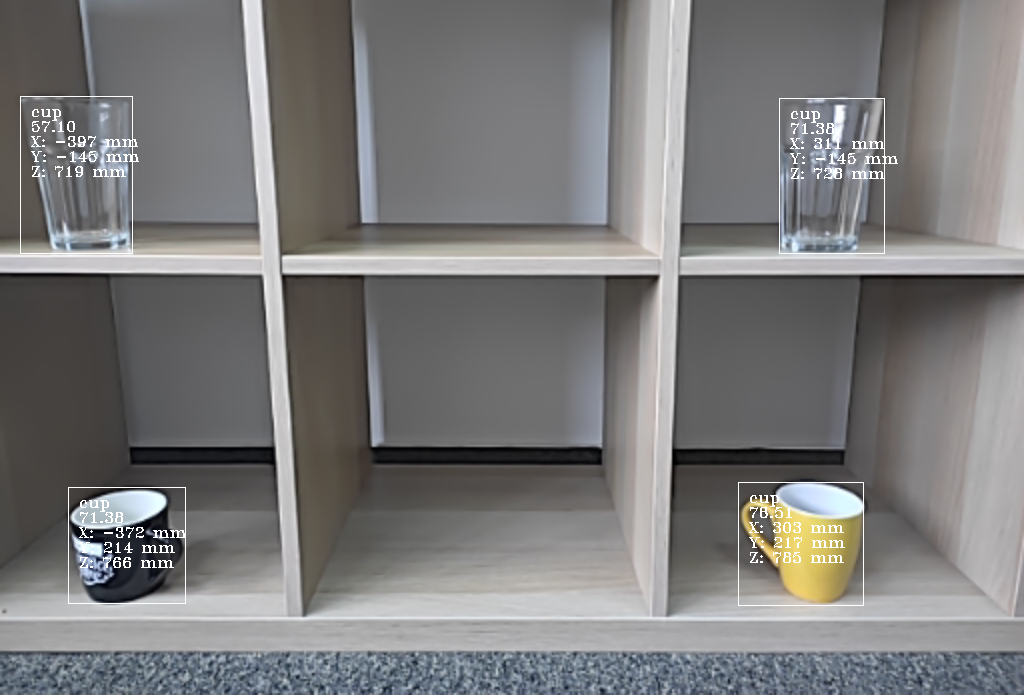
BoundingBoxScaleFactor 进行缩放。这样做是为了确保它包含整个对象。然后,边界框与深度一起用于计算对象的空间坐标。- X 和 Y 坐标取自边界框中心。它们是根据与帧中心偏移量以及该点的深度计算得出的。
- 对于深度(Z),会考虑缩放后的边界框(ROI)内的每个像素。这将为我们提供一组深度值,然后对这些值进行平均以获得最终的深度值。
平均方法
- 平均值/均值:ROI 的平均值用于计算。
- 最小值:ROI 内的最小值用于计算。
- 最大值:ROI 内的最大值用于计算。
- 众数:ROI 内最常见的值用于计算。
- 中位数:ROI 内的中位数用于计算。
常见错误
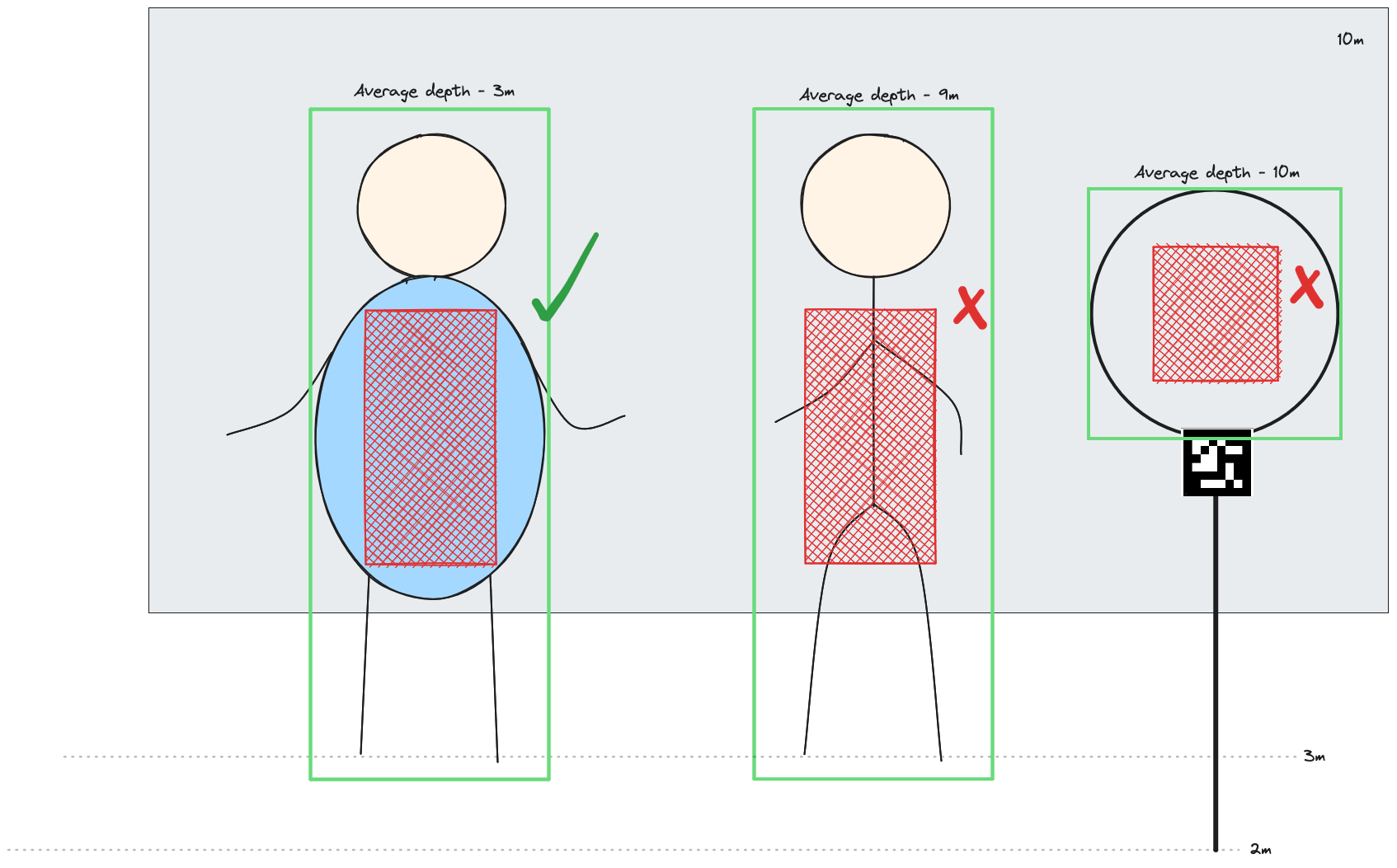
- 细长物体(如杆)的空间坐标可能不准确,因为边界框只有一小部分实际位于检测到的物体上。在这种情况下,如果可能,最好使用较小的
BoundingBoxScaleFactor。 - 带孔的物体 - 呼啦圈、圆环等。要获得正确的深度,边界框应包含整个物体。与其使用中位数深度,不如使用最小值深度方法来排除计算中的背景。或者,可以设置深度阈值来忽略静态环境中的背景。
用法
Python
Python
1with dai.Pipeline() as p:
2    camRgb = p.create(dai.node.Camera).build(dai.CameraBoardSocket.CAM_A)
3    monoLeft = p.create(dai.node.Camera).build(dai.CameraBoardSocket.CAM_B)
4    monoRight = p.create(dai.node.Camera).build(dai.CameraBoardSocket.CAM_C)
5    stereo = p.create(dai.node.StereoDepth)
6    spatialDetectionNetwork = p.create(dai.node.SpatialDetectionNetwork).build(camRgb, stereo, modelDescription, fps=FPS)
7
8    spatialDetectionNetwork.input.setBlocking(False)
9    spatialDetectionNetwork.setBoundingBoxScaleFactor(0.5)
10    spatialDetectionNetwork.setDepthLowerThreshold(100)
11    spatialDetectionNetwork.setDepthUpperThreshold(5000)
12
13 labelMap = spatialDetectionNetwork.getClasses()功能示例
空间坐标系
参考
class
dai::node::SpatialDetectionNetwork
variable
Properties & properties
variable
Subnode< NeuralNetwork > neuralNetwork
variable
Subnode< DetectionParser > detectionParser
variable
Subnode< SpatialLocationCalculator > spatialLocationCalculator
variable
std::unique_ptr< Subnode< ImageAlign > > depthAlign
variable
Input & input
Input message with data to be inferred upon Default queue is blocking with size 5
variable
Output & outNetwork
Outputs unparsed inference results.
variable
Output & passthrough
Passthrough message on which the inference was performed.Suitable for when input queue is set to non-blocking behavior.
variable
Input & inputDepth
Input message with depth data used to retrieve spatial information about detected object Default queue is non-blocking with size 4
variable
Output & out
variable
Output & passthroughDepth
Passthrough message for depth frame on which the spatial location calculation was performed. Suitable for when input queue is set to non-blocking behavior.
explicit function
SpatialDetectionNetwork(const std::shared_ptr< Device > & device)explicit function
SpatialDetectionNetwork(std::unique_ptr< Properties > props)function
SpatialDetectionNetwork(std::unique_ptr< Properties > props, bool confMode)function
SpatialDetectionNetwork(const std::shared_ptr< Device > & device, std::unique_ptr< Properties > props, bool confMode)function
std::shared_ptr< SpatialDetectionNetwork > build(const std::shared_ptr< Camera > & inputRgb, const DepthSource & depthSource, const Model & model, std::optional< float > fps, std::optional< dai::ImgResizeMode > resizeMode)function
std::shared_ptr< SpatialDetectionNetwork > build(const std::shared_ptr< Camera > & inputRgb, const DepthSource & depthSource, const Model & model, const ImgFrameCapability & capability)function
void setNNArchive(const NNArchive & nnArchive)function
void setFromModelZoo(NNModelDescription description, bool useCached)function
void setNNArchive(const NNArchive & nnArchive, int numShaves)function
void setBlobPath(const std::filesystem::path & path)Backwards compatibility interface Load network blob into assets and use once pipeline is started.
Parameters
- Error: if file doesn't exist or isn't a valid network blob.
Parameters
- path: Path to network blob
function
void setBlob(OpenVINO::Blob blob)Load network blob into assets and use once pipeline is started.
Parameters
- blob: Network blob
function
void setBlob(const std::filesystem::path & path)Same functionality as the setBlobPath(). Load network blob into assets and use once pipeline is started.
Parameters
- Error: if file doesn't exist or isn't a valid network blob.
Parameters
- path: Path to network blob
function
void setModelPath(const std::filesystem::path & modelPath)Load network file into assets.
Parameters
- modelPath: Path to the model file.
function
void setNumPoolFrames(int numFrames)Specifies how many frames will be available in the pool
Parameters
- numFrames: How many frames will pool have
function
void setNumInferenceThreads(int numThreads)How many threads should the node use to run the network.
Parameters
- numThreads: Number of threads to dedicate to this node
function
void setNumNCEPerInferenceThread(int numNCEPerThread)How many Neural Compute Engines should a single thread use for inference
Parameters
- numNCEPerThread: Number of NCE per thread
function
void setNumShavesPerInferenceThread(int numShavesPerThread)How many Shaves should a single thread use for inference
Parameters
- numShavesPerThread: Number of shaves per thread
function
void setBackend(std::string backend)Specifies backend to use
Parameters
- backend: String specifying backend to use
function
void setBackendProperties(std::map< std::string, std::string > properties)Set backend properties
Parameters
- backendProperties: backend properties map
function
int getNumInferenceThreads()How many inference threads will be used to run the network
Returns
Number of threads, 0, 1 or 2. Zero means AUTO
function
void setConfidenceThreshold(float thresh)Specifies confidence threshold at which to filter the rest of the detections.
Parameters
- thresh: Detection confidence must be greater than specified threshold to be added to the list
function
float getConfidenceThreshold()Retrieves threshold at which to filter the rest of the detections.
Returns
Detection confidence
function
void setBoundingBoxScaleFactor(float scaleFactor)Custom interface Specifies scale factor for detected bounding boxes.
Parameters
- scaleFactor: Scale factor must be in the interval (0,1].
function
void setDepthLowerThreshold(uint32_t lowerThreshold)Specifies lower threshold in depth units (millimeter by default) for depth values which will used to calculate spatial data
Parameters
- lowerThreshold: LowerThreshold must be in the interval [0,upperThreshold] and less than upperThreshold.
function
void setDepthUpperThreshold(uint32_t upperThreshold)Specifies upper threshold in depth units (millimeter by default) for depth values which will used to calculate spatial data
Parameters
- upperThreshold: UpperThreshold must be in the interval (lowerThreshold,65535].
function
void setSpatialCalculationAlgorithm(dai::SpatialLocationCalculatorAlgorithm calculationAlgorithm)Specifies spatial location calculator algorithm: Average/Min/Max
Parameters
- calculationAlgorithm: Calculation algorithm.
function
void setSpatialCalculationStepSize(int stepSize)Specifies spatial location calculator step size for depth calculation. Step size 1 means that every pixel is taken into calculation, size 2 means every second etc.
Parameters
- stepSize: Step size.
function
std::optional< std::vector< std::string > > getClasses()function
void buildInternal()enum
SpatialDetectionNetworkProperties Properties
enum
NeuralNetwork::Model Model
需要帮助?
请前往 Discussion Forum 获取技术支持或提出您可能有的任何其他问题。