Camera
Camera 是一个单一的、统一的源节点,取代了独立的 ColorCamera 和 MonoCamera 节点。 它生成 ImgFrame 消息,可用于图像处理和神经网络推理。主要特性
- 自动选择传感器分辨率和 FPS,当您未指定时 — 无需手动记录。
requestOutput()
Py
1cam.requestOutput(size=(640, 480), type=dai.ImgFrame.Type.NV12,
2                resize_mode=dai.ImgResizeMode.CROP,
3 enableUndistortion=True)- 畸变校正通过
enableUndistortion按输出选择加入(默认为None)。 它不会自动应用于任何流。 - 畸变校正会保留原始帧的内参,这意味着有效视场角(FOV)在角落处通常会略有减小,特别是对于广角镜头。
requestFullResolutionOutput()带有安全防护(除非您传递useHighestResolution=True,否则保持 ≤ 5K×4K)。setMockIsp()用于合成或录制的输入(连接一个ReplayVideo节点来馈送预捕获的帧)。
ColorCamera 或 MonoCamera 升级?只需进行节点创建的搜索和替换,并删除任何手动 setIspScale() 逻辑。放置节点
Python
Python
1with dai.Pipeline() as pipeline:
2    cam = pipeline.create(dai.node.Camera)
3 cam.build(dai.CameraBoardSocket.CAM_A) # 可选 — 否则会自动检测输入与输出
缩放模式
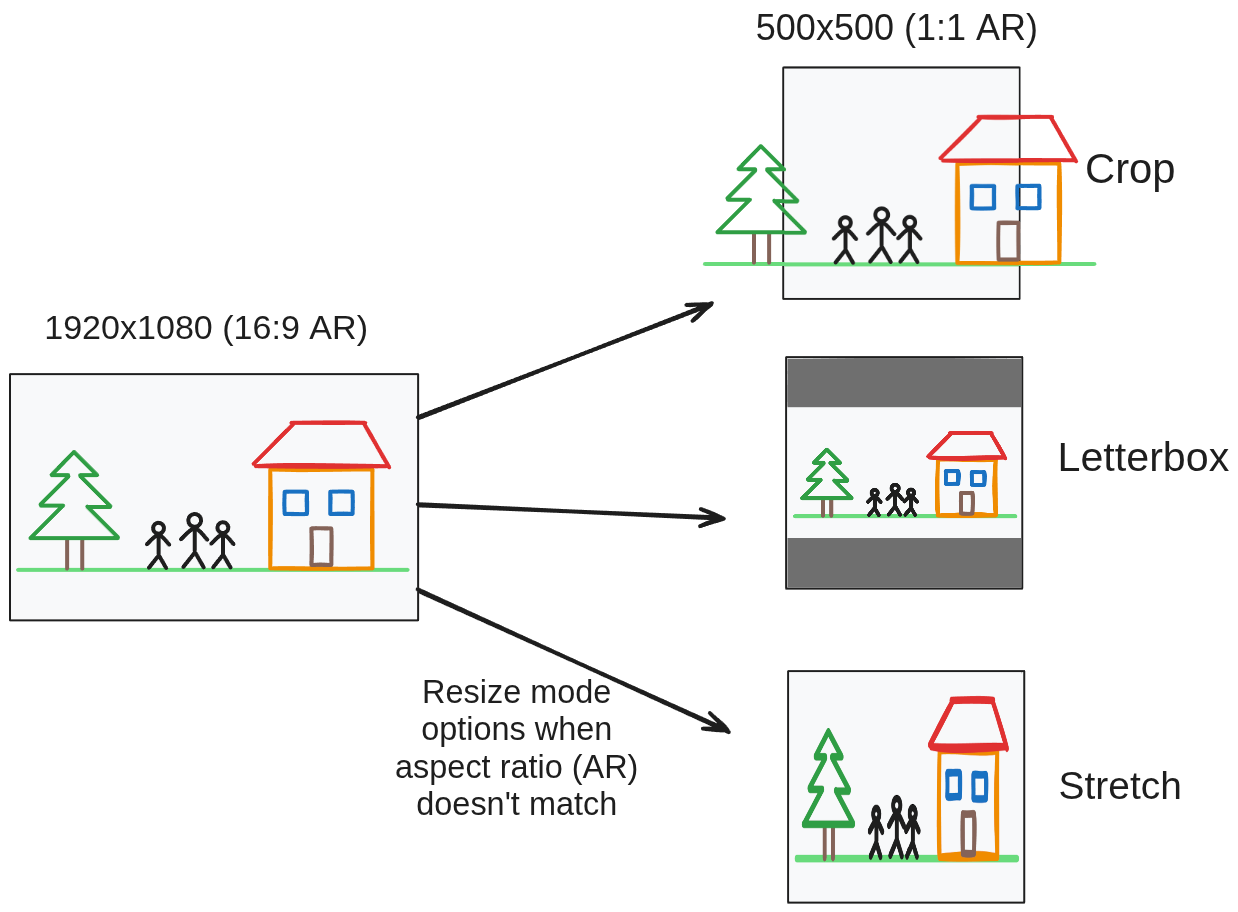
- Crop(裁剪):对 NN 精度无影响。缺点:帧被裁剪,因此不是完整的视场角。
- Letterbox(信箱):保留完整的视场角。缺点:较小的“帧”意味着特征可能减少,降低 NN 精度。
- Stretch(拉伸):保留完整的视场角。缺点:由于帧被拉伸,NN 精度可能会下降。
Python
1cam.requestOutput(size=(640, 480), type=dai.ImgFrame.Type.NV12,
2                resize_mode=dai.ImgResizeMode.CROP)
3cam.requestOutput(size=(640, 480), type=dai.ImgFrame.Type.NV12,
4                resize_mode=dai.ImgResizeMode.RESIZE)
5cam.requestOutput(size=(640, 480), type=dai.ImgFrame.Type.NV12,
6                resize_mode=dai.ImgResizeMode.LETTERBOX)
用法示例
Python
Python
1pipeline = dai.Pipeline()
2
3cam = pipeline.create(dai.node.Camera)
4cam.build(boardSocket=dai.CameraBoardSocket.CAM_A)
5
6# 1) 用于视频编码器的低延迟预览
7nn_in = cam.requestOutput(size=(300,300), type=dai.ImgFrame.Type.NV12, fps=30)
8
9# 2) 用于录制的 HD 流
10hd_out = cam.requestOutput(size=(1280,720), type=dai.ImgFrame.Type.BGR888p, fps=30)
11
12# 3) 每秒一张全分辨率静态照片
13full = cam.requestFullResolutionOutput(type=dai.ImgFrame.Type.BGR888p, fps=1)
14
15# 链接到下游节点…平台特定限制
RVC2
ISP 约 600 MP/s 持续吞吐量(约 4K @ 30 fps)→ 在运行 重度 NN 和视频编码器时请相应地进行预算。 3A 在嵌入式微型 DSP 上运行,聚合到所有相机流的总和上限约为 250 fps。
更多示例
API 参考
class
dai::node::Camera
variable
CameraControl initialControl
Initial control options to apply to sensor
variable
Input inputControl
variable
Input mockIsp
Input for mocking 'isp' functionality on RVC2. Default queue is blocking with size 8
variable
Output raw
Outputs ImgFrame message that carries RAW10-packed (MIPI CSI-2 format) frame data.Captured directly from the camera sensor, and the source for the 'isp' output.
variable
OutputMap dynamicOutputs
function
Node::Output * requestOutput(std::pair< uint32_t, uint32_t > size, std::optional< ImgFrame::Type > type, ImgResizeMode resizeMode, std::optional< float > fps, std::optional< bool > enableUndistortion)Get video output with specified size.
function
Node::Output * requestOutput(const Capability & capability, bool onHost)Request output with advanced controls. Mainly to be used by custom node writers.
function
Node::Output * requestFullResolutionOutput(std::optional< ImgFrame::Type > type, std::optional< float > fps, bool useHighestResolution)Get a high resolution output with full FOV on the sensor. By default the function will not use the resolutions higher than 5000x4000, as those often need a lot of resources, making them hard to use in combination with other nodes.
Parameters
- type: Type of the output (NV12, BGR, ...) - by default it's auto-selected for best performance
- fps: FPS of the output - by default it's auto-selected to highest possible that a sensor config support or 30, whichever is lower
- useHighestResolution: If true, the function will use the highest resolution available on the sensor, even if it's higher than 5000x4000
function
Node::Output * requestIspOutput(std::optional< float > fps)Request output with isp resolution. The fps does not vote.
function
std::shared_ptr< Camera > build(dai::CameraBoardSocket boardSocket, std::optional< std::pair< uint32_t, uint32_t >> sensorResolution, std::optional< float > sensorFps)Build with a specific board socket
Parameters
- boardSocket: Board socket to use
- sensorResolution: Sensor resolution to use - by default it's auto-detected from the requested outputs
- sensorFps: Sensor FPS to use - by default it's auto-detected from the requested outputs (maximum is used)
inline function
std::shared_ptr< Camera > setSensorType(CameraSensorType sensorType)Set the sensor type to use
Parameters
- sensorType: Sensor type to use
inline function
CameraSensorType getSensorType()Get the sensor type
Returns
Sensor type
function
std::shared_ptr< Camera > setImageOrientation(CameraImageOrientation imageOrientation)Set camera image orientation
Parameters
- imageOrientation: Image orientation to set
Returns
Shared pointer to the camera node
function
CameraImageOrientation getImageOrientation()Get camera image orientation
Returns
Image orientation
function
std::shared_ptr< Camera > build(dai::CameraBoardSocket boardSocket, ReplayVideo & replay)Build with a specific board socket and mock input
function
std::shared_ptr< Camera > build(ReplayVideo & replay)Build with mock input
function
uint32_t getMaxWidth()Get max width of the camera (can only be called after build)
function
uint32_t getMaxHeight()Get max height of the camera (can only be called after build)
function
CameraBoardSocket getBoardSocket()Retrieves which board socket to use
Returns
Board socket to use
function
std::shared_ptr< Camera > setRawNumFramesPool(int num)Set number of frames in raw pool (will be automatically reduced if the maximum pool memory size is exceeded)
Parameters
- num: Number of frames
Returns
Shared pointer to the camera node
function
std::shared_ptr< Camera > setMaxSizePoolRaw(int size)Set maximum size of raw pool
Parameters
- size: Maximum size in bytes of raw pool
Returns
Shared pointer to the camera node
function
std::shared_ptr< Camera > setIspNumFramesPool(int num)Set number of frames in isp pool (will be automatically reduced if the maximum pool memory size is exceeded)
Parameters
- num: Number of frames
Returns
Shared pointer to the camera node
function
std::shared_ptr< Camera > setMaxSizePoolIsp(int size)Set maximum size of isp pool
Parameters
- size: Maximum size in bytes of isp pool
Returns
Shared pointer to the camera node
function
std::shared_ptr< Camera > setNumFramesPools(int raw, int isp, int outputs)Set number of frames in all pools (will be automatically reduced if the maximum pool memory size is exceeded)
Parameters
- raw: Number of frames in raw pool
- isp: Number of frames in isp pool
- outputs: Number of frames in outputs pools
Returns
Shared pointer to the camera node
function
std::shared_ptr< Camera > setMaxSizePools(int raw, int isp, int outputs)Set maximum memory size of all pools
Parameters
- raw: Maximum size in bytes of raw pool
- isp: Maximum size in bytes of isp pool
- outputs: Maximum size in bytes of outputs pools
Returns
Shared pointer to the camera node
function
std::shared_ptr< Camera > setOutputsNumFramesPool(int num)Set number of frames in pools for all outputs
Parameters
- num: Number of frames in pools for all outputs
Returns
Shared pointer to the camera node
function
std::shared_ptr< Camera > setOutputsMaxSizePool(int size)Set maximum size of pools for all outputs
Parameters
- size: Maximum size in bytes of pools for all outputs
Returns
Shared pointer to the camera node
function
int getRawNumFramesPool()Get number of frames in raw pool
Returns
Number of frames
function
int getMaxSizePoolRaw()Get maximum size of raw pool
Returns
Maximum size in bytes of raw pool
function
int getIspNumFramesPool()Get number of frames in isp pool
Returns
Number of frames
function
int getMaxSizePoolIsp()Get maximum size of isp pool
Returns
Maximum size in bytes of isp pool
function
std::optional< int > getOutputsNumFramesPool()Get number of frames in outputs pool for all outputs
Returns
Number of frames
function
std::optional< size_t > getOutputsMaxSizePool()Get maximum size of outputs pool for all outputs
Returns
Maximum size in bytes of image manip pool
function
Camera & setMockIsp(ReplayVideo & replay)Set mock ISP for Camera node. Automatically sets mockIsp size.
Parameters
- replay: ReplayVideo node to use as mock ISP
function
Camera()explicit function
Camera(std::shared_ptr< Device > & defaultDevice)explicit function
Camera(std::unique_ptr< Properties > props)function
void buildStage1()function
float getMaxRequestedFps()function
uint32_t getMaxRequestedWidth()function
uint32_t getMaxRequestedHeight()inline function
DeviceNodeCRTP()inline function
DeviceNodeCRTP(const std::shared_ptr< Device > & device)inline function
DeviceNodeCRTP(std::unique_ptr< Properties > props)inline function
DeviceNodeCRTP(std::unique_ptr< Properties > props, bool confMode)inline function
DeviceNodeCRTP(const std::shared_ptr< Device > & device, std::unique_ptr< Properties > props, bool confMode)需要帮助?
请前往 Discussion Forum 获取技术支持或提出您可能有的任何其他问题。