Camera
InputControl 和 InputConfig 在运行时控制它。它旨在统一 Color Camera 和 MonoCamera 到一个节点中。与 Color Camera 节点相比,Camera 节点:- 支持 cam.setSize(),它取代了
cam.setResolution()和cam.setIspScale()。Camera 节点将自动找到最适合的分辨率,并应用正确的缩放以达到用户选择的大小。 - 支持 cam.setCalibrationAlpha(),示例如下:Undistort camera stream
- 支持 cam.loadMeshData() 和 cam.setMeshStep(),可用于自定义图像变形(去畸变、透视校正等)。
- 如果摄像头的 HFOV 大于 85°,将自动进行摄像头流去畸变。您可以使用以下命令禁用此功能:
cam.setMeshSource(dai.CameraProperties.WarpMeshSource.NONE)。
- 没有
out输出,因为它具有与 ColorCamera 相同的输出(raw、isp、still、preview、video)。这意味着preview将输出同一灰度帧的 3 个平面(3 倍开销),而isp/video/still将输出亮度(有用的灰度信息)+ 色度(所有值为 128),这将导致 1.5 倍的带宽开销。
如何放置它
Python
Python
1pipeline = dai.Pipeline()
2cam = pipeline.create(dai.node.Camera)输入和输出
inputConfig- ImageManipConfiginputControl- CameraControlraw- ImgFrame - RAW10 bayer 数据。解包演示代码 在此处isp- ImgFrame - YUV420 Планар (与 YU12/IYUV/I420 相同)still- ImgFrame - NV12,适用于较大尺寸的帧。发送捕获事件到 Camera 时创建图像,就像拍照一样。preview- ImgFrame - RGB(如果配置为 BGR Планар/交错),主要适用于小尺寸预览以及将图像输入 NeuralNetworkvideo- ImgFrame - NV12,适用于较大尺寸的帧
video/preview/still 帧。still(触发捕获时)和 isp 以最大摄像头分辨率工作,而 video 和 preview 则限制在最高 4K(3840 x 2160)分辨率,这是从 isp 裁剪的。 对于 IMX378(12MP),后处理 工作方式如下: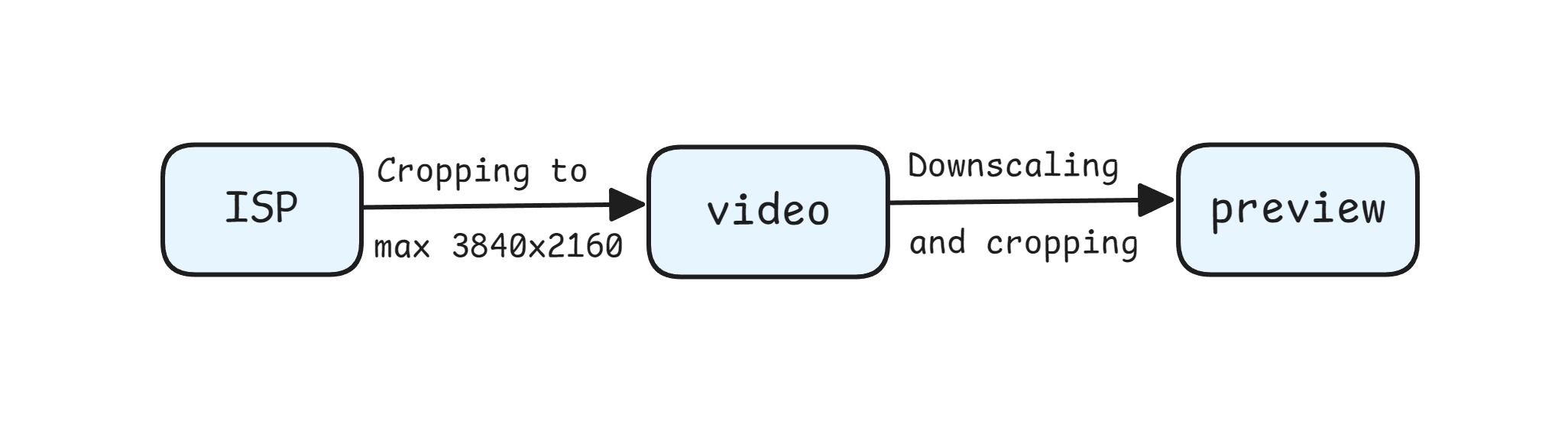
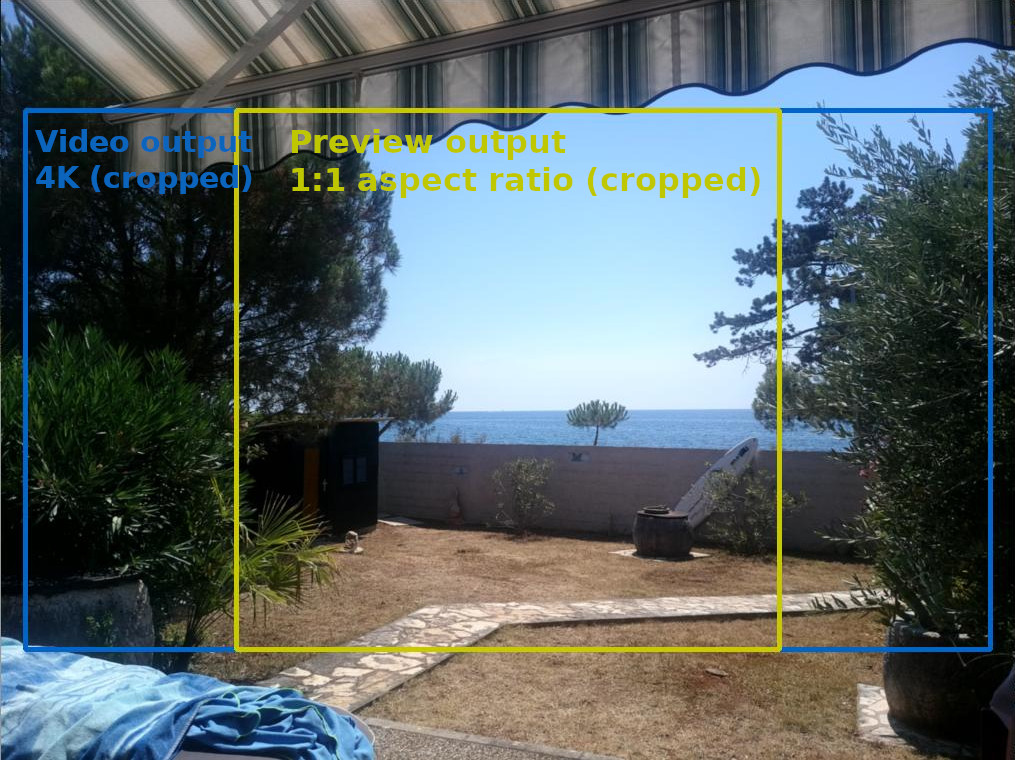
isp 输出(IMX378 的 12MP 分辨率)。如果您不缩小 ISP, 则 video 输出将被裁剪到 4k(由于 video 输出的限制,最大为 3840x2160),如蓝色矩形所示。黄色矩形表示裁剪的 preview 输出,当预览尺寸设置为 1:1 的宽高比时(例如,当使用 300x300 的预览尺寸用于 MobileNet-SSD NN 模型时),因为 preview 输出源自 video 输出。用法
Python
Python
1pipeline = dai.Pipeline()
2cam = pipeline.create(dai.node.Camera)
3cam.setPreviewSize(300, 300)
4cam.setBoardSocket(dai.CameraBoardSocket.CAM_A)
5# 用户可以指定大小,而不是设置分辨率,这将设置
6# 传感器分辨率以最佳匹配,并应用缩放
7cam.setSize(1280, 720)3A 算法
- 立体相机: 传感器共享同一 I2C 总线,可确保自动同步 3A 设置(AWB、AE)。
- 独立传感器: 在 OAK FFC 或 OAK-D-LR 等设置中,每个传感器都有自己的 I2C,可以使用
3a-follow功能将一个传感器的 3A 设置同步到其他传感器。
Python
1cam['cam_b'].initialControl.setMisc("3a-follow", dai.CameraBoardSocket.CAM_A)
2cam['cam_c'].initialControl.setMisc("3a-follow", dai.CameraBoardSocket.CAM_A)
3a-follow 功能将 3A 设置(曝光、ISO 和白平衡)从主相机(例如 CAM_A)复制到设置中的其他相机(例如 CAM_B 和 CAM_C)。限制
- ISP 的处理能力约为 600 MP/s,当流水线同时运行 NN 和视频编码器时,约为 500 MP/s。
- 3A 算法 的总处理能力约为 200..250 FPS(针对所有摄像头流)。这是我们当前实现的一个限制,我们计划通过一种变通方法来运行 3A 算法,但尚未确定具体时间。
功能示例
参考
class
depthai.node.Camera(depthai.Node)
method
getBoardSocket(self) -> depthai.CameraBoardSocket: depthai.CameraBoardSocketRetrieves which board socket to use Returns: Board socket to use
method
getCalibrationAlpha(self) -> float|None: float|NoneGet calibration alpha parameter that determines FOV of undistorted frames
method
getCamera(self) -> str: strRetrieves which camera to use by name Returns: Name of the camera to use
method
getFps(self) -> float: floatGet rate at which camera should produce frames Returns: Rate in frames per second
method
getHeight(self) -> int: intGet sensor resolution height
method
getImageOrientation(self) -> depthai.CameraImageOrientation: depthai.CameraImageOrientationGet camera image orientation
method
getMeshSource(self) -> depthai.CameraProperties.WarpMeshSource: depthai.CameraProperties.WarpMeshSourceGets the source of the warp mesh
method
getMeshStep(self) -> tuple[int, int]: tuple[int, int]Gets the distance between mesh points
method
getPreviewHeight(self) -> int: intGet preview height
method
getPreviewSize(self) -> tuple[int, int]: tuple[int, int]Get preview size as tuple
method
getPreviewWidth(self) -> int: intGet preview width
method
getSize(self) -> tuple[int, int]: tuple[int, int]Get sensor resolution as size
method
getStillHeight(self) -> int: intGet still height
method
getStillSize(self) -> tuple[int, int]: tuple[int, int]Get still size as tuple
method
getStillWidth(self) -> int: intGet still width
method
getVideoHeight(self) -> int: intGet video height
method
getVideoSize(self) -> tuple[int, int]: tuple[int, int]Get video size as tuple
method
getVideoWidth(self) -> int: intGet video width
method
getWidth(self) -> int: intGet sensor resolution width
method
loadMeshData(self, warpMesh: typing_extensions.Buffer)Specify mesh calibration data for undistortion See `loadMeshFiles` for the expected data format
method
loadMeshFile(self, warpMesh: Path)Specify local filesystem paths to the undistort mesh calibration files. When a mesh calibration is set, it overrides the camera intrinsics/extrinsics matrices. Overrides useHomographyRectification behavior. Mesh format: a sequence of (y,x) points as 'float' with coordinates from the input image to be mapped in the output. The mesh can be subsampled, configured by `setMeshStep`. With a 1280x800 resolution and the default (16,16) step, the required mesh size is: width: 1280 / 16 + 1 = 81 height: 800 / 16 + 1 = 51
method
setBoardSocket(self, boardSocket: depthai.CameraBoardSocket)Specify which board socket to use Parameter ``boardSocket``: Board socket to use
method
setCalibrationAlpha(self, alpha: typing.SupportsFloat)Set calibration alpha parameter that determines FOV of undistorted frames
method
setCamera(self, name: str)Specify which camera to use by name Parameter ``name``: Name of the camera to use
method
setFps(self, fps: typing.SupportsFloat)Set rate at which camera should produce frames Parameter ``fps``: Rate in frames per second
method
setImageOrientation(self, imageOrientation: depthai.CameraImageOrientation)Set camera image orientation
method
setIsp3aFps(self, isp3aFps: typing.SupportsInt)Isp 3A rate (auto focus, auto exposure, auto white balance, camera controls etc.). Default (0) matches the camera FPS, meaning that 3A is running on each frame. Reducing the rate of 3A reduces the CPU usage on CSS, but also increases the convergence rate of 3A. Note that camera controls will be processed at this rate. E.g. if camera is running at 30 fps, and camera control is sent at every frame, but 3A fps is set to 15, the camera control messages will be processed at 15 fps rate, which will lead to queueing.
method
setMeshSource(self, source: depthai.CameraProperties.WarpMeshSource)Set the source of the warp mesh or disable
method
setMeshStep(self, width: typing.SupportsInt, height: typing.SupportsInt)Set the distance between mesh points. Default: (32, 32)
method
method
setRawOutputPacked(self, packed: bool)Configures whether the camera `raw` frames are saved as MIPI-packed to memory. The packed format is more efficient, consuming less memory on device, and less data to send to host: RAW10: 4 pixels saved on 5 bytes, RAW12: 2 pixels saved on 3 bytes. When packing is disabled (`false`), data is saved lsb-aligned, e.g. a RAW10 pixel will be stored as uint16, on bits 9..0: 0b0000'00pp'pppp'pppp. Default is auto: enabled for standard color/monochrome cameras where ISP can work with both packed/unpacked, but disabled for other cameras like ToF.
method
method
method
property
frameEvent
Outputs metadata-only ImgFrame message as an early indicator of an incoming frame. It's sent on the MIPI SoF (start-of-frame) event, just after the exposure of the current frame has finished and before the exposure for next frame starts. Could be used to synchronize various processes with camera capture. Fields populated: camera id, sequence number, timestamp
property
initialControl
Initial control options to apply to sensor
property
inputConfig
Input for ImageManipConfig message, which can modify crop parameters in runtime Default queue is non-blocking with size 8
property
inputControl
Input for CameraControl message, which can modify camera parameters in runtime Default queue is blocking with size 8
property
isp
Outputs ImgFrame message that carries YUV420 planar (I420/IYUV) frame data. Generated by the ISP engine, and the source for the 'video', 'preview' and 'still' outputs
property
preview
Outputs ImgFrame message that carries BGR/RGB planar/interleaved encoded frame data. Suitable for use with NeuralNetwork node
property
raw
Outputs ImgFrame message that carries RAW10-packed (MIPI CSI-2 format) frame data. Captured directly from the camera sensor, and the source for the 'isp' output.
property
still
Outputs ImgFrame message that carries NV12 encoded (YUV420, UV plane interleaved) frame data. The message is sent only when a CameraControl message arrives to inputControl with captureStill command set.
property
video
Outputs ImgFrame message that carries NV12 encoded (YUV420, UV plane interleaved) frame data. Suitable for use with VideoEncoder node
需要帮助?
请前往 Discussion Forum 获取技术支持或提出您可能有的任何其他问题。