StereoDepth
如何放置它
Python
Python
1pipeline = dai.Pipeline()
2stereo = pipeline.create(dai.node.StereoDepth)输入和输出
debugDispLrCheckIt1、debugDispLrCheckIt2、debugExtDispLrCheckIt1、debugExtDispLrCheckIt2、debugDispCostDump 和 confidenceMap。StereoDepth 节点内部框图
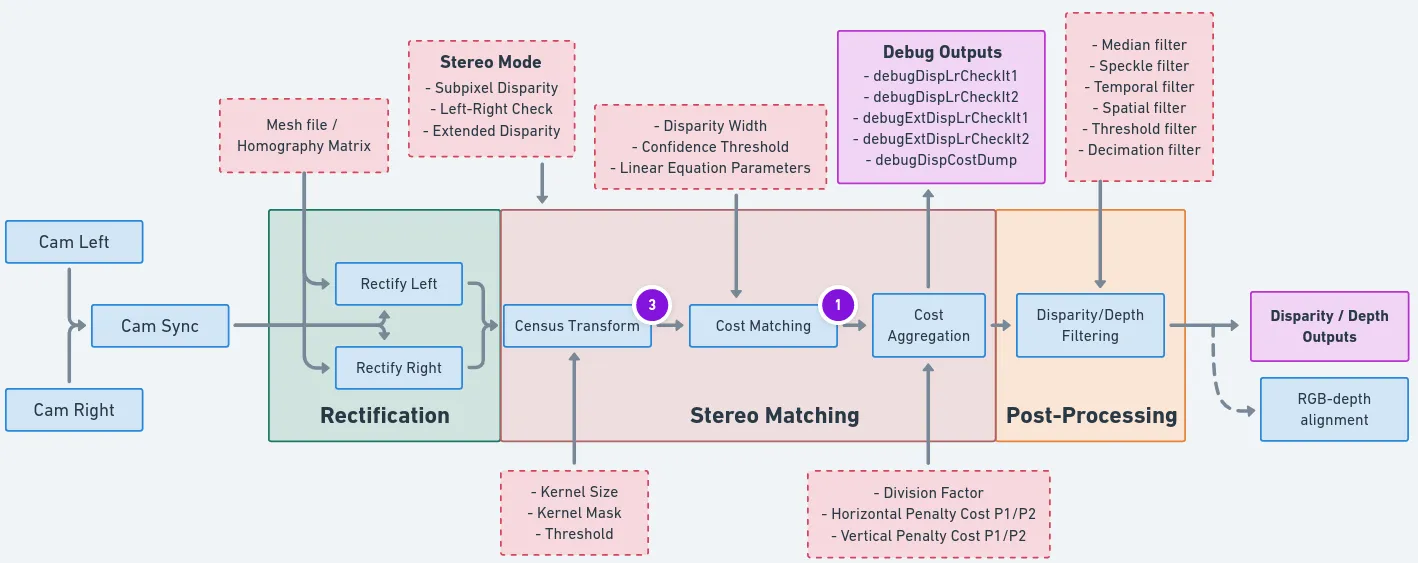
当前可配置块
- 立体模式:
- 左右检查:
- 左右检查或 LR 检查用于消除由于物体边界(左摄像机视图和右摄像机视图略有不同)遮挡而导致的错误计算的视差像素。
- 通过 R->L 方向匹配计算视差。
- 通过 L->R 方向匹配计算视差。
- 组合步骤 1 和 2 的结果,在 Shave 上运行:将每个像素 d = disparity_LR(x,y) 与 disparity_RL(x-d,y) 进行比较。如果差异超过阈值,则最终视差图中的像素 (x,y) 将被无效化。
- 您可以使用
debugDispLrCheckIt1和debugDispLrCheckIt2调试输出来进行调试/微调。
- 左右检查或 LR 检查用于消除由于物体边界(左摄像机视图和右摄像机视图略有不同)遮挡而导致的错误计算的视差像素。
- 扩展视差:
- 扩展视差模式允许检测给定基线的更近距离物体。这将最大视差搜索范围从 96 增加到 191,因此范围现在是:[0..190]。
- 在原始尺寸图像(例如 1280x720)上计算视差。
- 在 2 倍下采样图像(例如 640x360)上计算视差。
- 在 Shave 上组合两个级别的视差,有效覆盖总共 191 个像素的视差范围(相对于原始分辨率)。
- 您可以使用
debugExtDispLrCheckIt1和debugExtDispLrCheckIt2调试输出来进行调试/微调。
- 扩展视差模式允许检测给定基线的更近距离物体。这将最大视差搜索范围从 96 增加到 191,因此范围现在是:[0..190]。
- 亚像素视差:
- 亚像素模式提高了精度,对于远距离测量尤其有用。它还有助于更好地估计表面法线。
- 在此模式下,立体摄像头执行:94 个深度步长 * 8 个亚像素深度步长 + 2(最小值/最大值)= 754 个深度步长。
- 有关普通视差与亚像素视差图像的比较,请单击此处。
- 左右检查:
- 深度过滤器:
- 深度过滤 / 深度后处理 在深度管道的末端执行。它有助于降噪和提高整体深度质量。
- 网格文件:
- 网格文件(同位矩阵)是使用摄像机内参、畸变系数和校正旋转生成的。这些文件有助于克服摄像机畸变,提高精度,并且在使用了宽视场镜头时也有帮助。
- 目前,网格文件仅在校准期间在主机上为立体摄像机生成。生成的网格文件存储在 depthai/resources 中,用户可以将其加载到设备上。此过程将在未来的版本中移至设备端。
- 置信度阈值:
- 置信度阈值:立体深度算法在 96 个视差级别中搜索从右摄像机点到左图像的匹配特征。在此过程中,它计算每个视差级别的成本,并选择两个视差之间的最小成本,然后使用它来计算每个像素的置信度。立体节点仅输出深度置信度低于置信度阈值的视差/深度像素(置信度值越低表示深度精度越好)。
- 左右检查阈值:当左右视差和右左视差之间的差值小于左右检查阈值时,才考虑输出视差。
限制
- 当子像素模式设置为 4 位或 5 位时,中值滤波将被禁用。
- 对于 RGB-深度对齐,RGB 摄像机必须放置在与立体摄像机对相同的水平线上。
- 使用视差偏移时,RGB-深度对齐将不起作用。
运行时更改摄像机校准
device.setCalibration() 方法更改校准,如果设备立体质量随时间因环境因素而下降,则可以使用此方法。 可以使用 device.getCalibration() 获取相同的数据。深度预设
深度预设
| 特征 | 默认 | 人脸 | 高细节 | 机器人 |
|---|---|---|---|---|
| 基本配置文件 | HIGH_DENSITY | HIGH_DENSITY | HIGH_ACCURACY | HIGH_DENSITY |
| 中值滤波 | 7x7 内核 | 关闭 | 关闭 | 7x7 内核 |
| 子像素精度 | 3 位 | 5 位 | 5 位 | 3 位 |
| 扩展视差 | 否 | 是 | 是 | 否 |
| 范围 | 0-15m | 3cm-3m | 0-15m | 0-10m |
| 时间滤波器 | 启用 | 启用 | 启用 | 禁用 |
| 用途 | 通用 | 人脸跟踪、生物识别 | 3D 扫描、物体细节 | 导航、障碍物检测 |
- 左右一致性检查
- 2 倍抽取,像素跳过
- 斑点滤波(范围:200,阈值:2)
- 3 个硬件资源用于后处理
立体深度 FPS
| 过程 \ 分辨率 | 400P [ms] | 720P [ms] | 800P [ms] |
|---|---|---|---|
| 校正 | 1.5 | 5 | 6 |
| 宽视场校正 | 2.5 | 8 | 9 |
- LR: 左右检查 (
stereo.setLeftRightCheck())。它需要两次立体匹配操作(L->R 和 R->L 方向),然后合并结果。 - Ext: 扩展视差模式 (
stereo.setExtendedDisparity())。它需要两次立体匹配操作(原始和缩小),然后合并结果。 - Sub: 子像素匹配 (
stereo.setSubpixel())。每个像素您将获得 96 个字节的成本图(每个视差级别一个字节),因此对于 800P 帧,大约需要将 98MB 的数据移动到 CMX 内存(由 SHAVEs 使用)以进行子像素计算。因此,在这种情况下,瓶颈是内存带宽(约 4.1GB/秒)。子像素位数不会影响延迟。
| 进程 \ 分辨率 | 400P [ms] | 720P [ms] | 800P [ms] |
|---|---|---|---|
| 无 LR, 无 Ext, 无 Sub | 3.4 | 7.4 | 8.1 |
| 无 LR, 无 Ext, Sub | 6.2 | 21.7 | 23.9 |
| 无 LR, Ext, 无 Sub | 8.5 | 21.5 | 23.5 |
| 无 LR, Ext, Sub | 11 | 32.7 | 36.7 |
| LR, 无 Ext, 无 Sub | 7.4 | 18 | 19.8 |
| LR, 无 Ext, Sub | 10.1 | 27.6 | 30.5 |
| LR, Ext, 无 Sub | 16.7 | 43.7 | 48.3 |
| LR, Ext, Sub | 20.4 | 56 | 62 |
3x3、5x5、7x7)不影响延迟:| 进程 \ 分辨率 | 400P [ms] | 720P [ms] | 800P [ms] |
|---|---|---|---|
中值滤波 (3x3 / 5x5 / 7x7) | 0.8 | 1.8 | 1.8 |
用法
Python
Python
1pipeline = dai.Pipeline()
2stereo = pipeline.create(dai.node.StereoDepth)
3
4# 更好地处理遮挡:
5stereo.setLeftRightCheck(False)
6# 更近的最小深度,视差范围加倍:
7stereo.setExtendedDisparity(False)
8# 更长的距离精度更高,32 级小数视差:
9stereo.setSubpixel(False)
10
11# 提前定义并配置 MonoCamera 节点
12left.out.link(stereo.left)
13right.out.link(stereo.right)功能示例
- 深度预览
- RGB 深度对齐 - 将深度图与彩色摄像头对齐 (RGB-D)
- 立体深度后处理滤波器
- Mono & MobilenetSSD & Depth
- RGB & MobilenetSSD 及其空间数据
参考
class
depthai.node.StereoDepth(depthai.Node)
class
PresetMode
Preset modes for stereo depth. Members: HIGH_ACCURACY : **Deprecated:** Will be removed in future releases and replaced with DEFAULT HIGH_DENSITY : **Deprecated:** Will be removed in future releases and replaced with DEFAULT DEFAULT FACE HIGH_DETAIL ROBOTICS
method
enableDistortionCorrection(self, arg0: bool)Equivalent to useHomographyRectification(!enableDistortionCorrection)
method
getMaxDisparity(self) -> float: floatUseful for normalization of the disparity map. Returns: Maximum disparity value that the node can return
method
loadMeshData(self, dataLeft: collections.abc.Sequence

[


typing.SupportsInt

], dataRight: collections.abc.Sequence

[


typing.SupportsInt

])
Specify mesh calibration data for 'left' and 'right' inputs, as vectors of bytes. Overrides useHomographyRectification behavior. See `loadMeshFiles` for the expected data format
method
loadMeshFiles(self, pathLeft: Path, pathRight: Path)Specify local filesystem paths to the mesh calibration files for 'left' and 'right' inputs. When a mesh calibration is set, it overrides the camera intrinsics/extrinsics matrices. Overrides useHomographyRectification behavior. Mesh format: a sequence of (y,x) points as 'float' with coordinates from the input image to be mapped in the output. The mesh can be subsampled, configured by `setMeshStep`. With a 1280x800 resolution and the default (16,16) step, the required mesh size is: width: 1280 / 16 + 1 = 81 height: 800 / 16 + 1 = 51
method
setAlphaScaling(self, arg0: typing.SupportsFloat)Free scaling parameter between 0 (when all the pixels in the undistorted image are valid) and 1 (when all the source image pixels are retained in the undistorted image). On some high distortion lenses, and/or due to rectification (image rotated) invalid areas may appear even with alpha=0, in these cases alpha < 0.0 helps removing invalid areas. See getOptimalNewCameraMatrix from opencv for more details.
method
setBaseline(self, arg0: typing.SupportsFloat)Override baseline from calibration. Used only in disparity to depth conversion. Units are centimeters.
method
setConfidenceThreshold(self, arg0: typing.SupportsInt)Confidence threshold for disparity calculation Parameter ``confThr``: Confidence threshold value 0..255
method
setDefaultProfilePreset(self, arg0: StereoDepth.PresetMode)Sets a default preset based on specified option. Parameter ``mode``: Stereo depth preset mode
method
method
setDepthAlignmentUseSpecTranslation(self, arg0: bool)Use baseline information for depth alignment from specs (design data) or from calibration. Default: true
method
setDisparityToDepthUseSpecTranslation(self, arg0: bool)Use baseline information for disparity to depth conversion from specs (design data) or from calibration. Default: true
method
setEmptyCalibration(self)Specify that a passthrough/dummy calibration should be used, when input frames are already rectified (e.g. sourced from recordings on the host)
method
setExtendedDisparity(self, enable: bool)Disparity range increased from 0-95 to 0-190, combined from full resolution and downscaled images. Suitable for short range objects. Currently incompatible with sub-pixel disparity
method
setFocalLength(self, arg0: typing.SupportsFloat)Override focal length from calibration. Used only in disparity to depth conversion. Units are pixels.
method
setFocalLengthFromCalibration(self, arg0: bool)Whether to use focal length from calibration intrinsics or calculate based on calibration FOV. Default value is true.
method
method
setLeftRightCheck(self, enable: bool)Computes and combines disparities in both L-R and R-L directions, and combine them. For better occlusion handling, discarding invalid disparity values
method
setMedianFilter(self, arg0: depthai.MedianFilter)Parameter ``median``: Set kernel size for disparity/depth median filtering, or disable
method
setMeshStep(self, width: typing.SupportsInt, height: typing.SupportsInt)Set the distance between mesh points. Default: (16, 16)
method
setNumFramesPool(self, arg0: typing.SupportsInt)Specify number of frames in pool. Parameter ``numFramesPool``: How many frames should the pool have
method
method
setOutputKeepAspectRatio(self, keep: bool)Specifies whether the frames resized by `setOutputSize` should preserve aspect ratio, with potential cropping when enabled. Default `true`
method
method
setOutputSize(self, width: typing.SupportsInt, height: typing.SupportsInt)Specify disparity/depth output resolution size, implemented by scaling. Currently only applicable when aligning to RGB camera
method
setPostProcessingHardwareResources(self, arg0: typing.SupportsInt, arg1: typing.SupportsInt)Specify allocated hardware resources for stereo depth. Suitable only to increase post processing runtime. Parameter ``numShaves``: Number of shaves. Parameter ``numMemorySlices``: Number of memory slices.
method
setRectification(self, enable: bool)Rectify input images or not.
method
setRectificationUseSpecTranslation(self, arg0: bool)Obtain rectification matrices using spec translation (design data) or from calibration in calculations. Should be used only for debugging. Default: false
method
setRectifyEdgeFillColor(self, color: typing.SupportsInt)Fill color for missing data at frame edges Parameter ``color``: Grayscale 0..255, or -1 to replicate pixels
method
setRectifyMirrorFrame(self, arg0: bool)DEPRECATED function. It was removed, since rectified images are not flipped anymore. Mirror rectified frames, only when LR-check mode is disabled. Default `true`. The mirroring is required to have a normal non-mirrored disparity/depth output. A side effect of this option is disparity alignment to the perspective of left or right input: `false`: mapped to left and mirrored, `true`: mapped to right. With LR-check enabled, this option is ignored, none of the outputs are mirrored, and disparity is mapped to right. Parameter ``enable``: True for normal disparity/depth, otherwise mirrored
method
setRuntimeModeSwitch(self, arg0: bool)Enable runtime stereo mode switch, e.g. from standard to LR-check. Note: when enabled resources allocated for worst case to enable switching to any mode.
method
setSubpixel(self, enable: bool)Computes disparity with sub-pixel interpolation (3 fractional bits by default). Suitable for long range. Currently incompatible with extended disparity
method
setSubpixelFractionalBits(self, subpixelFractionalBits: typing.SupportsInt)Number of fractional bits for subpixel mode. Default value: 3. Valid values: 3,4,5. Defines the number of fractional disparities: 2^x. Median filter postprocessing is supported only for 3 fractional bits.
method
useHomographyRectification(self, arg0: bool)Use 3x3 homography matrix for stereo rectification instead of sparse mesh generated on device. Default behaviour is AUTO, for lenses with FOV over 85 degrees sparse mesh is used, otherwise 3x3 homography. If custom mesh data is provided through loadMeshData or loadMeshFiles this option is ignored. Parameter ``useHomographyRectification``: true: 3x3 homography matrix generated from calibration data is used for stereo rectification, can't correct lens distortion. false: sparse mesh is generated on-device from calibration data with mesh step specified with setMeshStep (Default: (16, 16)), can correct lens distortion. Implementation for generating the mesh is same as opencv's initUndistortRectifyMap function. Only the first 8 distortion coefficients are used from calibration data.
property
confidenceMap
Outputs ImgFrame message that carries RAW8 confidence map. Lower values means higher confidence of the calculated disparity value. RGB alignment, left-right check or any postproccessing (e.g. median filter) is not performed on confidence map.
property
debugDispCostDump
Outputs ImgFrame message that carries cost dump of disparity map. Useful for debugging/fine tuning.
property
debugDispLrCheckIt1
Outputs ImgFrame message that carries left-right check first iteration (before combining with second iteration) disparity map. Useful for debugging/fine tuning.
property
debugDispLrCheckIt2
Outputs ImgFrame message that carries left-right check second iteration (before combining with first iteration) disparity map. Useful for debugging/fine tuning.
property
debugExtDispLrCheckIt1
Outputs ImgFrame message that carries extended left-right check first iteration (downscaled frame, before combining with second iteration) disparity map. Useful for debugging/fine tuning.
property
debugExtDispLrCheckIt2
Outputs ImgFrame message that carries extended left-right check second iteration (downscaled frame, before combining with first iteration) disparity map. Useful for debugging/fine tuning.
property
depth
Outputs ImgFrame message that carries RAW16 encoded (0..65535) depth data in depth units (millimeter by default). Non-determined / invalid depth values are set to 0
property
disparity
Outputs ImgFrame message that carries RAW8 / RAW16 encoded disparity data: RAW8 encoded (0..95) for standard mode; RAW8 encoded (0..190) for extended disparity mode; RAW16 encoded for subpixel disparity mode: - 0..760 for 3 fractional bits (by default) - 0..1520 for 4 fractional bits - 0..3040 for 5 fractional bits
property
initialConfig
Initial config to use for StereoDepth.
property
inputConfig
Input StereoDepthConfig message with ability to modify parameters in runtime. Default queue is non-blocking with size 4.
property
left
Input for left ImgFrame of left-right pair Default queue is non-blocking with size 8
property
outConfig
Outputs StereoDepthConfig message that contains current stereo configuration.
property
rectifiedLeft
Outputs ImgFrame message that carries RAW8 encoded (grayscale) rectified frame data.
property
rectifiedRight
Outputs ImgFrame message that carries RAW8 encoded (grayscale) rectified frame data.
property
right
Input for right ImgFrame of left-right pair Default queue is non-blocking with size 8
property
syncedLeft
Passthrough ImgFrame message from 'left' Input.
property
syncedRight
Passthrough ImgFrame message from 'right' Input.
class
depthai.node.StereoDepth.PresetMode
variable
variable
variable
variable
variable
variable
variable
method
method
method
method
method
method
method
method
method
method
property
property
视差
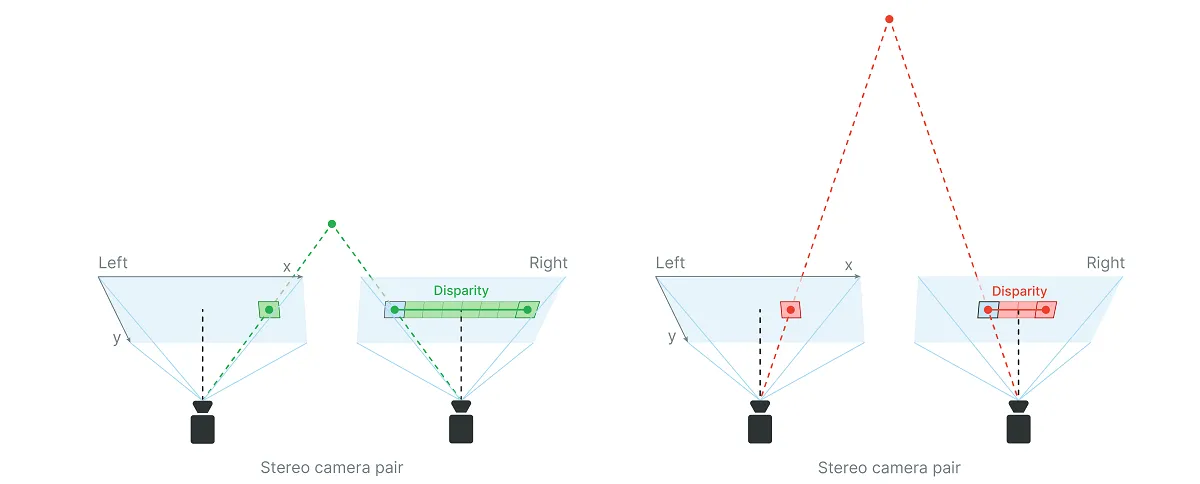
0..255,如下所示:0- 对持有有效值的最大置信度255- 最小置信度,因此该值出错的可能性更大
stereo.initialConfig.setConfidenceThreshold() 设置置信度阈值。使用视差图计算深度
Python
1depth = focal_length_in_pixels * baseline / disparity_in_pixelsintrinsics[0][0])中:Python
1import depthai as dai
2
3with dai.Device() as device:
4  calibData = device.readCalibration()
5  intrinsics = calibData.getCameraIntrinsics(dai.CameraBoardSocket.CAM_C)
6 print('右单目摄像头像素焦距:', intrinsics[0][0])Python
1focal_length_in_pixels = image_width_in_pixels * 0.5 / tan(HFOV * 0.5 * PI/180)
2
3# 对于 400P 单目摄像头分辨率,HFOV=71.9 度
4focal_length_in_pixels = 640 * 0.5 / tan(71.9 * 0.5 * PI / 180) = 441.25
5
6# 对于 800P 单目摄像头分辨率,HFOV=71.9 度
7focal_length_in_pixels = 1280 * 0.5 / tan(71.9 * 0.5 * PI / 180) = 882.5Python
1# 对于 OAK-D @ 400P 单目摄像头,视差为 50 像素
2depth = 441.25 * 7.5 / 50 = 66.19 # cm
3
4# 对于 OAK-D @ 800P 单目摄像头,视差为 10 像素
5depth = 882.5 * 7.5 / 10 = 661.88 # cmuint16 中,其中 0 是一个特殊值,表示距离未知。最小立体深度距离
disparity_in_pixels 参数选择最大值(请记住,它成反比,因此最大值将产生最小结果)。例如,OAK-D 的基线为 7.5cm,像素焦距为 882.5 像素,disparity_in_pixels 的默认最大值为 95。使用 使用视差图计算深度,我们得到:Python
1min_distance = focal_length_in_pixels * baseline / disparity_in_pixels = 882.5 * 7.5cm / 95 = 69.67cm- 将分辨率更改为 640x400,而不是标准的 1280x800。
- 启用扩展视差。
disparity_in_pixels 现在变为 190,最小距离为:Python
1min_distance = focal_length_in_pixels * baseline / disparity_in_pixels = 882.5 * 7.5cm / 190 = 34.84cm可以同时应用这两个选项,这将使最小深度设置为标准设置的 1/4,但在如此短的距离下,最小深度受限于焦距 19.6cm,因为 OAK-D 单目摄像头具有固定的对焦距离:19.6cm - 无穷远。
视差偏移以降低最小深度感知
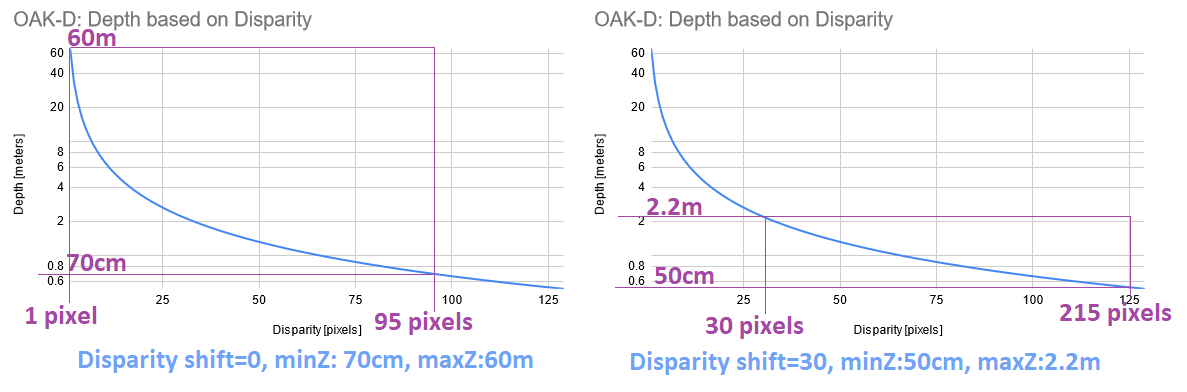
- 由于视差和深度之间的反比关系,随着视差偏移的增加,MaxZ 的减小速度远快于 MinZ。因此,建议不要使用大于必要值的视差偏移。
- 以这种方式减小 MinZ 的权衡是,距离 MaxZ 更远的物体将不可见。
- 由于上述原因,我们仅建议在使用已知 MaxZ 时使用视差偏移,例如将深度摄像头安装在桌面上方并向下指向桌面表面。
- 输出的视差图未扩展,只有深度图。因此,如果视差偏移设置为 50,并且获得的视差值为 90,则实际视差为 140。
- (+) 速度更快,因为它不需要额外的计算,这意味着也没有额外的延迟
- (-) 会减小 MaxZ(显著),而扩展视差仅减小 MinZ。
method
depthai.StereoDepthConfig.setDisparityShift
最大立体深度距离
Python
1Dm = (baseline/2) * tan((90 - HFOV / HPixels)*pi/180)Python
1# 对于 OAK-D (7.5cm 基线)
2Dm = (7.5/2) * tan((90 - 71.9/1280)*pi/180) = 3825.03cm = 38.25 米
3
4# 对于 OAK-D-CM4 (9cm 基线)
5Dm = (9/2) * tan((90 - 71.9/1280)*pi/180) = 4590.04cm = 45.9 米深度感知准确性
限制
B 标记。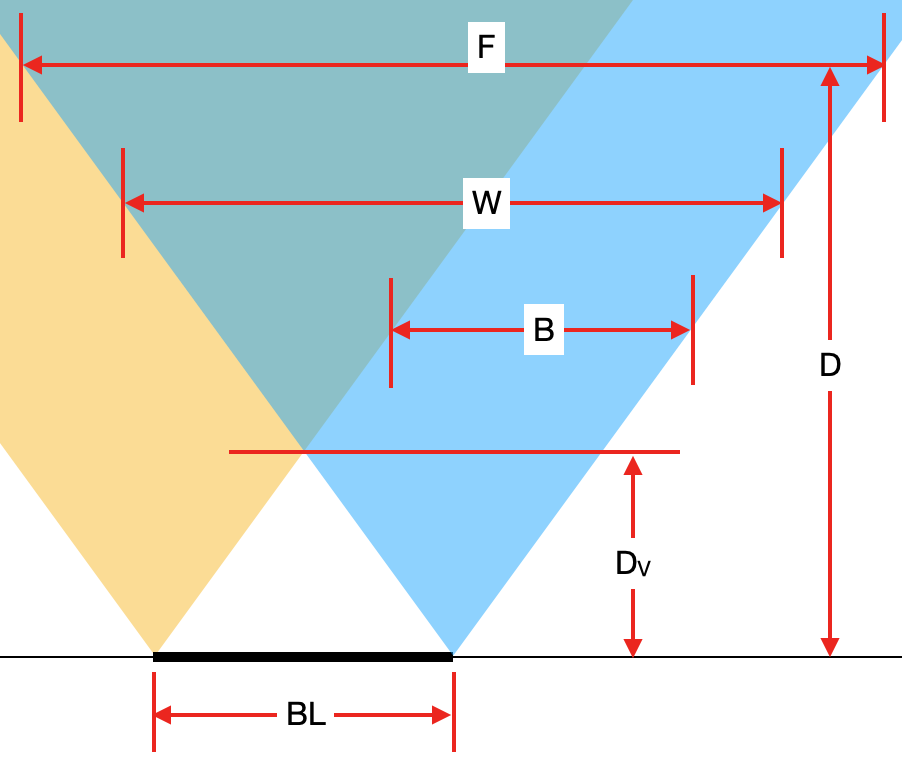
BL [cm]- 立体摄像机的基线。Dv [cm]- 两个摄像头都能看到物体的最小距离(因此可以计算深度)。B [pixels]- 无法计算深度的条带宽度。W [pixels]- 单目摄像机的像素宽度或水平像素数量,在其他公式中也称为HPixels。D [cm]- 从相机平面到物体的距离(参见图 测量真实世界物体尺寸)。F [cm]- 在距离D处的图像宽度。
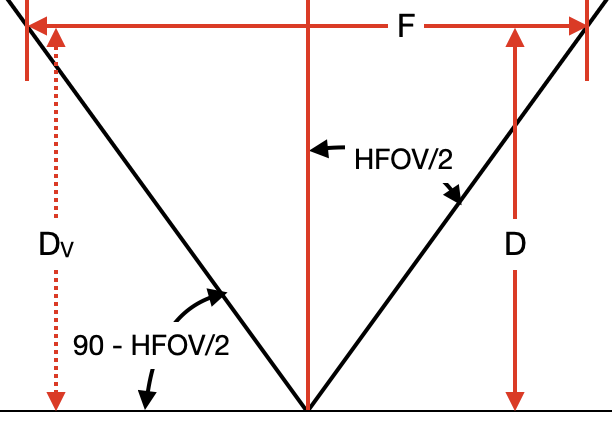
tan 函数,可以得到以下公式:F = 2 * D * tan(HFOV/2)Dv = (BL/2) * tan(90 - HFOV/2)
B,我们可以再次使用 tan 函数(与计算 F 相同),但这次我们还必须乘以 W 和 F 的比率,以将单位转换为像素。这给出了以下公式:Python
1B = 2 * Dv * tan(HFOV/2) * W / F
2B = 2 * Dv * tan(HFOV/2) * W / (2 * D * tan(HFOV/2))
3B = W * Dv / D # pixelsHFOV 为 72°,基线(BL)为 7.5 cm,并且使用了 640x400 (400P) 分辨率,因此 W = 640,并且物体距离为 D = 100 cm,我们可以按以下方式计算 B:Command Line
1Dv = 7.5 / 2 * tan(90 - 72/2) = 3.75 * tan(54°) = 5.16 cm
2B = 640 * 5.16 / 100 = 33 # pixelsOAK-D-PRO 将同时包含红外点投影仪和红外 LED,可在无光环境下运行。红外 LED 用于照亮整个区域(用于单目/彩色帧),而红外点投影仪主要用于精确的视差匹配——以便在空白表面上也能获得高质量的深度图。对于户外,红外激光点投影仪仅在夜间相关。有关更多信息,请参见开发进度 此处。
测量真实物体尺寸
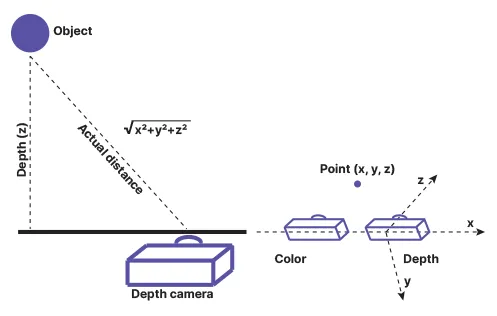
143 之后):Python
1distance = math.sqrt(detection.spatialCoordinates.x ** 2 + detection.spatialCoordinates.y ** 2 + detection.spatialCoordinates.z ** 2) # mm需要帮助?
请前往 Discussion Forum 获取技术支持或提出您可能有的任何其他问题。