ToF
- OAK-D ToF - 集成 33D ToF 传感器,以及一对立体摄像头
- OAK-FFC ToF 33D - 独立的 FFC 模块,带有一个 33D ToF 传感器
depth 输出可以替代 StereoDepth 的输出 - 因此您可以直接将 ToF.depth 连接到 MobileNetSpatialDetectionNetwork/YoloSpatialDetectionNetwork 或 SpatialLocationCalculator。与立体深度相比,ToF 的深度精度通常更高。您可以在此处查看 ToF 深度精度。ToF 点云演示视频,展示了深度精度:如何放置它
Python
Python
1pipeline = dai.Pipeline()
2tof = pipeline.create(dai.node.ToF)输入和输出
ToF 设置
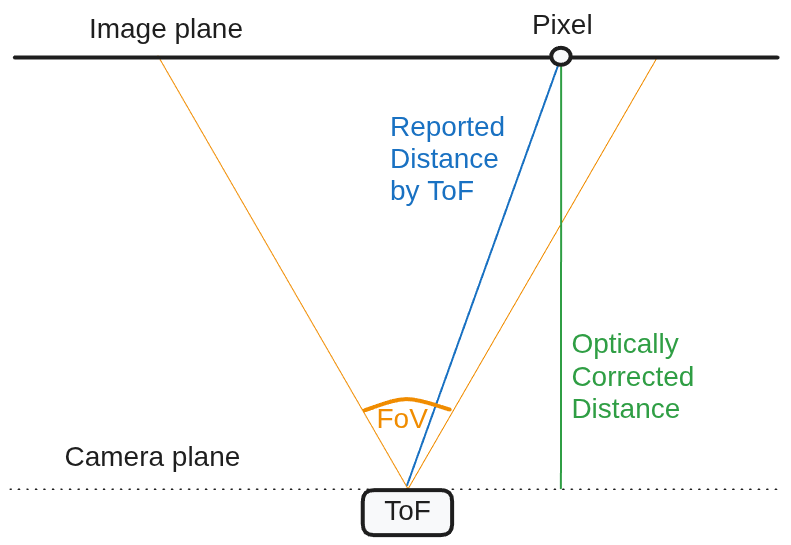
- 光学校正:这是一个校正光学效应的过程。启用后,ToF 会返回深度图(如下面的图中的绿线所示),而不是距离,因此它与 StereoDepth 的深度报告匹配。它执行校正和距离到深度的转换(Z-map)。
- 消除畸变:默认情况下,
depth和amplitude帧会进行消除畸变处理。 - 相位展开 - 校正 ToF 传感器相位缠绕效应的过程。您可以将其设置为 [0..5 为优化值]。数字越高,ToF 范围越长,但噪点也越多。近似最大距离(确切值请参见下面的 最大距离):
0- 禁用,最多约 1.87 米(使用 80MHz 调制频率)1- 最多约 3 米2- 最多约 4.5 米3- 最多约 6 米4- 最多约 7.5 米
- 突发模式:启用后,ToF 节点不会重复使用帧,如下图所示。这与 ToF 帧的后处理有关,而不是实际的传感器/投影仪。默认情况下禁用。
- 相位抖动时间滤波器:平均同一调制频率的抖动和非抖动帧,以减少噪点。默认情况下启用。您可以禁用它以减少 ToF 运动模糊 和系统负载。
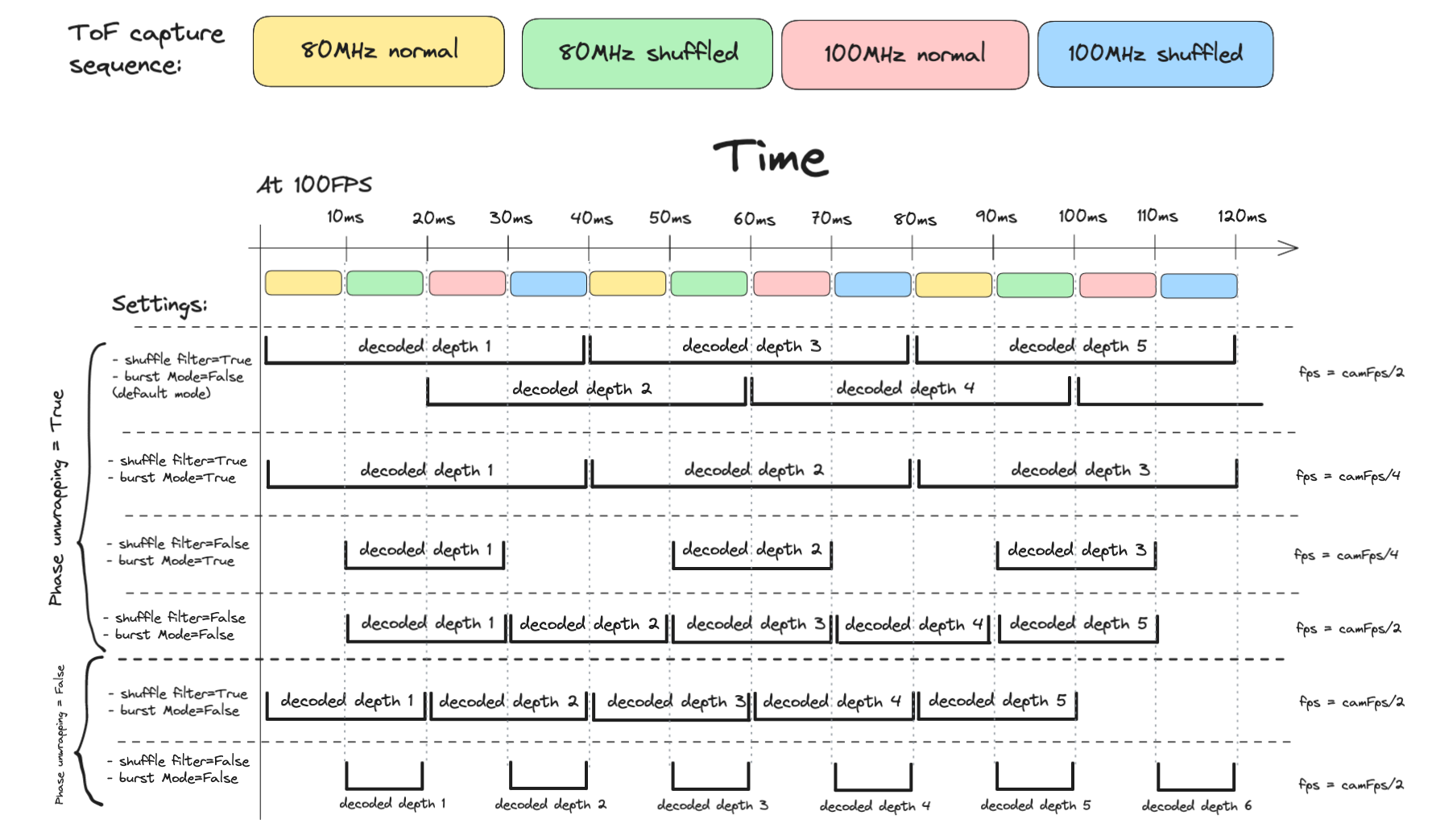
相位展开
ToF 运动模糊
- 提高摄像头帧率。最高可达 160 FPS,这使得帧捕获速度最快(帧之间间隔 6.25 毫秒)。这将减少运动模糊,因为 ToF 会组合多个帧来获取深度。请注意,160 FPS 会显著增加系统负载(请参阅 调试 DepthAI 管道)。另请注意,更高的 FPS -> 更短的曝光时间,这会增加噪点。
- 禁用相位混叠时间滤波器。这会引入更多噪点。
- 禁用相位展开。这将把最大距离减小到 1.87 米(使用 80MHz 调制频率),因此可见空间约为 1 立方米(用途非常有限)。
- 启用突发模式。如果禁用了混叠滤波器和相位展开(参见上图),则此设置无关紧要。启用后,ToF 节点将不会重用帧(降低 FPS)。
最大距离
Math
1c = 299792458.0 # speed of light in m/s
2
3MAX_80MHZ_M = c / (80000000 * 2) = 1.873 m
4MAX_100MHZ_M = c / (100000000 * 2) = 1.498 m
5
6MAX_DIST_80MHZ_M = (phaseUnwrappingLevel + 1) * 1.873 + (phaseUnwrapErrorThreshold / 2)
7MAX_DIST_100MHZ_M = (phaseUnwrappingLevel + 1) * 1.498 + (phaseUnwrapErrorThreshold / 2)
8
9MAX_DIST_PHASE_UNWRAPPING_M = MAX_DIST_100MHZ_M
ToF FPS
用法
Python
Python
1pipeline = dai.Pipeline()
2
3tof_cam = pipeline.create(dai.node.Camera)
4tof_cam.setFps(30)
5# We assume the ToF camera sensor is on port CAM_A
6tof_cam.setBoardSocket(dai.CameraBoardSocket.CAM_A)
7
8tof = pipeline.create(dai.node.ToF)
9
10# Higher number => faster processing. 1 shave core can do 30FPS.
11tof.setNumShaves(1)
12
13# Median filter, kernel size 5x5
14tof.initialConfig.setMedianFilter(dai.MedianFilter.KERNEL_5x5)
15
16tofConfig = tof.initialConfig.get()
17# Temporal filter averages shuffle/non-shuffle frequencies
18tofConfig.enablePhaseShuffleTemporalFilter = True
19# Phase unwrapping, for longer range.
20tofConfig.phaseUnwrappingLevel = 4 # Up to 7.5 meters
21tofConfig.phaseUnwrapErrorThreshold = 300
22tof.initialConfig.set(tofConfig)
23
24# ToF node converts raw sensor frames into depth
25tof_cam.raw.link(tof.input)
26
27# Send ToF depth output to the host, or perhaps to SLC / Spatial Detection Network
28tof.depth.link(xout.input)功能示例
- ToF 深度 - 获取 ToF 深度的示例
- RGB-ToF 对齐 - 将 ToF 深度与彩色流对齐
参考
class
depthai.node.ToF(depthai.Node)
method
setNumFramesPool(self, arg0: typing.SupportsInt) -> ToF: ToFSpecify number of frames in output pool Parameter ``numFramesPool``: Number of frames in output pool
method
setNumShaves(self, arg0: typing.SupportsInt) -> ToF: ToFSpecify number of shaves reserved for ToF decoding.
property
amplitude
Outputs ImgFrame message that carries amplitude image.
property
depth
Outputs ImgFrame message that carries decoded depth image.
property
initialConfig
Initial config to use for depth calculation.
property
input
Input raw ToF data. Default queue is blocking with size 8.
property
inputConfig
Input ToF message with ability to modify parameters in runtime. Default queue is non-blocking with size 4.
property
intensity
Outputs ImgFrame message that carries intensity image.
property
phase
Outputs ImgFrame message that carries phase image, useful for debugging. float32 type.
需要帮助?
请前往 Discussion Forum 获取技术支持或提出您可能有的任何其他问题。