DepthAI v2 has been superseded by DepthAI v3. You are viewing legacy documentation.
此页面由 AI 自动翻译。查看英文原版
DepthAI 教程
DepthAI API 参考

本页目录

  • 演示
  • 设置
  • 源代码
  • 管道图

深度预览

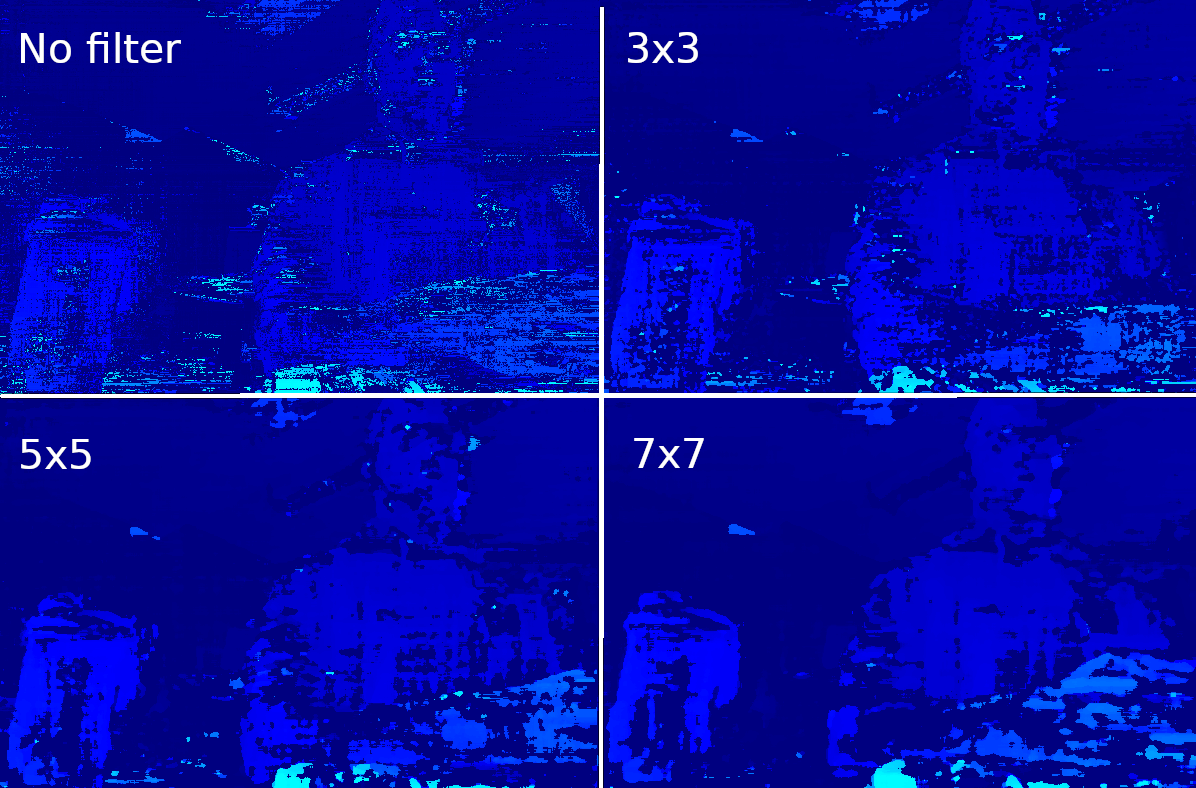
本示例展示了如何设置 SGBM(半全局匹配)视差深度节点,通过 XLink 将结果实时传输到主机,并在 OpenCV 中显示深度图。 在此示例中使用了视差,因为它以更直观的方式进行着色。 下方还预览了在深度图像上并排使用不同中值滤波器的效果。 您可以在代码中选择 3 种深度模式:
  • lr_check:用于更好的遮挡处理。有关更多信息,请单击此处
  • extended_disparity:适用于近距离物体。有关更多信息,请单击此处
  • subpixel:适用于远距离。有关更多信息,请单击此处

类似示例:

演示

使用中值滤波器过滤深度
Some image name

设置

请运行 安装脚本 以下载所有必需的依赖项。请注意,此脚本必须在 git 上下文中运行,因此您必须先下载 depthai-python 存储库,然后运行脚本
Command Line
1git clone https://github.com/luxonis/depthai-python.git
2cd depthai-python/examples
3python3 install_requirements.py
有关更多信息,请遵循 安装指南

源代码

Python

Python
GitHub
1#!/usr/bin/env python3
2
3import cv2
4import depthai as dai
5import numpy as np
6
7# Closer-in minimum depth, disparity range is doubled (from 95 to 190):
8extended_disparity = False
9# Better accuracy for longer distance, fractional disparity 32-levels:
10subpixel = False
11# Better handling for occlusions:
12lr_check = True
13
14# Create pipeline
15pipeline = dai.Pipeline()
16
17# Define sources and outputs
18monoLeft = pipeline.create(dai.node.MonoCamera)
19monoRight = pipeline.create(dai.node.MonoCamera)
20depth = pipeline.create(dai.node.StereoDepth)
21xout = pipeline.create(dai.node.XLinkOut)
22
23xout.setStreamName("disparity")
24
25# Properties
26monoLeft.setResolution(dai.MonoCameraProperties.SensorResolution.THE_400_P)
27monoLeft.setCamera("left")
28monoRight.setResolution(dai.MonoCameraProperties.SensorResolution.THE_400_P)
29monoRight.setCamera("right")
30
31# Create a node that will produce the depth map (using disparity output as it's easier to visualize depth this way)
32depth.setDefaultProfilePreset(dai.node.StereoDepth.PresetMode.HIGH_DENSITY)
33# Options: MEDIAN_OFF, KERNEL_3x3, KERNEL_5x5, KERNEL_7x7 (default)
34depth.initialConfig.setMedianFilter(dai.MedianFilter.KERNEL_7x7)
35depth.setLeftRightCheck(lr_check)
36depth.setExtendedDisparity(extended_disparity)
37depth.setSubpixel(subpixel)
38
39# Linking
40monoLeft.out.link(depth.left)
41monoRight.out.link(depth.right)
42depth.disparity.link(xout.input)
43
44# Connect to device and start pipeline
45with dai.Device(pipeline) as device:
46
47    # Output queue will be used to get the disparity frames from the outputs defined above
48    q = device.getOutputQueue(name="disparity", maxSize=4, blocking=False)
49
50    while True:
51        inDisparity = q.get()  # blocking call, will wait until a new data has arrived
52        frame = inDisparity.getFrame()
53        # Normalization for better visualization
54        frame = (frame * (255 / depth.initialConfig.getMaxDisparity())).astype(np.uint8)
55
56        cv2.imshow("disparity", frame)
57
58        # Available color maps: https://docs.opencv.org/3.4/d3/d50/group__imgproc__colormap.html
59        frame = cv2.applyColorMap(frame, cv2.COLORMAP_JET)
60        cv2.imshow("disparity_color", frame)
61
62        if cv2.waitKey(1) == ord('q'):
63            break

C++

1#include <iostream>
2
3// Includes common necessary includes for development using depthai library
4#include "depthai/depthai.hpp"
5
6// Closer-in minimum depth, disparity range is doubled (from 95 to 190):
7static std::atomic<bool> extended_disparity{false};
8// Better accuracy for longer distance, fractional disparity 32-levels:
9static std::atomic<bool> subpixel{false};
10// Better handling for occlusions:
11static std::atomic<bool> lr_check{true};
12
13int main() {
14    // Create pipeline
15    dai::Pipeline pipeline;
16
17    // Define sources and outputs
18    auto monoLeft = pipeline.create<dai::node::MonoCamera>();
19    auto monoRight = pipeline.create<dai::node::MonoCamera>();
20    auto depth = pipeline.create<dai::node::StereoDepth>();
21    auto xout = pipeline.create<dai::node::XLinkOut>();
22
23    xout->setStreamName("disparity");
24
25    // Properties
26    monoLeft->setResolution(dai::MonoCameraProperties::SensorResolution::THE_400_P);
27    monoLeft->setCamera("left");
28    monoRight->setResolution(dai::MonoCameraProperties::SensorResolution::THE_400_P);
29    monoRight->setCamera("right");
30
31    // Create a node that will produce the depth map (using disparity output as it's easier to visualize depth this way)
32    depth->setDefaultProfilePreset(dai::node::StereoDepth::PresetMode::HIGH_DENSITY);
33    // Options: MEDIAN_OFF, KERNEL_3x3, KERNEL_5x5, KERNEL_7x7 (default)
34    depth->initialConfig.setMedianFilter(dai::MedianFilter::KERNEL_7x7);
35    depth->setLeftRightCheck(lr_check);
36    depth->setExtendedDisparity(extended_disparity);
37    depth->setSubpixel(subpixel);
38
39    // Linking
40    monoLeft->out.link(depth->left);
41    monoRight->out.link(depth->right);
42    depth->disparity.link(xout->input);
43
44    // Connect to device and start pipeline
45    dai::Device device(pipeline);
46
47    // Output queue will be used to get the disparity frames from the outputs defined above
48    auto q = device.getOutputQueue("disparity", 4, false);
49
50    while(true) {
51        auto inDepth = q->get<dai::ImgFrame>();
52        auto frame = inDepth->getFrame();
53        // Normalization for better visualization
54        frame.convertTo(frame, CV_8UC1, 255 / depth->initialConfig.getMaxDisparity());
55
56        cv::imshow("disparity", frame);
57
58        // Available color maps: https://docs.opencv.org/3.4/d3/d50/group__imgproc__colormap.html
59        cv::applyColorMap(frame, frame, cv::COLORMAP_JET);
60        cv::imshow("disparity_color", frame);
61
62        int key = cv::waitKey(1);
63        if(key == 'q' || key == 'Q') {
64            return 0;
65        }
66    }
67    return 0;
68}

管道图

需要帮助?

请前往 Discussion Forum 获取技术支持或提出您可能有的任何其他问题。