DepthAI v2 has been superseded by DepthAI v3. You are viewing legacy documentation.
此页面由 AI 自动翻译。查看英文原版
DepthAI 教程
DepthAI API 参考

本页目录

  • 演示
  • 设置
  • 源代码
  • Pipeline

RGB 深度对齐

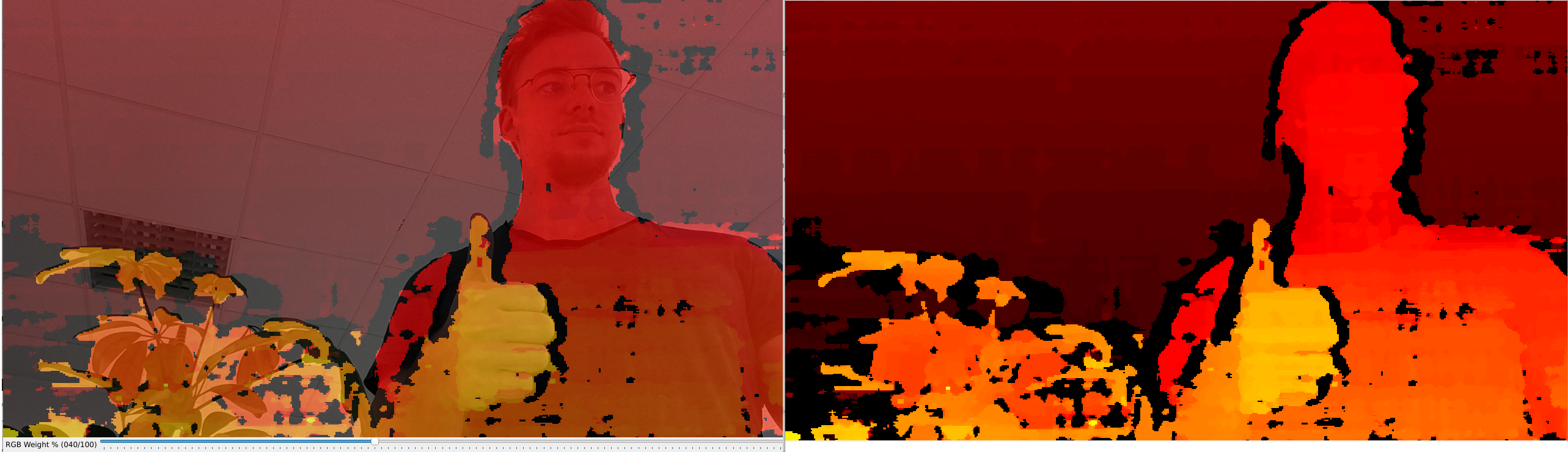
本示例展示了 RGB 深度对齐的用法。由于 OAK-D 具有彩色摄像头和一对立体摄像头, 您可以将深度图与顶部的彩色帧对齐,以获得 RGB 深度。在此示例中,rgb 和 depth 并非完美同步。为此,您需要添加 软件同步,该功能已添加到 Sync 演示 中,其中 RGB 和 depth 帧的延迟在毫秒以下。默认情况下,深度图将被缩放到匹配我们想要对其的摄像机传感器的分辨率。换句话说,如果 深度图与 1080P 彩色传感器对齐,StereoDepth 也会将深度图放大到 1080P。 可以通过配置 StereoDepthstereo.setOutputSize(width, height) 来避免深度缩放。要将深度图与更高分辨率的彩色流(例如 12MP)对齐,您需要限制深度图的分辨率。您可以通过 stereo.setOutputSize(w,h) 来实现。代码 示例在此

演示

RGB 深度对齐

设置

请运行 安装脚本 以下载所有必需的依赖项。请注意,此脚本必须在 git 上下文中运行,因此您必须先下载 depthai-python 存储库,然后运行脚本
Command Line
1git clone https://github.com/luxonis/depthai-python.git
2cd depthai-python/examples
3python3 install_requirements.py
有关更多信息,请遵循 安装指南

源代码

Python

Python
GitHub
1#!/usr/bin/env python3
2
3import cv2
4import numpy as np
5import depthai as dai
6import argparse
7
8# Weights to use when blending depth/rgb image (should equal 1.0)
9rgbWeight = 0.4
10depthWeight = 0.6
11
12parser = argparse.ArgumentParser()
13parser.add_argument('-alpha', type=float, default=None, help="Alpha scaling parameter to increase float. [0,1] valid interval.")
14args = parser.parse_args()
15alpha = args.alpha
16
17def updateBlendWeights(percent_rgb):
18    """
19    Update the rgb and depth weights used to blend depth/rgb image
20
21    @param[in] percent_rgb The rgb weight expressed as a percentage (0..100)
22    """
23    global depthWeight
24    global rgbWeight
25    rgbWeight = float(percent_rgb)/100.0
26    depthWeight = 1.0 - rgbWeight
27
28
29fps = 30
30# The disparity is computed at this resolution, then upscaled to RGB resolution
31monoResolution = dai.MonoCameraProperties.SensorResolution.THE_720_P
32
33# Create pipeline
34pipeline = dai.Pipeline()
35device = dai.Device()
36queueNames = []
37
38# Define sources and outputs
39camRgb = pipeline.create(dai.node.Camera)
40left = pipeline.create(dai.node.MonoCamera)
41right = pipeline.create(dai.node.MonoCamera)
42stereo = pipeline.create(dai.node.StereoDepth)
43
44rgbOut = pipeline.create(dai.node.XLinkOut)
45disparityOut = pipeline.create(dai.node.XLinkOut)
46
47rgbOut.setStreamName("rgb")
48queueNames.append("rgb")
49disparityOut.setStreamName("disp")
50queueNames.append("disp")
51
52#Properties
53rgbCamSocket = dai.CameraBoardSocket.CAM_A
54
55camRgb.setBoardSocket(rgbCamSocket)
56camRgb.setSize(1280, 720)
57camRgb.setFps(fps)
58
59# For now, RGB needs fixed focus to properly align with depth.
60# This value was used during calibration
61try:
62    calibData = device.readCalibration2()
63    lensPosition = calibData.getLensPosition(rgbCamSocket)
64    if lensPosition:
65        camRgb.initialControl.setManualFocus(lensPosition)
66except:
67    raise
68left.setResolution(monoResolution)
69left.setCamera("left")
70left.setFps(fps)
71right.setResolution(monoResolution)
72right.setCamera("right")
73right.setFps(fps)
74
75stereo.setDefaultProfilePreset(dai.node.StereoDepth.PresetMode.HIGH_DENSITY)
76# LR-check is required for depth alignment
77stereo.setLeftRightCheck(True)
78stereo.setDepthAlign(rgbCamSocket)
79
80# Linking
81camRgb.video.link(rgbOut.input)
82left.out.link(stereo.left)
83right.out.link(stereo.right)
84stereo.disparity.link(disparityOut.input)
85
86camRgb.setMeshSource(dai.CameraProperties.WarpMeshSource.CALIBRATION)
87if alpha is not None:
88    camRgb.setCalibrationAlpha(alpha)
89    stereo.setAlphaScaling(alpha)
90
91# Connect to device and start pipeline
92with device:
93    device.startPipeline(pipeline)
94
95    frameRgb = None
96    frameDisp = None
97
98    # Configure windows; trackbar adjusts blending ratio of rgb/depth
99    rgbWindowName = "rgb"
100    depthWindowName = "depth"
101    blendedWindowName = "rgb-depth"
102    cv2.namedWindow(rgbWindowName)
103    cv2.namedWindow(depthWindowName)
104    cv2.namedWindow(blendedWindowName)
105    cv2.createTrackbar('RGB Weight %', blendedWindowName, int(rgbWeight*100), 100, updateBlendWeights)
106
107    while True:
108        latestPacket = {}
109        latestPacket["rgb"] = None
110        latestPacket["disp"] = None
111
112        queueEvents = device.getQueueEvents(("rgb", "disp"))
113        for queueName in queueEvents:
114            packets = device.getOutputQueue(queueName).tryGetAll()
115            if len(packets) > 0:
116                latestPacket[queueName] = packets[-1]
117
118        if latestPacket["rgb"] is not None:
119            frameRgb = latestPacket["rgb"].getCvFrame()
120            cv2.imshow(rgbWindowName, frameRgb)
121
122        if latestPacket["disp"] is not None:
123            frameDisp = latestPacket["disp"].getFrame()
124            maxDisparity = stereo.initialConfig.getMaxDisparity()
125            # Optional, extend range 0..95 -> 0..255, for a better visualisation
126            if 1: frameDisp = (frameDisp * 255. / maxDisparity).astype(np.uint8)
127            # Optional, apply false colorization
128            if 1: frameDisp = cv2.applyColorMap(frameDisp, cv2.COLORMAP_HOT)
129            frameDisp = np.ascontiguousarray(frameDisp)
130            cv2.imshow(depthWindowName, frameDisp)
131
132        # Blend when both received
133        if frameRgb is not None and frameDisp is not None:
134            # Need to have both frames in BGR format before blending
135            if len(frameDisp.shape) < 3:
136                frameDisp = cv2.cvtColor(frameDisp, cv2.COLOR_GRAY2BGR)
137            blended = cv2.addWeighted(frameRgb, rgbWeight, frameDisp, depthWeight, 0)
138            cv2.imshow(blendedWindowName, blended)
139            frameRgb = None
140            frameDisp = None
141
142        if cv2.waitKey(1) == ord('q'):
143            break

C++

1#include <cstdio>
2#include <iostream>
3
4#include "utility.hpp"
5
6// Includes common necessary includes for development using depthai library
7#include "depthai/depthai.hpp"
8
9// Optional. If set (true), the ColorCamera is downscaled from 1080p to 720p.
10// Otherwise (false), the aligned depth is automatically upscaled to 1080p
11static std::atomic<bool> downscaleColor{true};
12static constexpr int fps = 30;
13// The disparity is computed at this resolution, then upscaled to RGB resolution
14static constexpr auto monoRes = dai::MonoCameraProperties::SensorResolution::THE_720_P;
15
16static float rgbWeight = 0.4f;
17static float depthWeight = 0.6f;
18
19static void updateBlendWeights(int percentRgb, void* ctx) {
20    rgbWeight = float(percentRgb) / 100.f;
21    depthWeight = 1.f - rgbWeight;
22}
23
24int main() {
25    using namespace std;
26
27    // Create pipeline
28    dai::Pipeline pipeline;
29    dai::Device device;
30    std::vector<std::string> queueNames;
31
32    // Define sources and outputs
33    auto camRgb = pipeline.create<dai::node::ColorCamera>();
34    auto left = pipeline.create<dai::node::MonoCamera>();
35    auto right = pipeline.create<dai::node::MonoCamera>();
36    auto stereo = pipeline.create<dai::node::StereoDepth>();
37
38    auto rgbOut = pipeline.create<dai::node::XLinkOut>();
39    auto depthOut = pipeline.create<dai::node::XLinkOut>();
40
41    rgbOut->setStreamName("rgb");
42    queueNames.push_back("rgb");
43    depthOut->setStreamName("depth");
44    queueNames.push_back("depth");
45
46    // Properties
47    camRgb->setBoardSocket(dai::CameraBoardSocket::CAM_A);
48    camRgb->setResolution(dai::ColorCameraProperties::SensorResolution::THE_1080_P);
49    camRgb->setFps(fps);
50    if(downscaleColor) camRgb->setIspScale(2, 3);
51    // For now, RGB needs fixed focus to properly align with depth.
52    // This value was used during calibration
53    try {
54        auto calibData = device.readCalibration2();
55        auto lensPosition = calibData.getLensPosition(dai::CameraBoardSocket::CAM_A);
56        if(lensPosition) {
57            camRgb->initialControl.setManualFocus(lensPosition);
58        }
59    } catch(const std::exception& ex) {
60        std::cout << ex.what() << std::endl;
61        return 1;
62    }
63
64    left->setResolution(monoRes);
65    left->setCamera("left");
66    left->setFps(fps);
67    right->setResolution(monoRes);
68    right->setCamera("right");
69    right->setFps(fps);
70
71    stereo->setDefaultProfilePreset(dai::node::StereoDepth::PresetMode::HIGH_DENSITY);
72    // LR-check is required for depth alignment
73    stereo->setLeftRightCheck(true);
74    stereo->setDepthAlign(dai::CameraBoardSocket::CAM_A);
75
76    // Linking
77    camRgb->isp.link(rgbOut->input);
78    left->out.link(stereo->left);
79    right->out.link(stereo->right);
80    stereo->disparity.link(depthOut->input);
81
82    // Connect to device and start pipeline
83    device.startPipeline(pipeline);
84
85    // Sets queues size and behavior
86    for(const auto& name : queueNames) {
87        device.getOutputQueue(name, 4, false);
88    }
89
90    std::unordered_map<std::string, cv::Mat> frame;
91
92    auto rgbWindowName = "rgb";
93    auto depthWindowName = "depth";
94    auto blendedWindowName = "rgb-depth";
95    cv::namedWindow(rgbWindowName);
96    cv::namedWindow(depthWindowName);
97    cv::namedWindow(blendedWindowName);
98    int defaultValue = (int)(rgbWeight * 100);
99    cv::createTrackbar("RGB Weight %", blendedWindowName, &defaultValue, 100, updateBlendWeights);
100
101    while(true) {
102        std::unordered_map<std::string, std::shared_ptr<dai::ImgFrame>> latestPacket;
103
104        auto queueEvents = device.getQueueEvents(queueNames);
105        for(const auto& name : queueEvents) {
106            auto packets = device.getOutputQueue(name)->tryGetAll<dai::ImgFrame>();
107            auto count = packets.size();
108            if(count > 0) {
109                latestPacket[name] = packets[count - 1];
110            }
111        }
112
113        for(const auto& name : queueNames) {
114            if(latestPacket.find(name) != latestPacket.end()) {
115                if(name == depthWindowName) {
116                    frame[name] = latestPacket[name]->getFrame();
117                    auto maxDisparity = stereo->initialConfig.getMaxDisparity();
118                    // Optional, extend range 0..95 -> 0..255, for a better visualisation
119                    if(1) frame[name].convertTo(frame[name], CV_8UC1, 255. / maxDisparity);
120                    // Optional, apply false colorization
121                    if(1) cv::applyColorMap(frame[name], frame[name], cv::COLORMAP_HOT);
122                } else {
123                    frame[name] = latestPacket[name]->getCvFrame();
124                }
125
126                cv::imshow(name, frame[name]);
127            }
128        }
129
130        // Blend when both received
131        if(frame.find(rgbWindowName) != frame.end() && frame.find(depthWindowName) != frame.end()) {
132            // Need to have both frames in BGR format before blending
133            if(frame[depthWindowName].channels() < 3) {
134                cv::cvtColor(frame[depthWindowName], frame[depthWindowName], cv::COLOR_GRAY2BGR);
135            }
136            cv::Mat blended;
137            cv::addWeighted(frame[rgbWindowName], rgbWeight, frame[depthWindowName], depthWeight, 0, blended);
138            cv::imshow(blendedWindowName, blended);
139            frame.clear();
140        }
141
142        int key = cv::waitKey(1);
143        if(key == 'q' || key == 'Q') {
144            return 0;
145        }
146    }
147    return 0;
148}

Pipeline

需要帮助?

请前往 Discussion Forum 获取技术支持或提出您可能有的任何其他问题。