深度后处理
演示
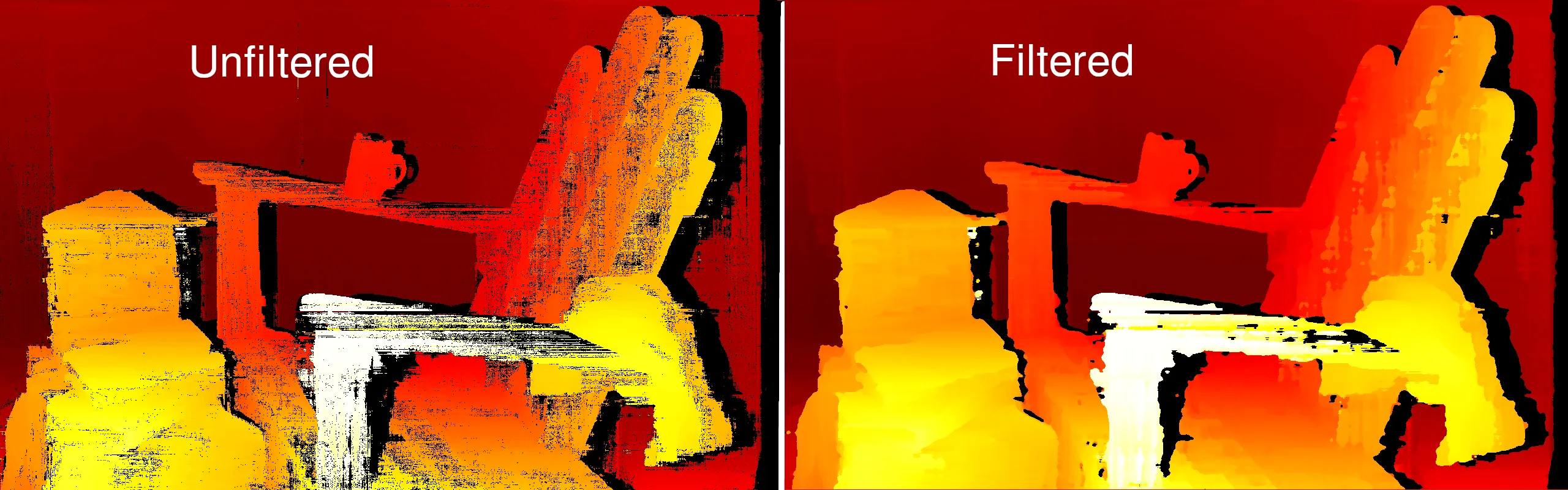
深度滤波器
中值滤波
class
depthai.StereoDepthConfig.MedianFilter
variable
variable
variable
variable
variable
method
method
method
method
method
method
method
method
method
method
property
property
斑点滤波
class
depthai.StereoDepthConfig.PostProcessing.SpeckleFilter
method
property
differenceThreshold
Maximum difference between neighbor disparity pixels to put them into the same blob. Units in disparity integer levels.
method
property
enable
Whether to enable or disable the filter.
method
property
speckleRange
Speckle search range.
method
时间滤波
class
depthai.StereoDepthConfig.PostProcessing.TemporalFilter
class
PersistencyMode
Persistency algorithm type. Members: PERSISTENCY_OFF : VALID_8_OUT_OF_8 : VALID_2_IN_LAST_3 : VALID_2_IN_LAST_4 : VALID_2_OUT_OF_8 : VALID_1_IN_LAST_2 : VALID_1_IN_LAST_5 : VALID_1_IN_LAST_8 : PERSISTENCY_INDEFINITELY :
method
property
alpha
The Alpha factor in an exponential moving average with Alpha=1 - no filter. Alpha = 0 - infinite filter. Determines the extent of the temporal history that should be averaged.
method
property
delta
Step-size boundary. Establishes the threshold used to preserve surfaces (edges). If the disparity value between neighboring pixels exceed the disparity threshold set by this delta parameter, then filtering will be temporarily disabled. Default value 0 means auto: 3 disparity integer levels. In case of subpixel mode it's 3*number of subpixel levels.
method
property
enable
Whether to enable or disable the filter.
method
property
persistencyMode
Persistency mode. If the current disparity/depth value is invalid, it will be replaced by an older value, based on persistency mode.
method
class
depthai.StereoDepthConfig.PostProcessing.TemporalFilter.PersistencyMode
variable
variable
PERSISTENCY_OFF: typing.ClassVar[RawStereoDepthConfig.PostProcessing.TemporalFilter.PersistencyMode]
variable
variable
variable
variable
variable
variable
variable
variable
method
method
method
method
method
method
method
method
method
method
property
property
空间滤波
class
depthai.StereoDepthConfig.PostProcessing.SpatialFilter
method
property
alpha
The Alpha factor in an exponential moving average with Alpha=1 - no filter. Alpha = 0 - infinite filter. Determines the amount of smoothing.
method
property
delta
Step-size boundary. Establishes the threshold used to preserve "edges". If the disparity value between neighboring pixels exceed the disparity threshold set by this delta parameter, then filtering will be temporarily disabled. Default value 0 means auto: 3 disparity integer levels. In case of subpixel mode it's 3*number of subpixel levels.
method
property
enable
Whether to enable or disable the filter.
method
property
holeFillingRadius
An in-place heuristic symmetric hole-filling mode applied horizontally during the filter passes. Intended to rectify minor artefacts with minimal performance impact. Search radius for hole filling.
method
property
numIterations
Number of iterations over the image in both horizontal and vertical direction.
method
阈值滤波
Python
1class ThresholdFilter:
2'''
3    空间边缘保持滤波将使用有效的相邻深度像素填充无效的深度像素。
4    它执行一系列一维水平和垂直传递或迭代,以增强重建数据的平滑度。它基于[这篇研究论文](https://www.inf.ufrgs.br/~eslgastal/DomainTransform/)。
5'''
类似示例:
设置
Command Line
1git clone https://github.com/luxonis/depthai-python.git
2cd depthai-python/examples
3python3 install_requirements.py源代码
Python
PythonGitHub
1#!/usr/bin/env python3
2
3import cv2
4import depthai as dai
5import numpy as np
6
7# Closer-in minimum depth, disparity range is doubled (from 95 to 190):
8extended_disparity = False
9# Better accuracy for longer distance, fractional disparity 32-levels:
10subpixel = False
11# Better handling for occlusions:
12lr_check = True
13
14# Create pipeline
15pipeline = dai.Pipeline()
16
17# Define sources and outputs
18monoLeft = pipeline.create(dai.node.MonoCamera)
19monoRight = pipeline.create(dai.node.MonoCamera)
20depth = pipeline.create(dai.node.StereoDepth)
21xout = pipeline.create(dai.node.XLinkOut)
22
23xout.setStreamName("disparity")
24
25# Properties
26monoLeft.setResolution(dai.MonoCameraProperties.SensorResolution.THE_400_P)
27monoLeft.setCamera("left")
28monoRight.setResolution(dai.MonoCameraProperties.SensorResolution.THE_400_P)
29monoRight.setCamera("right")
30
31# Create a node that will produce the depth map (using disparity output as it's easier to visualize depth this way)
32depth.setDefaultProfilePreset(dai.node.StereoDepth.PresetMode.HIGH_DENSITY)
33# Options: MEDIAN_OFF, KERNEL_3x3, KERNEL_5x5, KERNEL_7x7 (default)
34depth.initialConfig.setMedianFilter(dai.MedianFilter.KERNEL_7x7)
35depth.setLeftRightCheck(lr_check)
36depth.setExtendedDisparity(extended_disparity)
37depth.setSubpixel(subpixel)
38
39config = depth.initialConfig.get()
40config.postProcessing.speckleFilter.enable = False
41config.postProcessing.speckleFilter.speckleRange = 50
42config.postProcessing.temporalFilter.enable = True
43config.postProcessing.spatialFilter.enable = True
44config.postProcessing.spatialFilter.holeFillingRadius = 2
45config.postProcessing.spatialFilter.numIterations = 1
46config.postProcessing.thresholdFilter.minRange = 400
47config.postProcessing.thresholdFilter.maxRange = 15000
48config.postProcessing.decimationFilter.decimationFactor = 1
49depth.initialConfig.set(config)
50
51# Linking
52monoLeft.out.link(depth.left)
53monoRight.out.link(depth.right)
54depth.disparity.link(xout.input)
55
56# Connect to device and start pipeline
57with dai.Device(pipeline) as device:
58
59    # Output queue will be used to get the disparity frames from the outputs defined above
60    q = device.getOutputQueue(name="disparity", maxSize=4, blocking=False)
61
62    while True:
63        inDisparity = q.get()  # blocking call, will wait until a new data has arrived
64        frame = inDisparity.getFrame()
65        # Normalization for better visualization
66        frame = (frame * (255 / depth.initialConfig.getMaxDisparity())).astype(np.uint8)
67
68        cv2.imshow("disparity", frame)
69
70        # Available color maps: https://docs.opencv.org/3.4/d3/d50/group__imgproc__colormap.html
71        frame = cv2.applyColorMap(frame, cv2.COLORMAP_JET)
72        cv2.imshow("disparity_color", frame)
73
74        if cv2.waitKey(1) == ord('q'):
75 break流水线
需要帮助?
请前往 Discussion Forum 获取技术支持或提出您可能有的任何其他问题。