DepthAI v2 has been superseded by DepthAI v3. You are viewing legacy documentation.
此页面由 AI 自动翻译。查看英文原版
DepthAI 教程
DepthAI API 参考

本页目录

  • 演示
  • 设置
  • 源代码
  • 工作原理

深度与视频同步

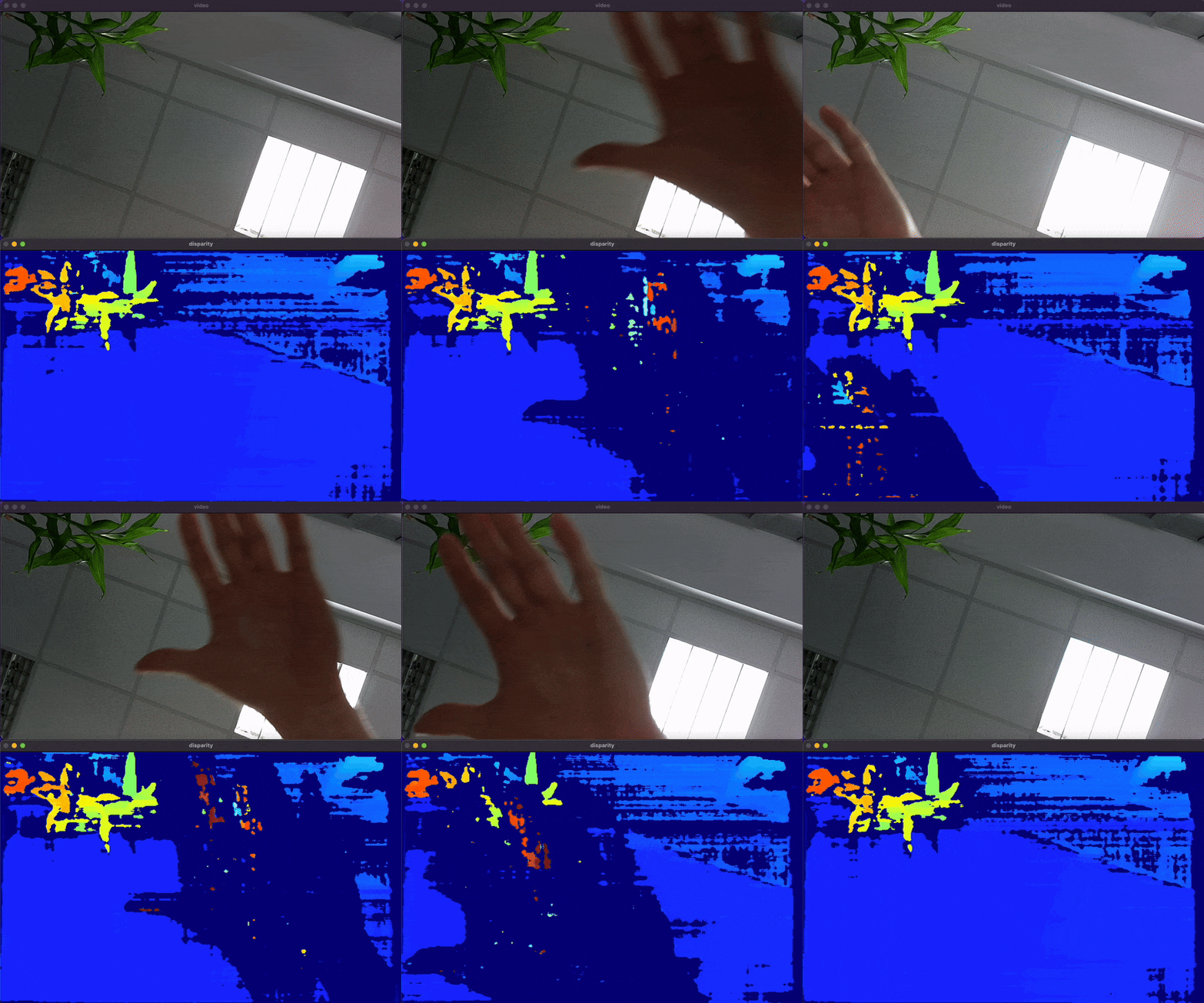
此示例演示了如何使用 DepthAI Sync 节点来同步 StereoDepth 和 Color Camera 节点的输出。它展示了如何实时处理和显示来自立体声摄像机的视差图以及来自彩色摄像机的视频帧。

类似示例

演示

深度与视频同步演示

设置

请运行 安装脚本 以下载所有必需的依赖项。请注意,此脚本必须在 git 上下文中运行,因此您必须先下载 depthai-python 存储库,然后运行脚本
Command Line
1git clone https://github.com/luxonis/depthai-python.git
2cd depthai-python/examples
3python3 install_requirements.py
有关更多信息,请遵循 安装指南

源代码

Python

Python
GitHub
1import depthai as dai
2import numpy as np
3import cv2
4from datetime import timedelta
5
6pipeline = dai.Pipeline()
7
8monoLeft = pipeline.create(dai.node.MonoCamera)
9monoRight = pipeline.create(dai.node.MonoCamera)
10color = pipeline.create(dai.node.ColorCamera)
11stereo = pipeline.create(dai.node.StereoDepth)
12sync = pipeline.create(dai.node.Sync)
13
14xoutGrp = pipeline.create(dai.node.XLinkOut)
15
16xoutGrp.setStreamName("xout")
17
18monoLeft.setResolution(dai.MonoCameraProperties.SensorResolution.THE_400_P)
19monoLeft.setCamera("left")
20monoRight.setResolution(dai.MonoCameraProperties.SensorResolution.THE_400_P)
21monoRight.setCamera("right")
22
23stereo.setDefaultProfilePreset(dai.node.StereoDepth.PresetMode.HIGH_ACCURACY)
24
25color.setCamera("color")
26
27sync.setSyncThreshold(timedelta(milliseconds=50))
28
29monoLeft.out.link(stereo.left)
30monoRight.out.link(stereo.right)
31
32stereo.disparity.link(sync.inputs["disparity"])
33color.video.link(sync.inputs["video"])
34
35sync.out.link(xoutGrp.input)
36
37disparityMultiplier = 255.0 / stereo.initialConfig.getMaxDisparity()
38with dai.Device(pipeline) as device:
39    queue = device.getOutputQueue("xout", 10, False)
40    while True:
41        msgGrp = queue.get()
42        for name, msg in msgGrp:
43            frame = msg.getCvFrame()
44            if name == "disparity":
45                frame = (frame * disparityMultiplier).astype(np.uint8)
46                frame = cv2.applyColorMap(frame, cv2.COLORMAP_JET)
47            cv2.imshow(name, frame)
48        if cv2.waitKey(1) == ord("q"):
49            break

C++

1#include <iostream>
2
3// Includes common necessary includes for development using depthai library
4#include "depthai/depthai.hpp"
5
6int main() {
7    // Create pipeline
8    dai::Pipeline pipeline;
9
10    // Define sources and outputs
11    auto monoLeft = pipeline.create<dai::node::MonoCamera>();
12    auto monoRight = pipeline.create<dai::node::MonoCamera>();
13    auto color = pipeline.create<dai::node::ColorCamera>();
14    auto stereo = pipeline.create<dai::node::StereoDepth>();
15    auto sync = pipeline.create<dai::node::Sync>();
16
17    auto xoutGrp = pipeline.create<dai::node::XLinkOut>();
18
19    // XLinkOut
20    xoutGrp->setStreamName("xout");
21
22    // Properties
23    monoLeft->setResolution(dai::MonoCameraProperties::SensorResolution::THE_400_P);
24    monoLeft->setCamera("left");
25    monoRight->setResolution(dai::MonoCameraProperties::SensorResolution::THE_400_P);
26    monoRight->setCamera("right");
27
28    stereo->setDefaultProfilePreset(dai::node::StereoDepth::PresetMode::HIGH_ACCURACY);
29
30    color->setCamera("color");
31
32    sync->setSyncThreshold(std::chrono::milliseconds(100));
33
34    // Linking
35    monoLeft->out.link(stereo->left);
36    monoRight->out.link(stereo->right);
37
38    stereo->disparity.link(sync->inputs["disparity"]);
39    color->video.link(sync->inputs["video"]);
40
41    sync->out.link(xoutGrp->input);
42
43    // Connect to device and start pipeline
44    dai::Device device(pipeline);
45
46    auto queue = device.getOutputQueue("xout", 10, true);
47
48    float disparityMultiplier = 255 / stereo->initialConfig.getMaxDisparity();
49
50    while(true) {
51        auto msgGrp = queue->get<dai::MessageGroup>();
52        for(auto& frm : *msgGrp) {
53            auto imgFrm = std::dynamic_pointer_cast<dai::ImgFrame>(frm.second);
54            cv::Mat img = imgFrm->getCvFrame();
55            if(frm.first == "disparity") {
56                img.convertTo(img, CV_8UC1, disparityMultiplier);  // Extend disparity range
57                cv::applyColorMap(img, img, cv::COLORMAP_JET);
58            }
59            cv::imshow(frm.first, img);
60        }
61
62        int key = cv::waitKey(1);
63        if(key == 'q' || key == 'Q') {
64            return 0;
65        }
66    }
67    return 0;
68}

工作原理

  • 初始化左右摄像机的 MonoCamera 节点。
  • 设置 ColorCamera 节点。
  • 创建一个 StereoDepth 节点以进行深度感知。
  • 配置 Sync 节点以同步来自 StereoDepth 节点的视差和来自 ColorCamera 节点的视频帧。
  • 使用 OpenCV 显示同步后的帧。帧同步阈值为 50 毫秒。

需要帮助?

请前往 Discussion Forum 获取技术支持或提出您可能有的任何其他问题。