DepthAI v2 has been superseded by DepthAI v3. You are viewing legacy documentation.
此页面由 AI 自动翻译。查看英文原版
DepthAI 教程
DepthAI API 参考

本页目录

  • 演示
  • 设置
  • 源代码
  • 管道

热成像相机

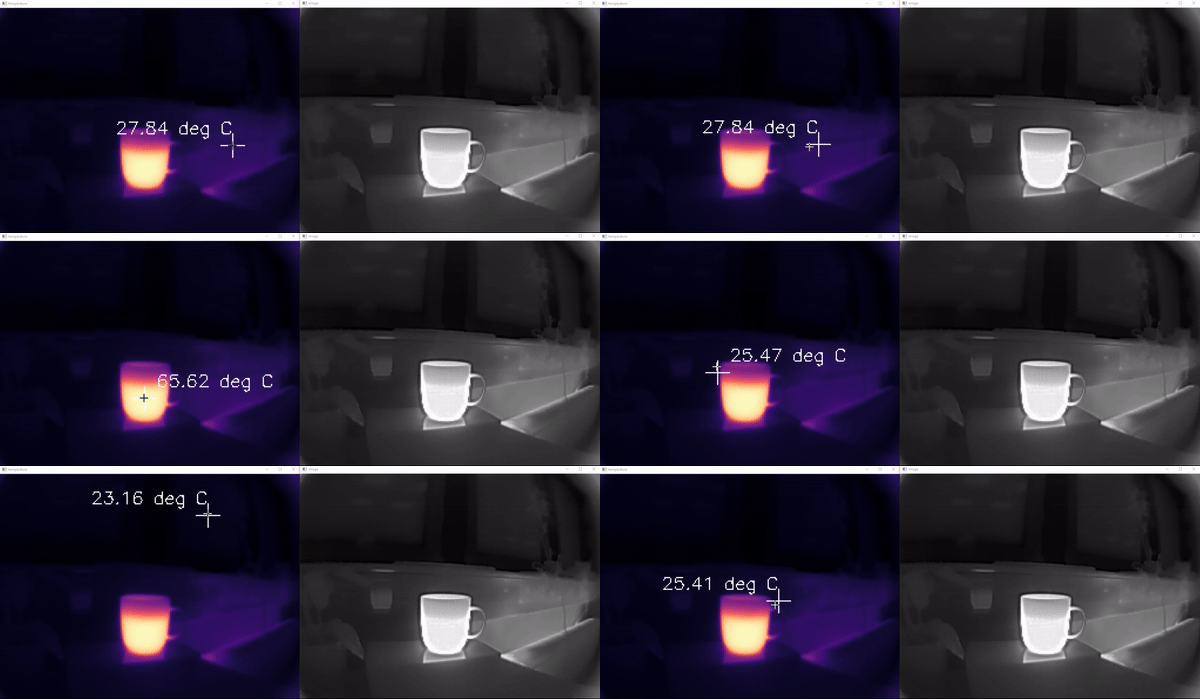
本示例演示了如何使用热成像相机显示带有颜色映射的原始温度数据以及实时 RGB 热成像视频。它包括鼠标交互以显示光标处的温度,结合了数据处理、可视化和用户交互,适用于热成像应用。

演示

热成像相机演示

设置

请运行 安装脚本 以下载所有必需的依赖项。请注意,此脚本必须在 git 上下文中运行,因此您必须先下载 depthai-python 存储库,然后运行脚本
Command Line
1git clone https://github.com/luxonis/depthai-python.git
2cd depthai-python/examples
3python3 install_requirements.py
有关更多信息,请遵循 安装指南

源代码

Python

Python
GitHub
1#!/usr/bin/env python3
2
3import depthai as dai
4import cv2
5import numpy as np
6
7mouseX, mouseY = 0, 0
8
9
10def onMouse(event, x, y, *args):
11    global mouseX, mouseY
12    mouseX = x
13    mouseY = y
14
15
16device = dai.Device()
17pipeline = dai.Pipeline()
18
19# Thermal camera
20thermalCam = pipeline.create(dai.node.Camera)
21thermalCam.setFps(25) # Limit to 25 to match what the sensor can do, capped even if left at default, but warns.
22width, height = -1, -1
23thermalFound = False
24for features in device.getConnectedCameraFeatures():
25    if dai.CameraSensorType.THERMAL in features.supportedTypes:
26        thermalFound = True
27        thermalCam.setBoardSocket(features.socket)
28        width, height = features.width, features.height
29        break
30if not thermalFound:
31    raise RuntimeError("No thermal camera found!")
32thermalCam.setPreviewSize(width, height)
33
34# Output raw: FP16 temperature data (degrees Celsius)
35xoutRaw = pipeline.create(dai.node.XLinkOut)
36xoutRaw.setStreamName("thermal_raw")
37thermalCam.raw.link(xoutRaw.input)
38
39# Output preview,video, isp: RGB or NV12 or YUV420 thermal image.
40xoutImage = pipeline.create(dai.node.XLinkOut)
41xoutImage.setStreamName("image")
42thermalCam.preview.link(xoutImage.input)
43device.startPipeline(pipeline)
44
45qRaw = device.getOutputQueue("thermal_raw", 2, False)
46qImage = device.getOutputQueue("image", 2, False)
47
48
49RAW_WINDOW_NAME = "temperature"
50IMAGE_WINDOW_NAME = "image"
51# Scale 4x and position one next to another
52cv2.namedWindow(RAW_WINDOW_NAME, cv2.WINDOW_NORMAL)
53cv2.namedWindow(IMAGE_WINDOW_NAME, cv2.WINDOW_NORMAL)
54cv2.moveWindow(RAW_WINDOW_NAME, 0, 0)
55cv2.resizeWindow(RAW_WINDOW_NAME, width * 4, height * 4)
56cv2.moveWindow(IMAGE_WINDOW_NAME, width * 4, 0)
57cv2.resizeWindow(IMAGE_WINDOW_NAME, width * 4, height * 4)
58cv2.setMouseCallback(RAW_WINDOW_NAME, onMouse)
59cv2.setMouseCallback(IMAGE_WINDOW_NAME, onMouse)
60
61while True:
62    inRaw = qRaw.get()
63    inImg = qImage.get()
64
65    # Retrieve one point of fp16 data
66    frame = inRaw.getCvFrame().astype(np.float32)
67    colormappedFrame = cv2.normalize(frame, None, 0, 255, cv2.NORM_MINMAX, cv2.CV_8U)
68    colormappedFrame = cv2.applyColorMap(colormappedFrame, cv2.COLORMAP_MAGMA)
69    if (
70        mouseX < 0
71        or mouseY < 0
72        or mouseX >= frame.shape[1]
73        or mouseY >= frame.shape[0]
74    ):
75        mouseX = max(0, min(mouseX, frame.shape[1] - 1))
76        mouseY = max(0, min(mouseY, frame.shape[0] - 1))
77    textColor = (255, 255, 255)
78    # Draw crosshair
79    cv2.line(
80        colormappedFrame,
81        (mouseX - 10, mouseY),
82        (mouseX + 10, mouseY),
83        textColor,
84        1,
85    )
86    cv2.line(
87        colormappedFrame,
88        (mouseX, mouseY - 10),
89        (mouseX, mouseY + 10),
90        textColor,
91        1,
92    )
93    # Draw deg C
94    text = f"{frame[mouseY, mouseX]:.2f} deg C"
95    putTextLeft = mouseX > colormappedFrame.shape[1] / 2
96    cv2.putText(
97        colormappedFrame,
98        text,
99        (mouseX - 100 if putTextLeft else mouseX + 10, mouseY - 10),
100        cv2.FONT_HERSHEY_SIMPLEX,
101        0.5,
102        textColor,
103        1,
104    )
105    cv2.imshow(RAW_WINDOW_NAME, colormappedFrame)
106
107    cv2.imshow(IMAGE_WINDOW_NAME, inImg.getCvFrame())
108
109    if cv2.waitKey(1) == ord("q"):
110        break

C++

1/*
2    Thermal camera example.
3    Streams temperature and thermal image from thermal sensor and displays them.
4*/
5#include <algorithm>
6#include <cstdio>
7
8#include "depthai/depthai.hpp"
9
10volatile int mouseX, mouseY = 0;
11void mouseCallback(int event, int x, int y, int flags, void* userdata) {
12    mouseX = x;
13    mouseY = y;
14}
15
16const cv::Scalar WHITE(255, 255, 255);
17
18int main() {
19    dai::Device d;
20    dai::Pipeline pipeline;
21    auto thermal = pipeline.create<dai::node::Camera>();
22    // Find the sensor width, height.
23    int width, height;
24    bool thermal_found = false;
25    for(auto& features : d.getConnectedCameraFeatures()) {
26        if(std::find_if(features.supportedTypes.begin(),
27                        features.supportedTypes.end(),
28                        [](const dai::CameraSensorType& type) { return type == dai::CameraSensorType::THERMAL; })
29           != features.supportedTypes.end()) {
30            thermal->setBoardSocket(features.socket);  // Thermal will always be on CAM_E
31            width = features.width;
32            height = features.height;
33            thermal_found = true;
34        }
35    }
36    if(!thermal_found) {
37        throw std::runtime_error("Thermal camera not found!");
38    }
39    thermal->setPreviewSize(width, height);
40    auto xlink = pipeline.create<dai::node::XLinkOut>();
41    auto xlinkRaw = pipeline.create<dai::node::XLinkOut>();
42    // Output preview,video, isp: RGB or NV12 or YUV420 thermal image.
43    thermal->preview.link(xlink->input);
44    // Output raw: FP16 temperature data (degrees Celsius)
45    thermal->raw.link(xlinkRaw->input);
46
47    xlinkRaw->setStreamName("thermal_raw");
48    xlink->setStreamName("thermal");
49    d.startPipeline(pipeline);
50    auto q = d.getOutputQueue("thermal", 2, false);
51    auto qRaw = d.getOutputQueue("thermal_raw", 2, false);
52
53    const char* tempWindow = "temperature";
54    const char* imageWindow = "image";
55    cv::namedWindow(tempWindow, cv::WINDOW_NORMAL);
56    cv::setMouseCallback(tempWindow, mouseCallback);
57    cv::namedWindow(imageWindow, cv::WINDOW_NORMAL);
58    cv::setMouseCallback(imageWindow, mouseCallback);
59    // Scale 4x and position one next to another
60    cv::moveWindow(tempWindow, 0, 0);
61    cv::resizeWindow(tempWindow, width * 4, height * 4);
62    cv::moveWindow(imageWindow, width * 4, 0);
63    cv::resizeWindow(imageWindow, width * 4, height * 4);
64    while(true) {
65        auto temp = qRaw->tryGet<dai::ImgFrame>();
66        if(temp) {
67            auto frame = temp->getCvFrame();
68            // Retrieve one point of fp16 data
69            cv::Mat frameFp32(temp->getHeight(), temp->getWidth(), CV_32F);
70            frame.convertTo(frameFp32, CV_32F);
71            cv::Mat normalized;
72            cv::normalize(frameFp32, normalized, 0, 255, cv::NORM_MINMAX, CV_8UC1);
73            cv::Mat colormapped(temp->getHeight(), temp->getWidth(), CV_8UC3);
74            cv::applyColorMap(normalized, colormapped, cv::COLORMAP_MAGMA);
75            if(mouseX < 0 || mouseY < 0 || mouseX >= colormapped.cols || mouseY >= colormapped.rows) {
76                mouseX = std::max(0, std::min(static_cast<int>(mouseX), colormapped.cols - 1));
77                mouseY = std::max(0, std::min(static_cast<int>(mouseY), colormapped.rows - 1));
78            }
79            double min, max;
80            cv::minMaxLoc(frameFp32, &min, &max);
81            auto textColor = WHITE;
82            // Draw crosshair
83            cv::line(colormapped, cv::Point(mouseX - 10, mouseY), cv::Point(mouseX + 10, mouseY), textColor, 1);
84            cv::line(colormapped, cv::Point(mouseX, mouseY - 10), cv::Point(mouseX, mouseY + 10), textColor, 1);
85            // Draw deg C
86            char text[32];
87            snprintf(text, sizeof(text), "%.1f deg C", frameFp32.at<float>(mouseY, mouseX));
88            bool putTextLeft = mouseX > colormapped.cols / 2;
89            cv::putText(colormapped, text, cv::Point(putTextLeft ? mouseX - 100 : mouseX + 10, mouseY - 10), cv::FONT_HERSHEY_SIMPLEX, 0.5, textColor, 1);
90            cv::imshow(tempWindow, colormapped);
91        }
92        auto image = q->tryGet<dai::ImgFrame>();
93        if(image) {
94            cv::imshow(imageWindow, image->getCvFrame());
95        }
96        int key = cv::waitKey(1);
97        if(key == 'q') {
98            break;
99        }
100    }
101
102    return 0;
103}

管道

需要帮助?

请前往 Discussion Forum 获取技术支持或提出您可能有的任何其他问题。