DepthAI v2 has been superseded by DepthAI v3. You are viewing legacy documentation.
此页面由 AI 自动翻译。查看英文原版
DepthAI 教程
DepthAI API 参考

本页目录

  • 演示
  • 设置
  • 源代码
  • Pipeline

多个设备

对于许多应用程序来说,同时运行多个 OAK 摄像头非常有用,因为更多的摄像头可以感知(周围的世界)更多。例如:
  • Box measurement 应用,来自多个不同视角的多个摄像头可以提供更好的尺寸估算
  • People counter/tracker 应用,多个摄像头可以统计/跟踪大区域内的人员(例如购物中心)
  • 将多个摄像头安装在机器人的前/后/左/右侧,实现全 360° 视野,这样您的机器人就可以感知周围的整个区域,而无论其位置如何
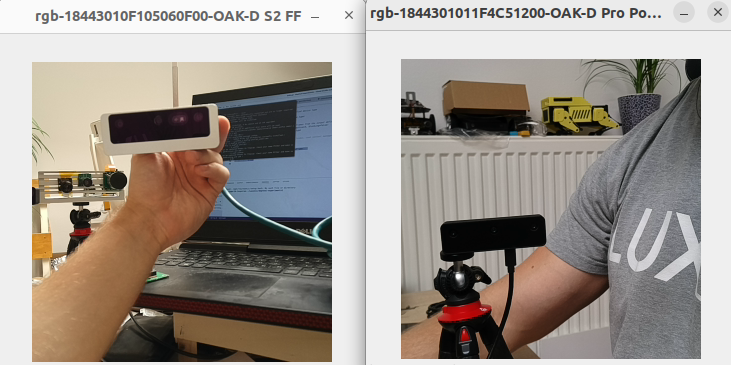
本示例展示了如何在单个主机上使用多个 OAK 摄像头。该演示将查找连接到主机的所有设备 并显示每个摄像头的 RGB 预览。一个用于从多个摄像头进行对象检测的演示应用程序可以在 此处找到。

演示

https://user-images.githubusercontent.com/18037362/185141173-5fe8708f-8a35-463d-8be3-66251f31d14f.png
Command Line
1Connected to  18443010F105060F00
2        >>> MXID: 18443010F105060F00
3        >>> Num of cameras: 3
4        >>> USB speed: UsbSpeed.SUPER
5        >>> Board name: DM9098
6        >>> Product name: OAK-D S2 FF
7    Connected to  1844301011F4C51200
8        >>> MXID: 1844301011F4C51200
9        >>> Num of cameras: 3
10        >>> USB speed: UsbSpeed.UNKNOWN
11        >>> Board name: NG9097
12        >>> Product name: OAK-D Pro PoE AF

设置

请运行 安装脚本 以下载所有必需的依赖项。请注意,此脚本必须在 git 上下文中运行,因此您必须先下载 depthai-python 存储库,然后运行脚本
Command Line
1git clone https://github.com/luxonis/depthai-python.git
2cd depthai-python/examples
3python3 install_requirements.py
有关更多信息,请遵循 安装指南

源代码

Python

Python
GitHub
1#!/usr/bin/env python3
2
3import cv2
4import depthai as dai
5import contextlib
6
7def createPipeline():
8    # Start defining a pipeline
9    pipeline = dai.Pipeline()
10    # Define a source - color camera
11    camRgb = pipeline.create(dai.node.ColorCamera)
12
13    camRgb.setPreviewSize(300, 300)
14    camRgb.setBoardSocket(dai.CameraBoardSocket.CAM_A)
15    camRgb.setResolution(dai.ColorCameraProperties.SensorResolution.THE_1080_P)
16    camRgb.setInterleaved(False)
17
18    # Create output
19    xoutRgb = pipeline.create(dai.node.XLinkOut)
20    xoutRgb.setStreamName("rgb")
21    camRgb.preview.link(xoutRgb.input)
22
23    return pipeline
24
25
26with contextlib.ExitStack() as stack:
27    deviceInfos = dai.Device.getAllAvailableDevices()
28    usbSpeed = dai.UsbSpeed.SUPER
29    openVinoVersion = dai.OpenVINO.Version.VERSION_2021_4
30
31    qRgbMap = []
32    devices = []
33
34    for deviceInfo in deviceInfos:
35        deviceInfo: dai.DeviceInfo
36        device: dai.Device = stack.enter_context(dai.Device(openVinoVersion, deviceInfo, usbSpeed))
37        devices.append(device)
38        print("===Connected to ", deviceInfo.getMxId())
39        mxId = device.getMxId()
40        cameras = device.getConnectedCameras()
41        usbSpeed = device.getUsbSpeed()
42        eepromData = device.readCalibration2().getEepromData()
43        print("   >>> MXID:", mxId)
44        print("   >>> Num of cameras:", len(cameras))
45        print("   >>> USB speed:", usbSpeed)
46        if eepromData.boardName != "":
47            print("   >>> Board name:", eepromData.boardName)
48        if eepromData.productName != "":
49            print("   >>> Product name:", eepromData.productName)
50
51        pipeline = createPipeline()
52        device.startPipeline(pipeline)
53
54        # Output queue will be used to get the rgb frames from the output defined above
55        q_rgb = device.getOutputQueue(name="rgb", maxSize=4, blocking=False)
56        stream_name = "rgb-" + mxId + "-" + eepromData.productName
57        qRgbMap.append((q_rgb, stream_name))
58
59    while True:
60        for q_rgb, stream_name in qRgbMap:
61            if q_rgb.has():
62                cv2.imshow(stream_name, q_rgb.get().getCvFrame())
63
64        if cv2.waitKey(1) == ord('q'):
65            break

C++

1#include <chrono>
2#include <iostream>
3
4// Includes common necessary includes for development using depthai library
5#include "depthai/depthai.hpp"
6
7std::shared_ptr<dai::Pipeline> createPipeline() {
8    // Start defining a pipeline
9    auto pipeline = std::make_shared<dai::Pipeline>();
10    // Define a source - color camera
11    auto camRgb = pipeline->create<dai::node::ColorCamera>();
12
13    camRgb->setPreviewSize(300, 300);
14    camRgb->setBoardSocket(dai::CameraBoardSocket::CAM_A);
15    camRgb->setResolution(dai::ColorCameraProperties::SensorResolution::THE_1080_P);
16    camRgb->setInterleaved(false);
17
18    // Create output
19    auto xoutRgb = pipeline->create<dai::node::XLinkOut>();
20    xoutRgb->setStreamName("rgb");
21    camRgb->preview.link(xoutRgb->input);
22
23    return pipeline;
24}
25
26int main(int argc, char** argv) {
27    auto deviceInfoVec = dai::Device::getAllAvailableDevices();
28    const auto usbSpeed = dai::UsbSpeed::SUPER;
29    auto openVinoVersion = dai::OpenVINO::Version::VERSION_2021_4;
30
31    std::map<std::string, std::shared_ptr<dai::DataOutputQueue>> qRgbMap;
32    std::vector<std::shared_ptr<dai::Device>> devices;
33
34    for(auto& deviceInfo : deviceInfoVec) {
35        auto device = std::make_shared<dai::Device>(openVinoVersion, deviceInfo, usbSpeed);
36        devices.push_back(device);
37        std::cout << "===Connected to " << deviceInfo.getMxId() << std::endl;
38        auto mxId = device->getMxId();
39        auto cameras = device->getConnectedCameras();
40        auto usbSpeed = device->getUsbSpeed();
41        auto eepromData = device->readCalibration2().getEepromData();
42        std::cout << "   >>> MXID:" << mxId << std::endl;
43        std::cout << "   >>> Num of cameras:" << cameras.size() << std::endl;
44        std::cout << "   >>> USB speed:" << usbSpeed << std::endl;
45        if(eepromData.boardName != "") {
46            std::cout << "   >>> Board name:" << eepromData.boardName << std::endl;
47        }
48        if(eepromData.productName != "") {
49            std::cout << "   >>> Product name:" << eepromData.productName << std::endl;
50        }
51        auto pipeline = createPipeline();
52        device->startPipeline(*pipeline);
53
54        auto qRgb = device->getOutputQueue("rgb", 4, false);
55        std::string streamName = "rgb-" + eepromData.productName + mxId;
56        qRgbMap.insert({streamName, qRgb});
57    }
58    while(true) {
59        for(auto& element : qRgbMap) {
60            auto qRgb = element.second;
61            auto streamName = element.first;
62            auto inRgb = qRgb->tryGet<dai::ImgFrame>();
63            if(inRgb != nullptr) {
64                cv::imshow(streamName, inRgb->getCvFrame());
65            }
66        }
67
68        int key = cv::waitKey(1);
69        if(key == 'q' || key == 'Q') {
70            return 0;
71        }
72    }
73    return 0;
74}

Pipeline

需要帮助?

请前往 Discussion Forum 获取技术支持或提出您可能有的任何其他问题。