RGB 场景
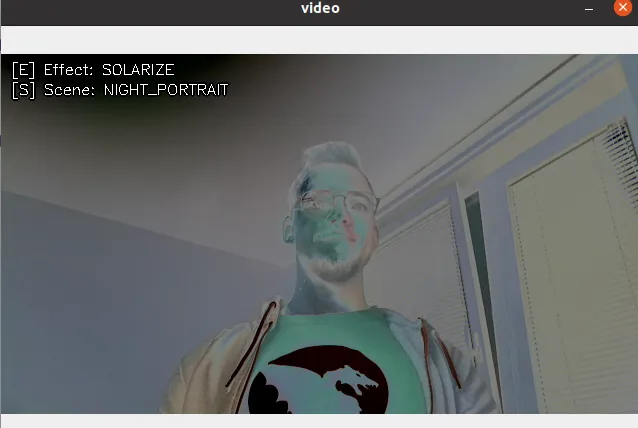
s将在可用场景之间切换e将在可用效果之间切换(目前不可用)
演示
设置
Command Line
1git clone https://github.com/luxonis/depthai-python.git
2cd depthai-python/examples
3python3 install_requirements.py源代码
Python
PythonGitHub
1#!/usr/bin/env python3
2
3import cv2
4import depthai as dai
5from itertools import cycle
6
7scenes = cycle([item for name, item in vars(dai.RawCameraControl.SceneMode).items() if name != "UNSUPPORTED" and name.isupper()])
8effects = cycle([item for name, item in vars(dai.RawCameraControl.EffectMode).items() if name.isupper()])
9curr_scene = "OFF"
10curr_effect = "OFF"
11
12# Create pipeline
13pipeline = dai.Pipeline()
14
15camRgb = pipeline.create(dai.node.ColorCamera)
16camRgb.setIspScale(1,3)
17
18xoutRgb = pipeline.create(dai.node.XLinkOut)
19xoutRgb.setStreamName("video")
20camRgb.video.link(xoutRgb.input)
21
22camControlIn = pipeline.create(dai.node.XLinkIn)
23camControlIn.setStreamName("camControl")
24camControlIn.out.link(camRgb.inputControl)
25
26# Connect to device and start pipeline
27with dai.Device(pipeline) as device:
28    videoQ = device.getOutputQueue(name="video", maxSize=4, blocking=False)
29    ctrlQ = device.getInputQueue(name="camControl")
30
31    def putText(frame, text, coords):
32        cv2.putText(frame, text, coords, cv2.FONT_HERSHEY_SIMPLEX, 0.5, (0, 0, 0), 4)
33        cv2.putText(frame, text, coords, cv2.FONT_HERSHEY_SIMPLEX, 0.5, (255, 255, 255), 1)
34
35    while True:
36        videoIn = videoQ.tryGet()
37        if videoIn is not None:
38            frame = videoIn.getCvFrame()
39            putText(frame, f"[E] Effect: {curr_effect}", (10, 20))
40            putText(frame, f"[S] Scene: {curr_scene}", (10, 40))
41            cv2.imshow("video", frame)
42
43        key = cv2.waitKey(1)
44        if key == ord('e') or key == ord('E'):
45            effect = next(effects)
46            print("Switching colorCamera effect:", str(effect))
47            curr_effect = str(effect).lstrip("EffectMode.")
48            cfg = dai.CameraControl()
49            cfg.setEffectMode(effect)
50            ctrlQ.send(cfg)
51        # Scene currently doesn't work
52        elif key == ord('s') or key == ord('S'):
53            scene = next(scenes)
54            print("Currently doesn't work! Switching colorCamera Scene:", str(scene))
55            curr_scene = str(scene).lstrip("SceneMode.")
56            cfg = dai.CameraControl()
57            cfg.setSceneMode(scene)
58            ctrlQ.send(cfg)
59        elif key == ord('q'):
60            break
管道
需要帮助?
请前往 Discussion Forum 获取技术支持或提出您可能有的任何其他问题。