DepthAI v2 has been superseded by DepthAI v3. You are viewing legacy documentation.
此页面由 AI 自动翻译。查看英文原版
DepthAI 教程
DepthAI API 参考

本页目录

  • 演示
  • 设置
  • 源代码
  • 管道

RGB-左对齐

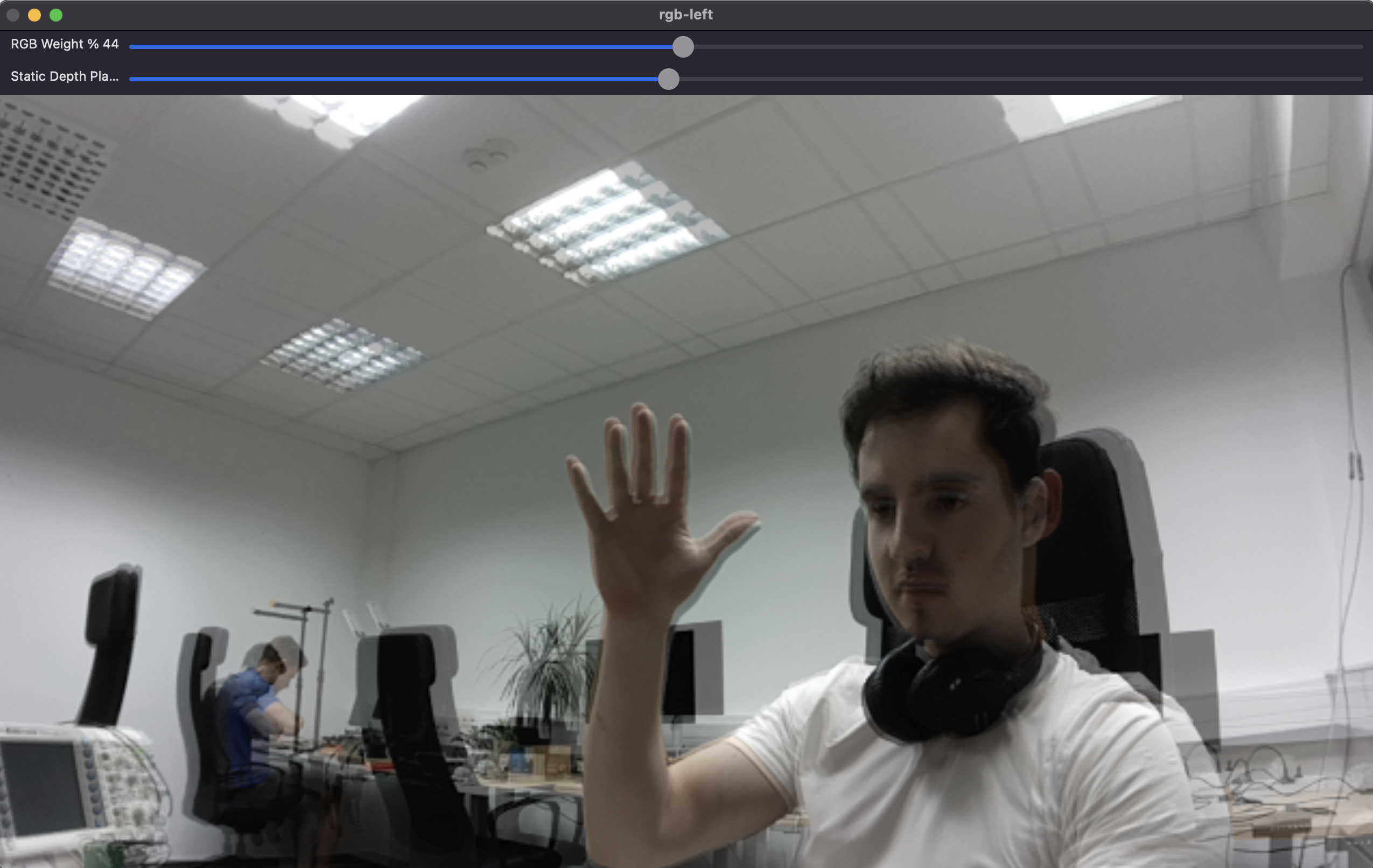
本示例演示了如何将来自左摄像机的深度信息对齐到 RGB 摄像机。这对于需要叠加或比较深度和颜色数据的应用程序特别有用。将创建一个 OpenCV 窗口来显示 RGB 和对齐的深度数据的混合图像。提供了滑块来调整混合比例和静态深度平面。

演示

RGB-左对齐演示

设置

请运行 安装脚本 以下载所有必需的依赖项。请注意,此脚本必须在 git 上下文中运行,因此您必须先下载 depthai-python 存储库,然后运行脚本
Command Line
1git clone https://github.com/luxonis/depthai-python.git
2cd depthai-python/examples
3python3 install_requirements.py
有关更多信息,请遵循 安装指南

源代码

Python

Python
GitHub
1#!/usr/bin/env python3
2
3import cv2
4import depthai as dai
5from datetime import timedelta
6import numpy as np
7
8# This is an interactive example that shows how two frame sources without depth information.
9FPS = 30.0
10
11RGB_SOCKET = dai.CameraBoardSocket.CAM_A
12LEFT_SOCKET = dai.CameraBoardSocket.CAM_B
13ALIGN_SOCKET = LEFT_SOCKET
14
15COLOR_RESOLUTION = dai.ColorCameraProperties.SensorResolution.THE_1080_P
16LEFT_RIGHT_RESOLUTION = dai.MonoCameraProperties.SensorResolution.THE_720_P
17
18ISP_SCALE = 3
19
20device = dai.Device()
21
22calibrationHandler = device.readCalibration()
23rgbDistortion = calibrationHandler.getDistortionCoefficients(RGB_SOCKET)
24distortionModel = calibrationHandler.getDistortionModel(RGB_SOCKET)
25if distortionModel != dai.CameraModel.Perspective:
26    raise RuntimeError("Unsupported distortion model for RGB camera. This example supports only Perspective model.")
27
28pipeline = dai.Pipeline()
29
30# Define sources and outputs
31camRgb = pipeline.create(dai.node.ColorCamera)
32left = pipeline.create(dai.node.MonoCamera)
33sync = pipeline.create(dai.node.Sync)
34out = pipeline.create(dai.node.XLinkOut)
35align = pipeline.create(dai.node.ImageAlign)
36cfgIn = pipeline.create(dai.node.XLinkIn)
37
38left.setResolution(LEFT_RIGHT_RESOLUTION)
39left.setBoardSocket(LEFT_SOCKET)
40left.setFps(FPS)
41
42camRgb.setBoardSocket(RGB_SOCKET)
43camRgb.setResolution(COLOR_RESOLUTION)
44camRgb.setFps(FPS)
45camRgb.setIspScale(1, ISP_SCALE)
46
47out.setStreamName("out")
48
49sync.setSyncThreshold(timedelta(seconds=0.5 / FPS))
50
51cfgIn.setStreamName("config")
52
53cfg = align.initialConfig.get()
54staticDepthPlane = cfg.staticDepthPlane
55
56# Linking
57align.outputAligned.link(sync.inputs["aligned"])
58camRgb.isp.link(sync.inputs["rgb"])
59camRgb.isp.link(align.inputAlignTo)
60left.out.link(align.input)
61sync.out.link(out.input)
62cfgIn.out.link(align.inputConfig)
63
64
65rgbWeight = 0.4
66leftWeight = 0.6
67
68
69def updateBlendWeights(percentRgb):
70    """
71    Update the rgb and left weights used to blend rgb/left image
72
73    @param[in] percent_rgb The rgb weight expressed as a percentage (0..100)
74    """
75    global leftWeight
76    global rgbWeight
77    rgbWeight = float(percentRgb) / 100.0
78    leftWeight = 1.0 - rgbWeight
79
80def updateDepthPlane(depth):
81    global staticDepthPlane
82    staticDepthPlane = depth
83
84# Connect to device and start pipeline
85with device:
86    device.startPipeline(pipeline)
87    queue = device.getOutputQueue("out", 8, False)
88    cfgQ = device.getInputQueue("config")
89
90    # Configure windows; trackbar adjusts blending ratio of rgb/depth
91    windowName = "rgb-left"
92
93    # Set the window to be resizable and the initial size
94    cv2.namedWindow(windowName, cv2.WINDOW_NORMAL)
95    cv2.resizeWindow(windowName, 1280, 720)
96    cv2.createTrackbar(
97        "RGB Weight %",
98        windowName,
99        int(rgbWeight * 100),
100        100,
101        updateBlendWeights,
102    )
103    cv2.createTrackbar(
104        "Static Depth Plane [mm]",
105        windowName,
106        0,
107        2000,
108        updateDepthPlane,
109    )
110    while True:
111        messageGroup = queue.get()
112        assert isinstance(messageGroup, dai.MessageGroup)
113        frameRgb = messageGroup["rgb"]
114        assert isinstance(frameRgb, dai.ImgFrame)
115        leftAligned = messageGroup["aligned"]
116        assert isinstance(leftAligned, dai.ImgFrame)
117
118        frameRgbCv = frameRgb.getCvFrame()
119        # Colorize the aligned depth
120        leftCv = leftAligned.getCvFrame()
121
122        rgbIntrinsics = calibrationHandler.getCameraIntrinsics(RGB_SOCKET, int(frameRgbCv.shape[1]), int(frameRgbCv.shape[0]))
123
124        cvFrameUndistorted = cv2.undistort(
125            frameRgbCv,
126            np.array(rgbIntrinsics),
127            np.array(rgbDistortion),
128        )
129
130        if len(leftCv.shape) == 2:
131            leftCv = cv2.cvtColor(leftCv, cv2.COLOR_GRAY2BGR)
132        if leftCv.shape != cvFrameUndistorted.shape:
133            leftCv = cv2.resize(leftCv, (cvFrameUndistorted.shape[1], cvFrameUndistorted.shape[0]))
134
135        blended = cv2.addWeighted(cvFrameUndistorted, rgbWeight, leftCv, leftWeight, 0)
136        cv2.imshow(windowName, blended)
137
138        key = cv2.waitKey(1)
139        if key == ord("q"):
140            break
141
142        cfg.staticDepthPlane = staticDepthPlane
143        cfgQ.send(cfg)

C++

1#include <chrono>
2#include <opencv2/opencv.hpp>
3#include <queue>
4
5#include "depthai/depthai.hpp"
6
7constexpr auto FPS = 30.0;
8
9constexpr auto RGB_SOCKET = dai::CameraBoardSocket::CAM_A;
10constexpr auto LEFT_SOCKET = dai::CameraBoardSocket::CAM_B;
11constexpr auto ALIGN_SOCKET = LEFT_SOCKET;
12
13constexpr auto COLOR_RESOLUTION = dai::ColorCameraProperties::SensorResolution::THE_1080_P;
14constexpr auto LEFT_RIGHT_RESOLUTION = dai::MonoCameraProperties::SensorResolution::THE_720_P;
15
16class FPSCounter {
17   public:
18    void tick() {
19        auto now = std::chrono::steady_clock::now();
20        frameTimes.push(now);
21        if(frameTimes.size() > 100) {
22            frameTimes.pop();
23        }
24    }
25
26    double getFps() {
27        if(frameTimes.size() <= 1) return 0;
28        auto duration = std::chrono::duration_cast<std::chrono::milliseconds>(frameTimes.back() - frameTimes.front()).count();
29        return (frameTimes.size() - 1) * 1000.0 / duration;
30    }
31
32   private:
33    std::queue<std::chrono::steady_clock::time_point> frameTimes;
34};
35
36double rgbWeight = 0.4;
37double leftWeight = 0.6;
38int staticDepthPlane = 0;
39
40void updateBlendWeights(int percentRgb, void*) {
41    rgbWeight = static_cast<double>(percentRgb) / 100.0;
42    leftWeight = 1.0 - rgbWeight;
43}
44
45void updateDepthPlane(int depth, void*) {
46    staticDepthPlane = depth;
47}
48
49int main() {
50    dai::Pipeline pipeline;
51
52    auto camRgb = pipeline.create<dai::node::ColorCamera>();
53    auto left = pipeline.create<dai::node::MonoCamera>();
54    auto sync = pipeline.create<dai::node::Sync>();
55    auto out = pipeline.create<dai::node::XLinkOut>();
56    auto align = pipeline.create<dai::node::ImageAlign>();
57    auto cfgIn = pipeline.create<dai::node::XLinkIn>();
58
59    left->setResolution(LEFT_RIGHT_RESOLUTION);
60    left->setBoardSocket(LEFT_SOCKET);
61    left->setFps(FPS);
62
63    camRgb->setBoardSocket(RGB_SOCKET);
64    camRgb->setResolution(COLOR_RESOLUTION);
65    camRgb->setFps(FPS);
66    camRgb->setIspScale(1, 3);
67
68    out->setStreamName("out");
69
70    sync->setSyncThreshold(std::chrono::milliseconds(static_cast<int>((1 / FPS) * 1000.0 * 0.5)));
71
72    cfgIn->setStreamName("config");
73
74    align->outputAligned.link(sync->inputs["aligned"]);
75    camRgb->isp.link(sync->inputs["rgb"]);
76    camRgb->isp.link(align->inputAlignTo);
77    left->out.link(align->input);
78    sync->out.link(out->input);
79    cfgIn->out.link(align->inputConfig);
80
81    dai::Device device(pipeline);
82    auto queue = device.getOutputQueue("out", 8, false);
83    auto cfgQ = device.getInputQueue("config");
84
85    FPSCounter fpsCounter;
86
87    std::string windowName = "rgb-left";
88    cv::namedWindow(windowName, cv::WINDOW_NORMAL);
89    cv::resizeWindow(windowName, 1280, 720);
90    cv::createTrackbar("RGB Weight %", windowName, nullptr, 100, updateBlendWeights);
91    cv::createTrackbar("Static Depth Plane [mm]", windowName, nullptr, 2000, updateDepthPlane);
92
93    while(true) {
94        auto messageGroup = queue->get<dai::MessageGroup>();
95        fpsCounter.tick();
96
97        auto frameRgb = messageGroup->get<dai::ImgFrame>("rgb");
98        auto leftAligned = messageGroup->get<dai::ImgFrame>("aligned");
99
100        if(frameRgb && leftAligned) {
101            auto frameRgbCv = frameRgb->getCvFrame();
102            auto leftCv = leftAligned->getCvFrame();
103
104            if(leftCv.channels() == 1) {
105                cv::cvtColor(leftCv, leftCv, cv::COLOR_GRAY2BGR);
106            }
107            if(leftCv.size() != frameRgbCv.size()) {
108                cv::resize(leftCv, leftCv, frameRgbCv.size());
109            }
110
111            cv::Mat blended;
112            cv::addWeighted(frameRgbCv, rgbWeight, leftCv, leftWeight, 0, blended);
113            cv::imshow(windowName, blended);
114        }
115
116        int key = cv::waitKey(1);
117        if(key == 'q' || key == 'Q') {
118            break;
119        }
120
121        auto cfg = align->initialConfig.get();
122        cfg.staticDepthPlane = staticDepthPlane;
123        auto alignConfig = std::make_shared<dai::ImageAlignConfig>();
124        alignConfig->set(cfg);
125        cfgQ->send(alignConfig);
126    }
127
128    return 0;
129}

管道

需要帮助?

请前往 Discussion Forum 获取技术支持或提出您可能有的任何其他问题。