DepthAI v2 has been superseded by DepthAI v3. You are viewing legacy documentation.
此页面由 AI 自动翻译。查看英文原版
DepthAI 教程
DepthAI API 参考

本页目录

  • 演示
  • 设置
  • 源代码
  • 管道

脚本 HTTP 服务器

此演示在设备本身上运行一个 HTTP 服务器。服务器将在您连接到它时(发送 GET 请求)提供一个静态图像。

演示

运行演示时,它将打印类似以下内容:
Command Line
1Serving at 192.168.1.193:8080
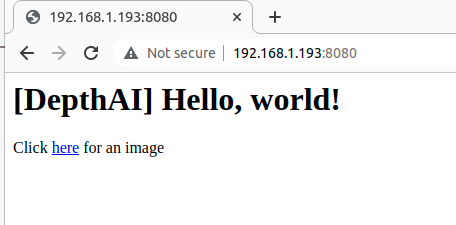
如果您在浏览器(例如 Chrome)中打开此 IP,您将看到:
HTTP 服务器
如果您点击 here 链接,您将获得一个静态图像。有关视频流,请查看 脚本 MJPEG 服务器

设置

请运行 安装脚本 以下载所有必需的依赖项。请注意,此脚本必须在 git 上下文中运行,因此您必须先下载 depthai-python 存储库,然后运行脚本
Command Line
1git clone https://github.com/luxonis/depthai-python.git
2cd depthai-python/examples
3python3 install_requirements.py
有关更多信息,请遵循 安装指南

源代码

Python

Python
GitHub
1#!/usr/bin/env python3
2
3import depthai as dai
4import time
5
6# Start defining a pipeline
7pipeline = dai.Pipeline()
8
9# Define a source - color camera
10cam = pipeline.create(dai.node.ColorCamera)
11# VideoEncoder
12jpeg = pipeline.create(dai.node.VideoEncoder)
13jpeg.setDefaultProfilePreset(cam.getFps(), dai.VideoEncoderProperties.Profile.MJPEG)
14
15# Script node
16script = pipeline.create(dai.node.Script)
17script.setProcessor(dai.ProcessorType.LEON_CSS)
18script.setScript("""
19    from http.server import BaseHTTPRequestHandler
20    import socketserver
21    import socket
22    import fcntl
23    import struct
24
25    PORT = 8080
26    ctrl = CameraControl()
27    ctrl.setCaptureStill(True)
28
29    def get_ip_address(ifname):
30        s = socket.socket(socket.AF_INET, socket.SOCK_DGRAM)
31        return socket.inet_ntoa(fcntl.ioctl(
32            s.fileno(),
33            -1071617759,  # SIOCGIFADDR
34            struct.pack('256s', ifname[:15].encode())
35        )[20:24])
36
37    class HTTPHandler(BaseHTTPRequestHandler):
38        def do_GET(self):
39            if self.path == '/':
40                self.send_response(200)
41                self.end_headers()
42                self.wfile.write(b'<h1>[DepthAI] Hello, world!</h1><p>Click <a href="img">here</a> for an image</p>')
43            elif self.path == '/img':
44                node.io['out'].send(ctrl)
45                jpegImage = node.io['jpeg'].get()
46                self.send_response(200)
47                self.send_header('Content-Type', 'image/jpeg')
48                self.send_header('Content-Length', str(len(jpegImage.getData())))
49                self.end_headers()
50                self.wfile.write(jpegImage.getData())
51            else:
52                self.send_response(404)
53                self.end_headers()
54                self.wfile.write(b'Url not found...')
55
56    with socketserver.TCPServer(("", PORT), HTTPHandler) as httpd:
57        node.warn(f"Serving at {get_ip_address('re0')}:{PORT}")
58        httpd.serve_forever()
59""")
60
61# Connections
62cam.still.link(jpeg.input)
63script.outputs['out'].link(cam.inputControl)
64jpeg.bitstream.link(script.inputs['jpeg'])
65
66# Connect to device with pipeline
67with dai.Device(pipeline) as device:
68    while not device.isClosed():
69        time.sleep(1)

C++

1#include <chrono>
2#include <iostream>
3#include <thread>
4
5// Includes common necessary includes for development using depthai library
6#include "depthai/depthai.hpp"
7
8int main() {
9    using namespace std;
10
11    // Start defining a pipeline
12    dai::Pipeline pipeline;
13
14    auto cam = pipeline.create<dai::node::ColorCamera>();
15
16    auto jpeg = pipeline.create<dai::node::VideoEncoder>();
17    jpeg->setDefaultProfilePreset(cam->getFps(), dai::VideoEncoderProperties::Profile::MJPEG);
18
19    // Script node
20    auto script = pipeline.create<dai::node::Script>();
21    script->setProcessor(dai::ProcessorType::LEON_CSS);
22    script->setScript(R"(
23    from http.server import BaseHTTPRequestHandler
24    import socketserver
25    import socket
26    import fcntl
27    import struct
28
29    PORT = 8080
30    ctrl = CameraControl()
31    ctrl.setCaptureStill(True)
32
33    def get_ip_address(ifname):
34        s = socket.socket(socket.AF_INET, socket.SOCK_DGRAM)
35        return socket.inet_ntoa(fcntl.ioctl(
36            s.fileno(),
37            -1071617759,  # SIOCGIFADDR
38            struct.pack('256s', ifname[:15].encode())
39        )[20:24])
40
41    class HTTPHandler(BaseHTTPRequestHandler):
42        def do_GET(self):
43            if self.path == '/':
44                self.send_response(200)
45                self.end_headers()
46                self.wfile.write(b'<h1>[DepthAI] Hello, world!</h1><p>Click <a href="img">here</a> for an image</p>')
47            elif self.path == '/img':
48                node.io['out'].send(ctrl)
49                jpegImage = node.io['jpeg'].get()
50                self.send_response(200)
51                self.send_header('Content-Type', 'image/jpeg')
52                self.send_header('Content-Length', str(len(jpegImage.getData())))
53                self.end_headers()
54                self.wfile.write(jpegImage.getData())
55            else:
56                self.send_response(404)
57                self.end_headers()
58                self.wfile.write(b'Url not found...')
59
60    with socketserver.TCPServer(("", PORT), HTTPHandler) as httpd:
61        node.warn(f"Serving at {get_ip_address('re0')}:{PORT}")
62        httpd.serve_forever()
63    )");
64
65    cam->still.link(jpeg->input);
66    script->outputs["out"].link(cam->inputControl);
67    jpeg->bitstream.link(script->inputs["jpeg"]);
68
69    // Connect to device with pipeline
70    dai::Device device(pipeline);
71    while(!device.isClosed()) {
72        this_thread::sleep_for(chrono::milliseconds(1000));
73    }
74    return 0;
75}

管道

需要帮助?

请前往 Discussion Forum 获取技术支持或提出您可能有的任何其他问题。