点云可视化
关键概念
- 使用 DepthAI API 捕获同步的彩色和深度帧。
- 创建带有彩色数据的点云以进行可视化。
- 使用 Open3D 实时可视化点云。
- 实现 FPS 计数器以监控应用程序的性能。
演示
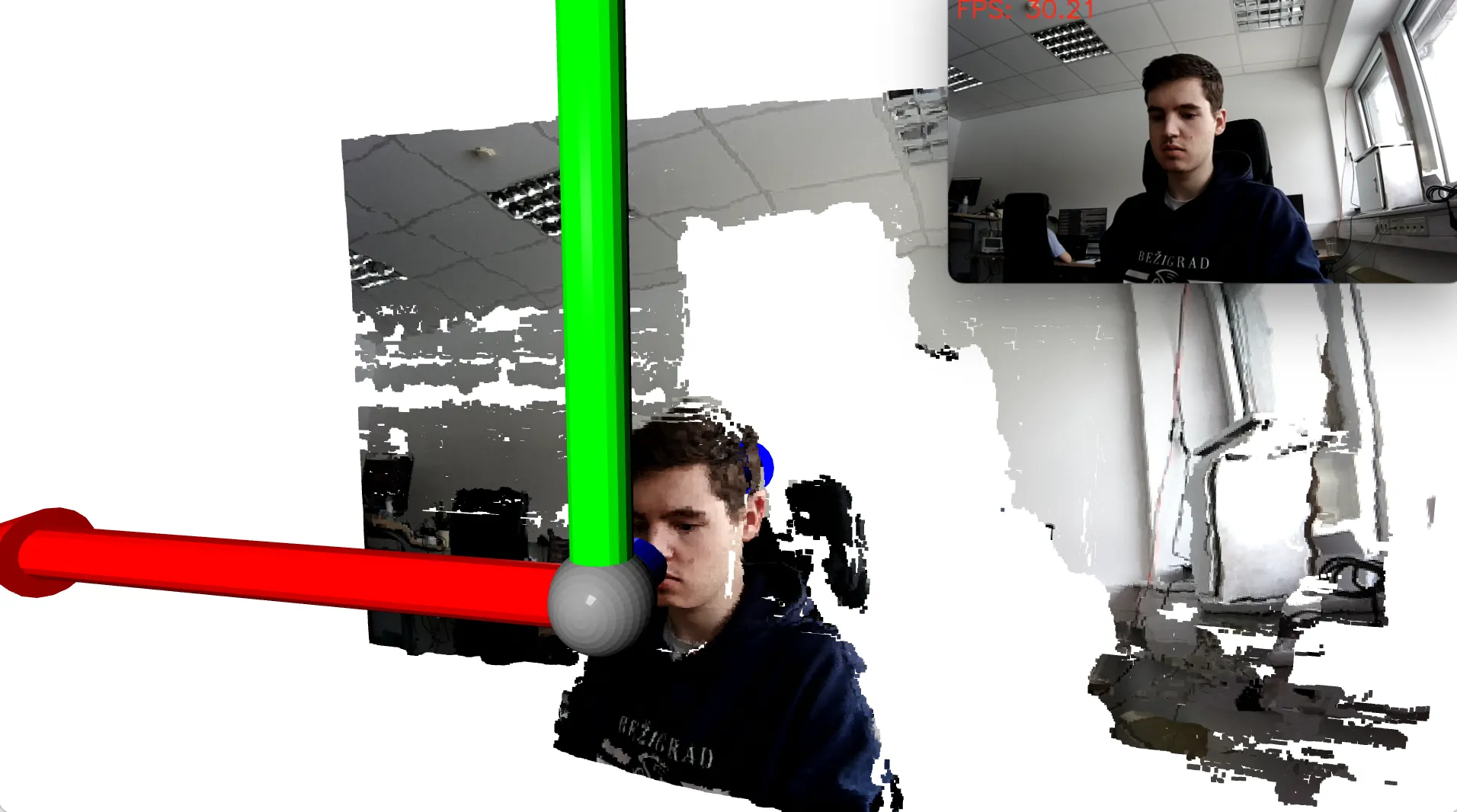
设置
Command Line
1python3 -m pip install depthai open3d源代码
Python
PythonGitHub
1#!/usr/bin/env python3
2
3import depthai as dai
4from time import sleep
5import numpy as np
6import cv2
7import time
8import sys
9try:
10    import open3d as o3d
11except ImportError:
12    sys.exit("Critical dependency missing: Open3D. Please install it using the command: '{} -m pip install open3d' and then rerun the script.".format(sys.executable))
13
14FPS = 30
15class FPSCounter:
16    def __init__(self):
17        self.frameCount = 0
18        self.fps = 0
19        self.startTime = time.time()
20
21    def tick(self):
22        self.frameCount += 1
23        if self.frameCount % 10 == 0:
24            elapsedTime = time.time() - self.startTime
25            self.fps = self.frameCount / elapsedTime
26            self.frameCount = 0
27            self.startTime = time.time()
28        return self.fps
29
30pipeline = dai.Pipeline()
31camRgb = pipeline.create(dai.node.ColorCamera)
32monoLeft = pipeline.create(dai.node.MonoCamera)
33monoRight = pipeline.create(dai.node.MonoCamera)
34depth = pipeline.create(dai.node.StereoDepth)
35pointcloud = pipeline.create(dai.node.PointCloud)
36sync = pipeline.create(dai.node.Sync)
37xOut = pipeline.create(dai.node.XLinkOut)
38xOut.input.setBlocking(False)
39
40
41camRgb.setResolution(dai.ColorCameraProperties.SensorResolution.THE_1080_P)
42camRgb.setBoardSocket(dai.CameraBoardSocket.CAM_A)
43camRgb.setIspScale(1,3)
44camRgb.setFps(FPS)
45
46monoLeft.setResolution(dai.MonoCameraProperties.SensorResolution.THE_400_P)
47monoLeft.setCamera("left")
48monoLeft.setFps(FPS)
49monoRight.setResolution(dai.MonoCameraProperties.SensorResolution.THE_400_P)
50monoRight.setCamera("right")
51monoRight.setFps(FPS)
52
53depth.setDefaultProfilePreset(dai.node.StereoDepth.PresetMode.HIGH_DENSITY)
54depth.initialConfig.setMedianFilter(dai.MedianFilter.KERNEL_7x7)
55depth.setLeftRightCheck(True)
56depth.setExtendedDisparity(False)
57depth.setSubpixel(True)
58depth.setDepthAlign(dai.CameraBoardSocket.CAM_A)
59
60monoLeft.out.link(depth.left)
61monoRight.out.link(depth.right)
62depth.depth.link(pointcloud.inputDepth)
63camRgb.isp.link(sync.inputs["rgb"])
64pointcloud.outputPointCloud.link(sync.inputs["pcl"])
65sync.out.link(xOut.input)
66xOut.setStreamName("out")
67
68
69
70
71with dai.Device(pipeline) as device:
72    isRunning = True
73    def key_callback(vis, action, mods):
74        global isRunning
75        if action == 0:
76            isRunning = False
77
78    q = device.getOutputQueue(name="out", maxSize=4, blocking=False)
79    vis = o3d.visualization.VisualizerWithKeyCallback()
80    vis.create_window()
81    vis.register_key_action_callback(81, key_callback)
82    pcd = o3d.geometry.PointCloud()
83    coordinateFrame = o3d.geometry.TriangleMesh.create_coordinate_frame(size=1000, origin=[0,0,0])
84    vis.add_geometry(coordinateFrame)
85
86    first = True
87    fpsCounter = FPSCounter()
88    while isRunning:
89        inMessage = q.get()
90        inColor = inMessage["rgb"]
91        inPointCloud = inMessage["pcl"]
92        cvColorFrame = inColor.getCvFrame()
93        # Convert the frame to RGB
94        cvRGBFrame = cv2.cvtColor(cvColorFrame, cv2.COLOR_BGR2RGB)
95        fps = fpsCounter.tick()
96        # Display the FPS on the frame
97        cv2.putText(cvColorFrame, f"FPS: {fps:.2f}", (10, 30), cv2.FONT_HERSHEY_SIMPLEX, 1, (0, 0, 255), 2)
98        cv2.imshow("color", cvColorFrame)
99        key = cv2.waitKey(1)
100        if key == ord('q'):
101            break
102        if inPointCloud:
103            t_before = time.time()
104            points = inPointCloud.getPoints().astype(np.float64)
105            pcd.points = o3d.utility.Vector3dVector(points)
106            colors = (cvRGBFrame.reshape(-1, 3) / 255.0).astype(np.float64)
107            pcd.colors = o3d.utility.Vector3dVector(colors)
108            if first:
109                vis.add_geometry(pcd)
110                first = False
111            else:
112                vis.update_geometry(pcd)
113        vis.poll_events()
114        vis.update_renderer()
115 vis.destroy_window()需要帮助?
请前往 Discussion Forum 获取技术支持或提出您可能有的任何其他问题。