交互式扭曲网格
r 键重新启动管道并应用更改。用户定义的参数:--mesh_dims- 网格尺寸(默认值:4x4)。--resolution- 输入图像的分辨率(默认值:512x512)。宽度必须能被 16 整除。--random- 生成随机网格点(默认禁用)。
设置
Command Line
1git clone https://github.com/luxonis/depthai-python.git
2cd depthai-python/examples
3python3 install_requirements.py演示
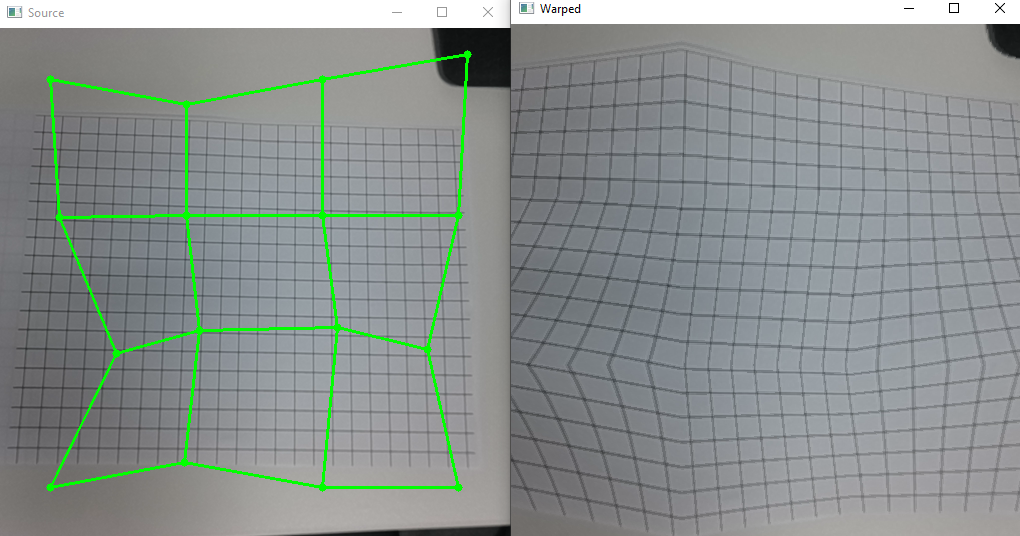
源代码
Python
PythonGitHub
1#!/usr/bin/env python3
2import cv2
3import depthai as dai
4import numpy as np
5import argparse
6import re
7import sys
8from random import randint
9
10parser = argparse.ArgumentParser()
11parser.add_argument("-m", "--mesh_dims", type=str, default="4x4", help="mesh dimensions widthxheight (default=%(default)s)")
12parser.add_argument("-r", "--resolution", type=str, default="512x512", help="preview resolution (default=%(default)s)")
13parser.add_argument("-rnd", "--random", action="store_true", help="Generate random initial mesh")
14args = parser.parse_args()
15
16# mesh dimensions
17match = re.search(r'.*?(\d+)x(\d+).*', args.mesh_dims)
18if not match:
19    raise Exception(f"Mesh dimensions format incorrect '{args.resolution}'!")
20mesh_w = int(match.group(1))
21mesh_h = int(match.group(2))
22
23# Preview resolution
24match = re.search(r'.*?(\d+)x(\d+).*', args.resolution)
25if not match:
26    raise Exception(f"Resolution format incorrect '{args.resolution}'!")
27preview_w = int(match.group(1))
28preview_h = int(match.group(2))
29if preview_w % 16 != 0:
30    raise Exception(f"Preview width must be a multiple of 16!")
31
32# Create an initial mesh (optionally random) of dimension mesh_w x mesh_h
33first_point_x = int(preview_w / 10)
34between_points_x = int(4 * preview_w / (5 * (mesh_w - 1)))
35first_point_y = int(preview_h / 10)
36between_points_y = int(4 * preview_h / (5 * (mesh_h - 1)))
37if args.random:
38    max_rnd_x = int(between_points_x / 4)
39    max_rnd_y = int(between_points_y / 4)
40mesh = []
41for i in range(mesh_h):
42    for j in range(mesh_w):
43        x = first_point_x + j * between_points_x
44        y = first_point_y + i * between_points_y
45        if args.random:
46            rnd_x = randint(-max_rnd_x, max_rnd_x)
47            if x + rnd_x > 0 and x + rnd_x < preview_w:
48                x += rnd_x
49            rnd_y = randint(-max_rnd_y, max_rnd_y)
50            if y + rnd_y > 0 and y + rnd_y < preview_h:
51                y += rnd_y
52        mesh.append((x, y))
53
54def create_pipeline(mesh):
55    print(mesh)
56    # Create pipeline
57    pipeline = dai.Pipeline()
58
59    camRgb = pipeline.create(dai.node.ColorCamera)
60    camRgb.setPreviewSize(preview_w, preview_h)
61    camRgb.setInterleaved(False)
62    width = camRgb.getPreviewWidth()
63    height = camRgb.getPreviewHeight()
64
65    # Output source
66    xout_source = pipeline.create(dai.node.XLinkOut)
67    xout_source.setStreamName('source')
68    camRgb.preview.link(xout_source.input)
69    # Warp source frame
70    warp = pipeline.create(dai.node.Warp)
71    warp.setWarpMesh(mesh, mesh_w, mesh_h)
72    warp.setOutputSize(width, height)
73    warp.setMaxOutputFrameSize(width * height * 3)
74    camRgb.preview.link(warp.inputImage)
75
76    warp.setHwIds([1])
77    warp.setInterpolation(dai.Interpolation.NEAREST_NEIGHBOR)
78    # Output warped
79    xout_warped = pipeline.create(dai.node.XLinkOut)
80    xout_warped.setStreamName('warped')
81    warp.out.link(xout_warped.input)
82    return pipeline
83
84point_selected = None
85
86def mouse_callback(event, x, y, flags, param):
87    global mesh, point_selected, mesh_changed
88    if event == cv2.EVENT_LBUTTONDOWN:
89        if point_selected is None:
90            # Which point is selected ?
91            min_dist = 100
92
93            for i in range(len(mesh)):
94                dist = np.linalg.norm((x - mesh[i][0], y - mesh[i][1]))
95                if dist < 20 and dist < min_dist:
96                    min_dist = dist
97                    point_selected = i
98            if point_selected is not None:
99                mesh[point_selected] = (x, y)
100                mesh_changed = True
101
102    elif event == cv2.EVENT_LBUTTONUP:
103        point_selected = None
104    elif event == cv2.EVENT_MOUSEMOVE:
105        if point_selected is not None:
106            mesh[point_selected] = (x, y)
107            mesh_changed = True
108
109
110cv2.namedWindow("Source")
111cv2.setMouseCallback("Source", mouse_callback)
112
113running = True
114
115print("Use your mouse to modify the mesh by clicking/moving points of the mesh in the Source window")
116print("Then press 'r' key to restart the device/pipeline")
117while running:
118    pipeline = create_pipeline(mesh)
119    # Connect to device and start pipeline
120    with dai.Device(pipeline) as device:
121        print("Starting device")
122        # Output queue will be used to get the rgb frames from the output defined above
123        q_source = device.getOutputQueue(name="source", maxSize=4, blocking=False)
124        q_warped = device.getOutputQueue(name="warped", maxSize=4, blocking=False)
125
126        restart_device = False
127        mesh_changed = False
128        while not restart_device:
129            in0 = q_source.get()
130            if in0 is not None:
131                source = in0.getCvFrame()
132                color = (0, 0,255) if mesh_changed else (0,255,0)
133                for i in range(len(mesh)):
134                    cv2.circle(source, (mesh[i][0], mesh[i][1]), 4, color, -1)
135                    if i % mesh_w != mesh_w -1:
136                        cv2.line(source, (mesh[i][0], mesh[i][1]), (mesh[i+1][0], mesh[i+1][1]), color, 2)
137                    if i + mesh_w < len(mesh):
138                        cv2.line(source, (mesh[i][0], mesh[i][1]), (mesh[i+mesh_w][0], mesh[i+mesh_w][1]), color, 2)
139                cv2.imshow("Source", source)
140
141            in1 = q_warped.get()
142            if in1 is not None:
143                cv2.imshow("Warped", in1.getCvFrame())
144
145            key = cv2.waitKey(1)
146            if key == ord('r'): # Restart the device if mesh has changed
147                if mesh_changed:
148                    print("Restart requested...")
149                    mesh_changed = False
150                    restart_device = True
151            elif key == 27 or key == ord('q'): # Exit
152                running = False
153 break管道
需要帮助?
请前往 Discussion Forum 获取技术支持或提出您可能有的任何其他问题。