帧归一化
-0.5 到 0.5 范围内的帧。ColorCamera 的预览输出 的值在 0 到 255 之间。一个简单的自定义模型,使用 PyTorch 创建(链接在此,教程在此), 允许用户指定将应用于所有帧值(像素)的均值和缩放因子。Python
1output = (input - mean) / scale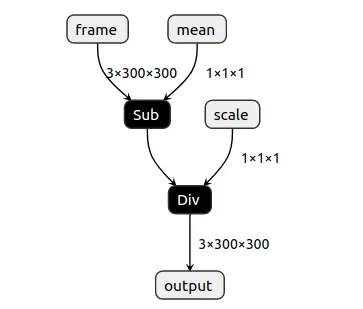
0-255,以便 OpenCV 可以显示它们。这只是一个演示,对于归一化,您应该使用 OpenVINO 的 模型优化器 参数
--mean_values 和 --scale_values。设置
Command Line
1git clone https://github.com/luxonis/depthai-python.git
2cd depthai-python/examples
3python3 install_requirements.py源代码
Python
PythonGitHub
1#!/usr/bin/env python3
2
3from pathlib import Path
4import sys
5import numpy as np
6import cv2
7import depthai as dai
8SHAPE = 300
9
10# Get argument first
11nnPath = str((Path(__file__).parent / Path('../models/normalize_openvino_2021.4_4shave.blob')).resolve().absolute())
12if len(sys.argv) > 1:
13    nnPath = sys.argv[1]
14
15if not Path(nnPath).exists():
16    import sys
17    raise FileNotFoundError(f'Required file/s not found, please run "{sys.executable} install_requirements.py"')
18
19p = dai.Pipeline()
20p.setOpenVINOVersion(dai.OpenVINO.VERSION_2021_4)
21
22camRgb = p.createColorCamera()
23# Model expects values in FP16, as we have compiled it with `-ip FP16`
24camRgb.setFp16(True)
25camRgb.setInterleaved(False)
26camRgb.setPreviewSize(SHAPE, SHAPE)
27
28nn = p.createNeuralNetwork()
29nn.setBlobPath(nnPath)
30nn.setNumInferenceThreads(2)
31
32script = p.create(dai.node.Script)
33script.setScript("""
34# Run script only once. We could also send these values from host.
35# Model formula:
36# output = (input - mean) / scale
37
38# This configuration will subtract all frame values (pixels) by 127.5
39# 0.0 .. 255.0 -> -127.5 .. 127.5
40data = NNData(2)
41data.setLayer("mean", [127.5])
42node.io['mean'].send(data)
43
44# This configuration will divide all frame values (pixels) by 255.0
45# -127.5 .. 127.5 -> -0.5 .. 0.5
46data = NNData(2)
47data.setLayer("scale", [255.0])
48node.io['scale'].send(data)
49""")
50
51# Re-use the initial values for multiplier/addend
52script.outputs['mean'].link(nn.inputs['mean'])
53nn.inputs['mean'].setWaitForMessage(False)
54
55script.outputs['scale'].link(nn.inputs['scale'])
56nn.inputs['scale'].setWaitForMessage(False)
57# Always wait for the new frame before starting inference
58camRgb.preview.link(nn.inputs['frame'])
59
60# Send normalized frame values to host
61nn_xout = p.createXLinkOut()
62nn_xout.setStreamName("nn")
63nn.out.link(nn_xout.input)
64
65# Pipeline is defined, now we can connect to the device
66with dai.Device(p) as device:
67    qNn = device.getOutputQueue(name="nn", maxSize=4, blocking=False)
68    shape = (3, SHAPE, SHAPE)
69    while True:
70        inNn = np.array(qNn.get().getData())
71        # Get back the frame. It's currently normalized to -0.5 - 0.5
72        frame = inNn.view(np.float16).reshape(shape).transpose(1, 2, 0)
73        # To get original frame back (0-255), we add multiply all frame values (pixels) by 255 and then add 127.5 to them
74        frame = (frame * 255.0 + 127.5).astype(np.uint8)
75        # Show the initial frame
76        cv2.imshow("Original frame", frame)
77
78        if cv2.waitKey(1) == ord('q'):
79 breakPipeline
需要帮助?
请前往 Discussion Forum 获取技术支持或提出您可能有的任何其他问题。